
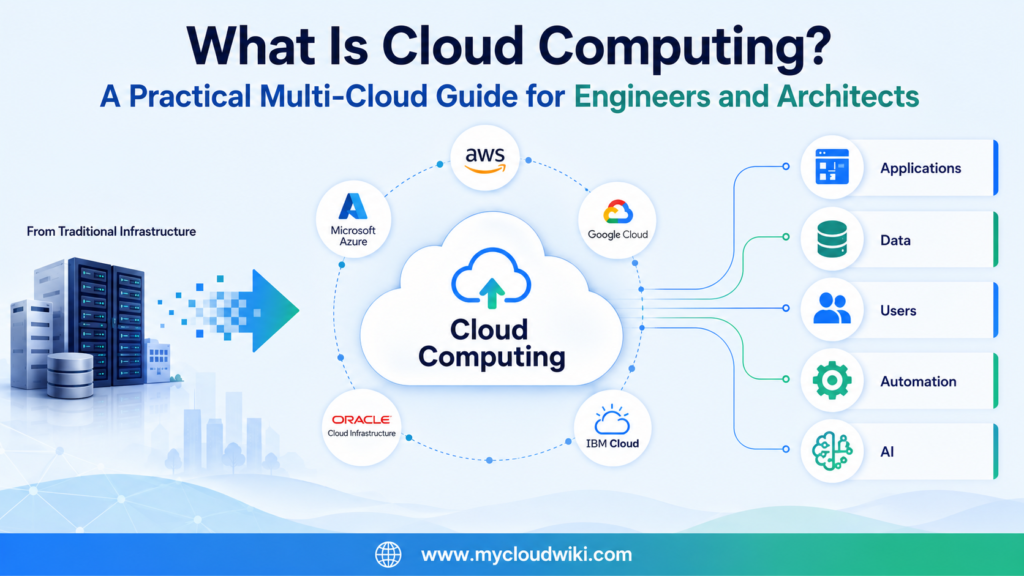
Welcome to the Multi-Cloud Fundamental Learning Series
Cloud computing has changed how organizations build, deploy, and operate technology.
Businesses no longer need to wait months for new hardware or maintain large amounts of unused capacity for occasional demand peaks.
Cloud platforms allow teams to provision infrastructure, deploy applications, and increase capacity much faster.
Today, cloud computing is a core part of modern enterprise IT.
Learn Cloud Concepts Before Provider Services
Many cloud resources begin with one provider.
They may teach AWS services first, Azure services first, or Google Cloud services first.
This learning series takes a different approach.
You will first understand the cloud concept.
You will then see how that concept is implemented across:
- Amazon Web Services
- Microsoft Azure
- Google Cloud
- Oracle Cloud Infrastructure
- IBM Cloud
This approach helps you build knowledge that transfers across providers.
It also prevents cloud learning from becoming a long exercise in memorizing service names.
The goal is not to make every workload identical across every provider. The goal is to understand the common principles, evaluate provider strengths, and make informed architecture decisions for each business requirement.
Learn Through the MyRetail Story
Throughout this learning series, you will follow MyRetail, a fictional global retail company.
MyRetail operates physical stores, distribution centers, digital applications, and an expanding e-commerce platform.
As the business grows, its technology challenges also grow.
Each lesson introduces a new MyRetail business problem.
The article then explains:
- Why the problem matters
- Which cloud concept can help
- What engineers need to implement
- What architects need to design and govern
- What business outcome the solution should produce
This keeps the learning connected to real enterprise decisions.
Think Like an Engineer and an Architect
Engineers and architects often work on the same cloud initiative, but they focus on different questions.
Engineers concentrate on implementation, automation, monitoring, troubleshooting, and day-to-day operations.
Architects concentrate on design decisions, governance, security, resilience, cost, and long-term business alignment.
This learning series brings both perspectives together.
You will learn not only how cloud technology works, but also how to apply it responsibly in enterprise environments.
Build Your Knowledge Step by Step
This article begins with the most important question:
What is cloud computing?
From there, the learning journey continues into:
- Traditional data centers versus cloud computing
- Cloud service models
- Cloud deployment models
- Major cloud providers
- Cloud building blocks
- Identity and security
- Networking
- Compute
- Storage
- Databases
- Automation
- AI and Agentic AI
- Enterprise multi-cloud architecture
Each lesson builds on the previous one.
The objective is to develop a strong multi-cloud mental model before moving into deeper engineering and architecture topics.
This learning series teaches cloud principles first and provider implementations second. MyRetail provides the continuous business story that connects each concept to real engineering, architecture, and business outcomes.
MyRetail Business Challenge
MyRetail has grown from a regional retailer into a global business.
It now operates physical stores, distribution centers, customer-facing applications, and a rapidly expanding e-commerce platform.
The business is growing faster than its traditional infrastructure can support.
🏢 MyRetail Business Challenge
Business Context
MyRetail serves customers through hundreds of stores and a growing digital commerce platform. Seasonal sales, new market expansion, and changing customer expectations are placing increasing pressure on its technology environment.
Business Problem
- New servers take weeks or months to purchase and deploy.
- Peak shopping events regularly exceed available capacity.
- Unused infrastructure remains costly during quieter periods.
- Disaster recovery requires expensive duplicate environments.
- Development teams wait too long for test and production resources.
Engineering Challenge
Engineering teams need a faster way to provision infrastructure, deploy applications, monitor systems, and respond to changes in customer demand.
Architecture Challenge
Architects need to design a secure, resilient, scalable, and governed operating model that can work across multiple cloud providers without creating unnecessary complexity.
Desired Business Outcome
MyRetail wants to scale during demand peaks, release new services faster, improve resilience, support future AI initiatives, and control technology costs more effectively.
Cloud computing gives MyRetail a new way to approach these problems.
Instead of treating infrastructure as fixed hardware, the company can begin treating technology resources as services that are available when needed.
What Is Cloud Computing?
Cloud computing is a way of accessing computing resources over a network when they are needed.
These resources can include:
- Virtual machines
- Storage
- Databases
- Networking
- Security services
- Application platforms
- Analytics
- AI services
The organization does not need to purchase, install, and manage every physical component itself.
Instead, cloud providers operate large-scale infrastructure and make those capabilities available as services.
From Physical Infrastructure to On-Demand Services
In a traditional data center, a team may need to:
- Estimate future demand.
- Purchase hardware.
- Wait for delivery.
- Install equipment.
- Configure networking and security.
- Deploy the application.
This process can take weeks or months.
In cloud environments, approved resources can often be provisioned through a management console, command-line tool, API, software development kit, or Infrastructure as Code workflow.
The physical infrastructure still exists.
The difference is that the cloud provider operates it at scale, while the customer consumes the required capabilities as services.
Cloud computing changes infrastructure from a slow purchasing process into a technology capability that can be requested, automated, scaled, monitored, and governed through software.
Cloud Is More Than Remote Hosting
Cloud computing is sometimes described as “someone else’s data center.”
That description is incomplete.
Remote hosting existed before modern cloud platforms.
What makes cloud computing different is the combination of:
- On-demand access
- Elastic capacity
- API-driven management
- Shared infrastructure
- Managed services
- Usage-based measurement
- Global service availability
These capabilities change how organizations operate technology.
They also change how engineers automate infrastructure and how architects design enterprise platforms.
A Simple Business Analogy
Think of electricity.
Most businesses do not build their own power station for every office or store.
They consume electricity as a service, use what they need, and measure how much they consume.
Cloud computing applies a similar model to technology resources.
MyRetail can request computing capacity when demand increases and reduce that capacity when demand falls.
The analogy is not perfect.
Cloud still requires careful design, security, governance, cost control, and operational management.
But it helps explain the shift from owning every infrastructure component to consuming technology capabilities as services.
How Cloud Computing Helps MyRetail
During a major sales event, MyRetail may need significantly more application capacity.
In a traditional environment, the business would need to purchase enough hardware for the busiest day of the year.
That hardware might remain underused for most of the year.
With cloud computing, MyRetail can design its applications to increase capacity during peak demand and reduce capacity afterward.
This does not happen automatically by simply moving to cloud.
Engineers must configure scaling, monitoring, deployment, and operational controls.
Architects must design the platform for resilience, security, governance, performance, and cost efficiency.
Cloud does not remove the need for architecture. It increases the number of available choices, which makes clear standards, governance, automation, and design discipline even more important.
The Core Characteristics of Cloud Computing
Cloud providers implement services differently.
However, the core cloud characteristics remain broadly consistent across AWS, Microsoft Azure, Google Cloud, Oracle Cloud Infrastructure, and IBM Cloud.
On-Demand Access
Teams can request approved resources when they need them.
This reduces dependence on long hardware procurement cycles.
For MyRetail, a development team can create a new test environment without waiting for physical servers to arrive.
Elastic Capacity
Cloud resources can expand or contract as demand changes.
This is especially valuable for workloads with unpredictable or seasonal traffic.
MyRetail can increase application capacity during a major promotion and reduce it after the event.
Resource Pooling
Cloud providers operate large pools of compute, storage, and networking infrastructure.
Customers consume isolated services from these shared platforms.
The provider manages the underlying physical capacity, while the customer remains responsible for configuring and securing the services it uses.
Measured Consumption
Cloud usage can be monitored and associated with costs.
This allows organizations to understand which teams, applications, or environments are consuming resources.
Measured consumption creates flexibility, but it also makes FinOps, tagging, budgets, and cost governance essential.
Broad Network Access
Cloud services are designed to be accessed through networks using standard interfaces.
Applications, users, branch locations, data centers, devices, and other cloud environments can connect to these services when the architecture and security controls permit it.
Software-Driven Management
Cloud infrastructure is managed through software interfaces.
These commonly include:
- Web consoles
- Command-line tools
- APIs
- SDKs
- Infrastructure as Code
- Automation platforms
This software-driven model makes repeatable deployment and consistent governance possible.
The later lesson, How Cloud Resources Are Created, explores these methods in more detail.
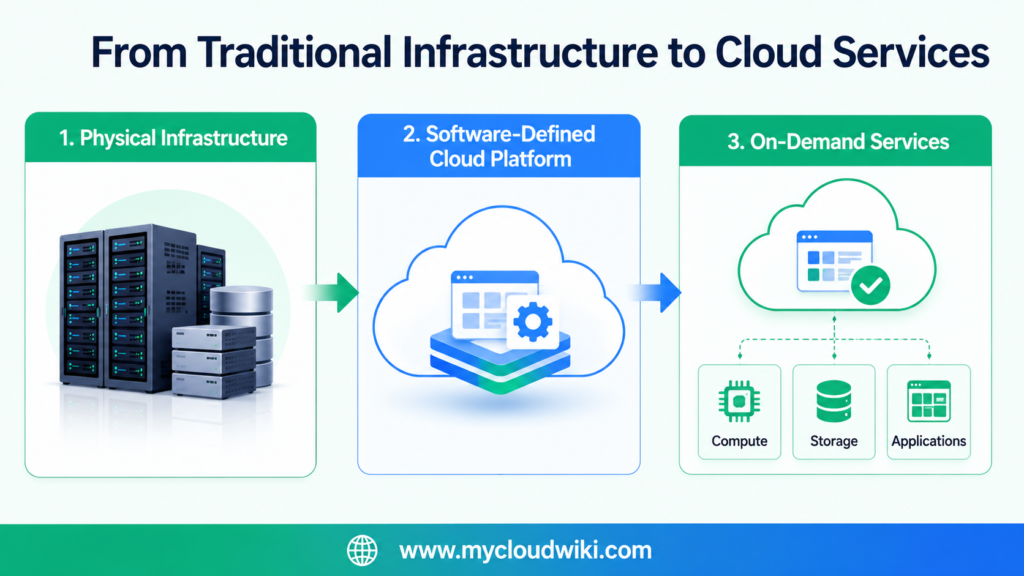
Cloud computing gives organizations on-demand access to software-defined technology services. Its value comes not only from where the infrastructure runs, but from how quickly resources can be provisioned, scaled, automated, measured, and governed.
Why Organizations Adopt Cloud Computing
Cloud computing is not simply about moving servers to another location.
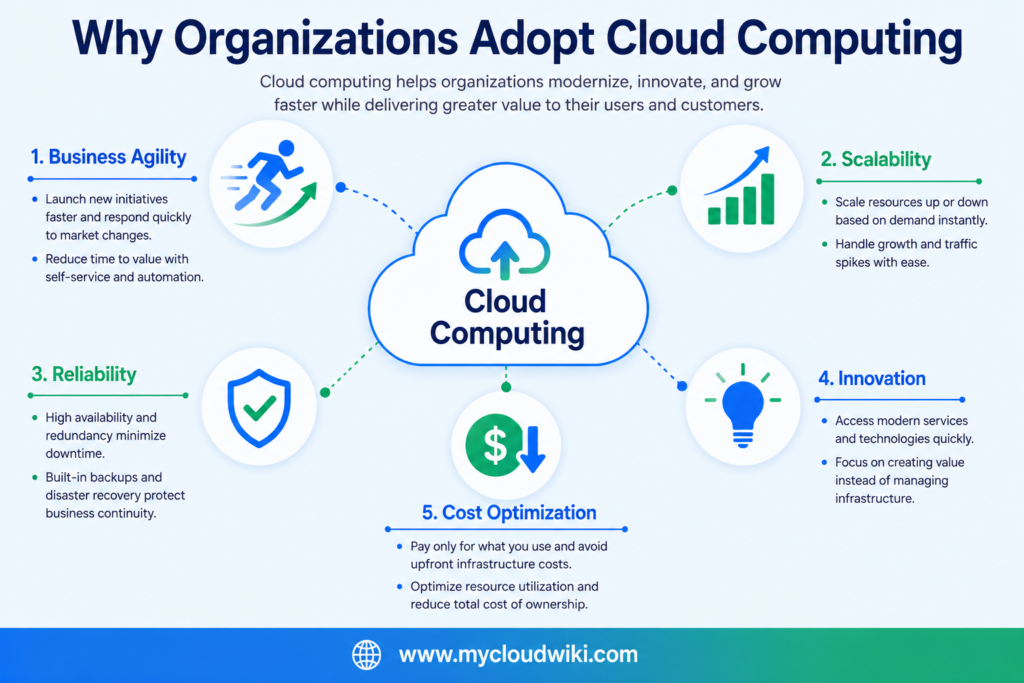
Organizations adopt cloud computing because it helps them respond faster to changing business needs while improving operational efficiency, resilience, and innovation.
For MyRetail, cloud computing is an opportunity to modernize its technology platform rather than continuously expanding its traditional data center.
Let’s look at some of the key reasons why organizations choose cloud computing.
Increase Business Agility
Business requirements change constantly.
A new marketing campaign, product launch, or seasonal promotion can significantly increase demand for IT resources.
Traditional infrastructure often struggles to respond quickly because new hardware must be purchased, installed, and configured.
Cloud computing allows organizations to provision approved resources much faster, helping teams respond to changing business requirements with greater flexibility.
For MyRetail, this means launching new online services or expanding into new regions without waiting months for additional infrastructure.
Scale with Business Growth
Most organizations experience changes in workload throughout the year.
Retail businesses see increased activity during holidays.
Financial organizations experience spikes during reporting periods.
Educational institutions have predictable enrollment cycles.
Cloud platforms allow infrastructure to scale as demand changes.
Instead of permanently purchasing enough hardware for peak demand, organizations can design solutions that adjust capacity as business needs evolve.
Business growth should not be limited by infrastructure. Cloud computing enables organizations to align technology capacity with business demand instead of investing in large amounts of hardware that may remain underutilized.
Improve Reliability
Unexpected hardware failures can interrupt business operations.
Traditional environments often require duplicate hardware, secondary data centers, and complex disaster recovery plans to reduce these risks.
Cloud providers offer infrastructure that supports highly available and resilient architectures.
Engineers and architects can design applications that continue operating even when individual components fail.
For MyRetail, improved reliability means customers can continue shopping even if part of the underlying infrastructure becomes unavailable.
Accelerate Innovation
Modern businesses continuously introduce new applications, digital services, and customer experiences.
Long infrastructure procurement cycles often slow these initiatives.
Cloud computing reduces the time required to provision development, testing, and production environments.
Engineering teams spend less time waiting for infrastructure and more time building business capabilities.
Optimize Technology Costs
Cloud computing changes how organizations acquire technology resources.
Instead of making large capital investments in hardware, organizations consume cloud services based on business requirements.
This provides greater flexibility when infrastructure demand changes.
However, cloud does not automatically reduce costs.
Without governance, monitoring, and cost optimization practices, organizations can still waste resources.
Successful cloud adoption combines technical capabilities with strong operational and financial management.
Cloud Computing from a Multi-Cloud Perspective
The business goals of cloud computing remain consistent across all major cloud providers.
Organizations want to become more agile, scalable, resilient, and efficient regardless of the platform they choose.
The implementation differs between providers, but the underlying principles remain the same.
AWS, Microsoft Azure, Google Cloud, Oracle Cloud Infrastructure, and IBM Cloud all provide services that help organizations improve agility, scalability, reliability, and operational efficiency. While service names and implementation details differ, the business objectives remain the same across every cloud platform.
MyRetail’s Next Step
Cloud computing gives MyRetail the ability to modernize its technology platform.
However, simply moving applications to the cloud does not guarantee success.
The company still needs engineers to build secure, automated environments and architects to design scalable, governed, and resilient platforms.
In the next section, we’ll explore how cloud engineers and cloud architects approach the same cloud platform from different perspectives and why both roles are essential to successful multi-cloud adoption.
Organizations adopt cloud computing to improve agility, scalability, reliability, innovation, and operational efficiency. These business goals remain consistent across AWS, Azure, Google Cloud, OCI, and IBM Cloud, reinforcing the importance of learning cloud concepts from a multi-cloud perspective before focusing on provider-specific services.
Cloud Computing Through an Engineer and Architect Perspective
Cloud computing is much more than deploying virtual machines or migrating applications.
Successful cloud adoption requires engineers and architects to work together toward the same business objectives.
While both roles contribute to the success of cloud initiatives, they focus on different responsibilities throughout the lifecycle of a cloud solution.
For MyRetail, engineers build and operate the cloud platform, while architects ensure the platform remains secure, scalable, resilient, and aligned with business goals.
Neither role is more important than the other.
Successful cloud adoption depends on close collaboration between both disciplines.
Roles & Responsibilities
Engineer and Architect Responsibilities
Cloud engineers focus on building and operating cloud environments, while cloud architects design the overall platform strategy, governance, and long-term architecture.
Business Outcome: Although their responsibilities differ, cloud engineers and cloud architects work toward the same goal—building a secure, reliable, scalable, and cost-effective cloud platform that enables business growth and innovation.
How Engineers Help MyRetail
Engineers transform architecture into working solutions.
They provision cloud resources, deploy applications, automate operational tasks, monitor system health, and resolve production issues.
For MyRetail, engineers ensure that customer-facing applications remain available during busy shopping periods and that new business capabilities can be delivered quickly.
Typical engineering activities include:
- Provisioning cloud infrastructure
- Deploying applications
- Configuring networking and security
- Monitoring performance
- Automating operational tasks
- Responding to incidents
- Optimizing cloud resources
How Architects Help MyRetail
Architects focus on long-term success rather than individual deployments.
They establish the standards, governance, and design principles that engineering teams follow.
For MyRetail, architects ensure the cloud platform can support future business growth while maintaining security, compliance, reliability, and cost efficiency.
Typical architecture responsibilities include:
- Designing multi-cloud solutions
- Selecting appropriate cloud services
- Defining security and governance standards
- Designing resilient architectures
- Managing technology risks
- Supporting business strategy
- Reducing unnecessary complexity
One of the most common mistakes organizations make is assuming architects only design diagrams while engineers implement them. In successful enterprises, architects stay engaged throughout the entire lifecycle, and engineers actively contribute operational feedback that continuously improves the architecture.
Engineers and Architects Solve Different Parts of the Same Problem
Let’s return to MyRetail’s business challenge.
The business wants a platform that can support rapid growth, seasonal demand, future AI initiatives, and expansion into new markets.
Engineers and architects approach this challenge from different perspectives.
Engineers ask:
- How do we deploy this application?
- How do we automate infrastructure?
- How do we monitor workloads?
- How do we troubleshoot failures?
- How do we improve operational efficiency?
Architects ask:
- Is this the right cloud service?
- How will the solution scale globally?
- Does the design meet security requirements?
- Can we operate this consistently across multiple cloud providers?
- Will this architecture still meet business needs three years from now?
Together, these perspectives produce solutions that are both operationally effective and strategically aligned.
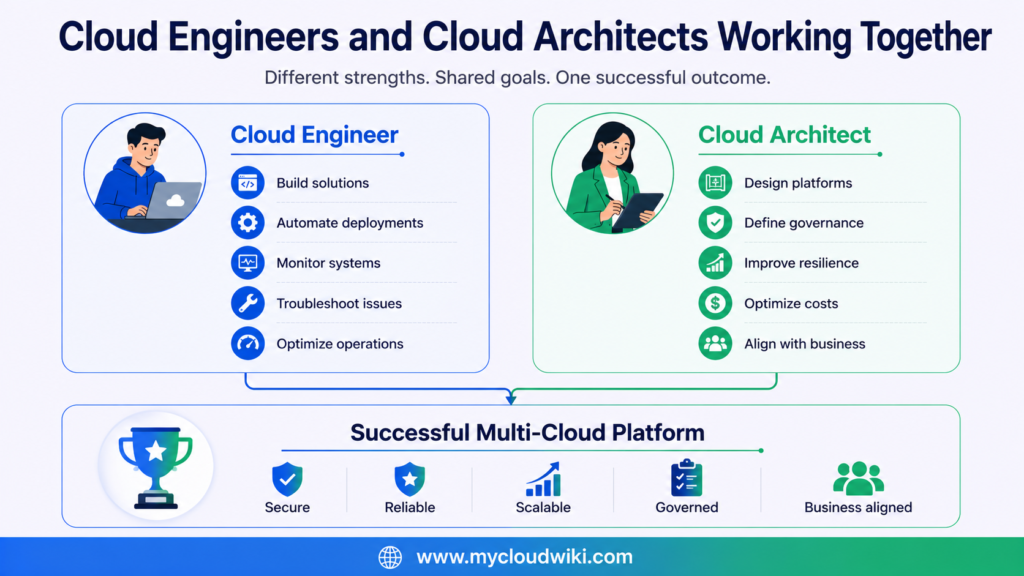
Regardless of whether MyRetail uses AWS, Microsoft Azure, Google Cloud, Oracle Cloud Infrastructure, IBM Cloud, or multiple providers, the responsibilities of engineers and architects remain fundamentally the same. Technologies evolve, but the need for sound engineering practices and strong architectural governance remains constant across every cloud platform.
Cloud engineers and cloud architects solve different parts of the same business problem. Engineers build, automate, and operate cloud platforms, while architects design, govern, and optimize them. Together, they enable organizations like MyRetail to build secure, scalable, and resilient multi-cloud environments.
Building a successful cloud platform requires more than skilled engineers and experienced architects.
Organizations also need a consistent way to evaluate whether their cloud solutions are secure, reliable, high-performing, operationally efficient, and cost-effective.
In the next section, we’ll introduce the Well-Architected Framework and see how its design principles help MyRetail build a successful multi-cloud foundation across every stage of its cloud journey.
Applying Well-Architected Principles to Cloud Computing
Moving applications to the cloud is only the first step.
The real challenge is designing cloud environments that remain secure, reliable, high-performing, and cost-effective as the business grows.
For MyRetail, success is not measured by how many applications run in the cloud.
Success is measured by how well the cloud platform supports customers, employees, and business operations.
This is where Well-Architected principles become important.
They provide a structured way for engineers and architects to evaluate whether cloud solutions are designed for long-term success.
Although AWS, Microsoft Azure, Google Cloud, Oracle Cloud Infrastructure (OCI), and IBM Cloud each publish their own architectural guidance, the core principles remain remarkably similar.
Rather than focusing on one provider’s framework, this learning series applies a multi-cloud interpretation of these common design principles.
Well-Architected Framework
The Five Well-Architected Principles
The Well-Architected Framework provides a consistent way to evaluate cloud solutions. These five principles help organizations like MyRetail build secure, reliable, high-performing, and cost-effective multi-cloud environments.
Key Takeaway: These five principles will appear throughout the Multi-Cloud Fundamental Learning Series. Every major cloud technology, architecture decision, and best practice will be evaluated using this same Well-Architected Framework to help you design enterprise-ready multi-cloud solutions.
Operational Excellence
Cloud environments change constantly.
Manual processes become difficult to manage as infrastructure grows.
Operational Excellence focuses on automation, monitoring, continuous improvement, and repeatable operational practices.
For MyRetail, this means deploying infrastructure consistently, reducing manual effort, and improving operational efficiency.
Security
Cloud computing introduces new opportunities but also new responsibilities.
Protecting identities, customer information, applications, APIs, and cloud resources must be part of every architecture decision.
Security is not a single service.
It is a continuous responsibility shared across engineers, architects, and business teams.
Reliability
Customers expect cloud applications to remain available.
Reliability focuses on designing systems that continue operating even when components fail.
For MyRetail, reliable cloud services ensure customers can continue shopping during infrastructure failures, software updates, or unexpected demand spikes.
Performance Efficiency
Applications should use cloud resources efficiently.
Selecting the right services, monitoring performance, and adapting to changing workloads help organizations deliver consistent user experiences.
Performance efficiency is about using technology intelligently—not simply using larger resources.
Cost Optimization
Cloud provides flexibility.
However, flexibility without governance often leads to unnecessary spending.
Cost Optimization encourages organizations to continuously monitor usage, remove waste, and align technology investments with business value.
For MyRetail, optimizing costs means investing where technology creates customer value rather than paying for unused resources.
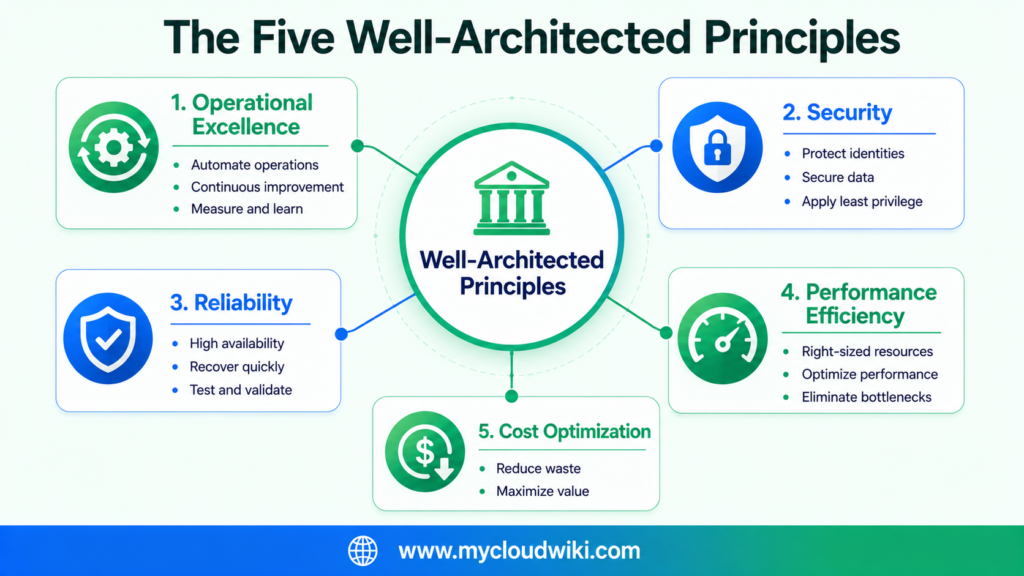
Every major cloud provider publishes architectural best practices. While terminology and implementation differ, they all encourage organizations to build solutions that are operationally efficient, secure, reliable, high-performing, and cost-conscious. These shared principles provide a common foundation for designing successful multi-cloud architectures.
The Well-Architected principles are not a checklist to complete at the end of a project. Experienced architects use them throughout the design lifecycle to evaluate trade-offs, improve decision-making, and continuously refine cloud architectures as business needs evolve.
Successful cloud adoption is not defined by where applications run but by how well they are designed and operated. Applying Well-Architected principles helps engineers and architects build cloud platforms that remain secure, reliable, high-performing, and cost-effective across AWS, Microsoft Azure, Google Cloud, Oracle Cloud Infrastructure, and IBM Cloud.
AI and Agentic AI in Modern Cloud Computing
Cloud computing has become the foundation for today’s AI-powered applications.
Organizations use cloud platforms not only to host applications, but also to develop, deploy, monitor, and scale Artificial Intelligence (AI) solutions.
For MyRetail, cloud computing provides the platform that enables future AI capabilities such as intelligent product recommendations, customer support assistants, inventory forecasting, and supply chain optimization.
As you progress through this learning series, you’ll see AI becoming part of almost every area of cloud engineering and architecture.
How AI Helps
Artificial Intelligence helps people make faster and more informed decisions.
Instead of replacing engineers and architects, AI assists by analyzing information, identifying patterns, generating recommendations, and reducing repetitive work.
Examples include:
- Generating infrastructure templates
- Explaining cloud services
- Summarizing logs
- Assisting with troubleshooting
- Recommending security improvements
- Supporting documentation
For MyRetail, AI helps engineering teams improve productivity while allowing them to focus on higher-value work.
How Agentic AI Helps
Agentic AI goes one step further.
Instead of only answering questions, AI agents can perform approved tasks on behalf of users by following defined goals and governance policies.
Examples include:
- Provisioning approved cloud resources
- Running operational health checks
- Investigating alerts
- Creating incident summaries
- Validating infrastructure configurations
- Assisting with compliance reporting
These agents operate within predefined boundaries and remain subject to organizational governance.
Governance Matters
AI should always operate within enterprise governance.
Organizations must define:
- Who can use AI
- What data AI can access
- Which actions require approval
- How AI decisions are monitored
- How sensitive information is protected
For MyRetail, governance ensures that AI improves productivity without introducing unnecessary business or security risks.
Human Oversight Remains Essential
AI can accelerate many engineering activities.
However, important architectural decisions still require human judgment.
Engineers validate AI-generated configurations before deployment.
Architects evaluate trade-offs involving security, resilience, compliance, cost, and long-term business strategy.
AI supports decision-making.
People remain accountable for the final outcome.
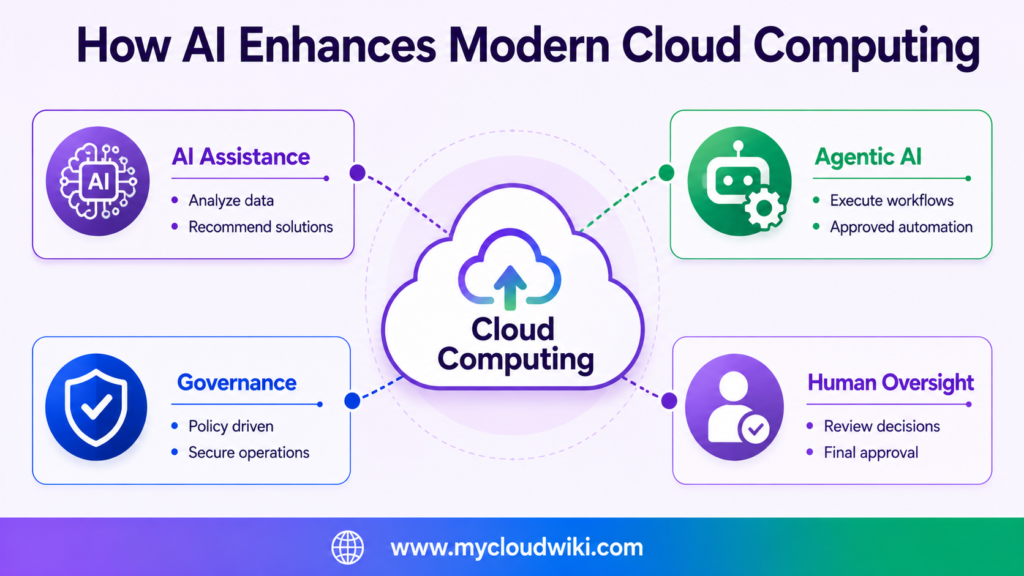
Every major cloud provider now integrates AI capabilities into its platform. While the tools differ, the goal is consistent: help engineers automate routine work, help architects make better decisions, and improve business outcomes through responsible AI adoption.
AWS, Microsoft Azure, Google Cloud, Oracle Cloud Infrastructure, and IBM Cloud all provide AI services and automation capabilities. The service names differ, but the enterprise objective is the same: use AI responsibly to improve productivity, automate approved workflows, and support better engineering and architectural decisions.
Cloud computing provides the platform that enables modern AI capabilities. As organizations adopt AI and Agentic AI, success depends on balancing automation with governance, security, and human oversight across multi-cloud environments.
How Cloud Computing Will Help MyRetail
MyRetail has identified cloud computing as the foundation for its future technology strategy.
However, the company is still at the beginning of its transformation journey.
Cloud computing provides the direction, but successfully adopting a multi-cloud operating model requires careful planning, modern architecture, and new engineering practices.
What MyRetail Hopes to Achieve
By adopting a multi-cloud strategy, MyRetail plans to:
- Provision new environments much faster.
- Scale customer-facing applications during peak shopping periods.
- Improve application availability and resilience.
- Modernize the way engineering teams build and operate technology.
- Create a foundation for automation, AI, analytics, and future innovation.
These goals will not be achieved overnight.
Each capability will be introduced and implemented throughout this learning series.
The Journey Starts Here
Understanding cloud computing is the first step.
Before MyRetail can build a modern multi-cloud platform, the company must understand many additional concepts, including:
- Traditional data centers
- Cloud service models
- Cloud deployment models
- Networking
- Identity and Security
- Compute
- Storage
- Databases
- Automation
- Observability
- AI & Agentic AI
- Governance
- FinOps
Each lesson will help MyRetail solve one part of its overall business challenge.
By the end of the Multi-Cloud Fundamental Learning Series, you’ll see how these individual building blocks come together to create a complete enterprise multi-cloud architecture.
Cloud computing gives MyRetail a clear direction for modernizing its technology platform. In the next lesson, we’ll explore why traditional data centers can no longer meet the needs of a rapidly growing business and why cloud computing became the preferred operating model for modern enterprises.
Architect’s Notebook
Every cloud transformation is different, but experienced architects often encounter similar challenges and lessons.
Here are some practical observations that consistently apply across enterprise multi-cloud environments.
Architect’s Notebook
Enterprise Architecture Notes
Review the enterprise challenges, practical lessons, multi-cloud observations, and AI recommendations that engineers and architects should consider throughout the cloud journey.
Enterprise Challenges
| Challenge | Why It Matters |
|---|---|
| Legacy mindset | Treating cloud as another data center limits its value. |
| Skills gap | Teams need new cloud engineering and operational skills. |
| Governance | Uncontrolled cloud adoption increases operational risk. |
| Cost visibility | Without monitoring, cloud spending grows quickly. |
| Operating model | Cloud requires automation and continuous operations. |
Lessons Learned
| Lesson | Practical Advice |
|---|---|
| Start with business | Solve business problems before selecting cloud services. |
| Standardize early | Common architecture patterns simplify operations. |
| Automate everything possible | Reduce manual effort and improve consistency. |
| Design for change | Business requirements will continue evolving. |
| Improve continuously | Cloud adoption is an ongoing journey, not a one-time project. |
Multi-Cloud Observations
| Observation | Architect’s View |
|---|---|
| Common principles | Cloud concepts remain consistent across providers. |
| Different implementations | Service names change, but architectural thinking does not. |
| Governance first | Apply consistent security and operational standards everywhere. |
| Avoid unnecessary lock-in | Use provider strengths while maintaining flexibility. |
| Business drives technology | Choose platforms based on business needs, not vendor preference. |
AI & Agentic AI Notes
| Topic | Recommendation |
|---|---|
| AI assistance | Use AI to improve productivity and knowledge sharing. |
| Agentic AI | Allow agents to automate approved operational workflows. |
| Governance | Apply security and policy controls to every AI workflow. |
| Human oversight | Engineers and architects remain accountable for final decisions. |
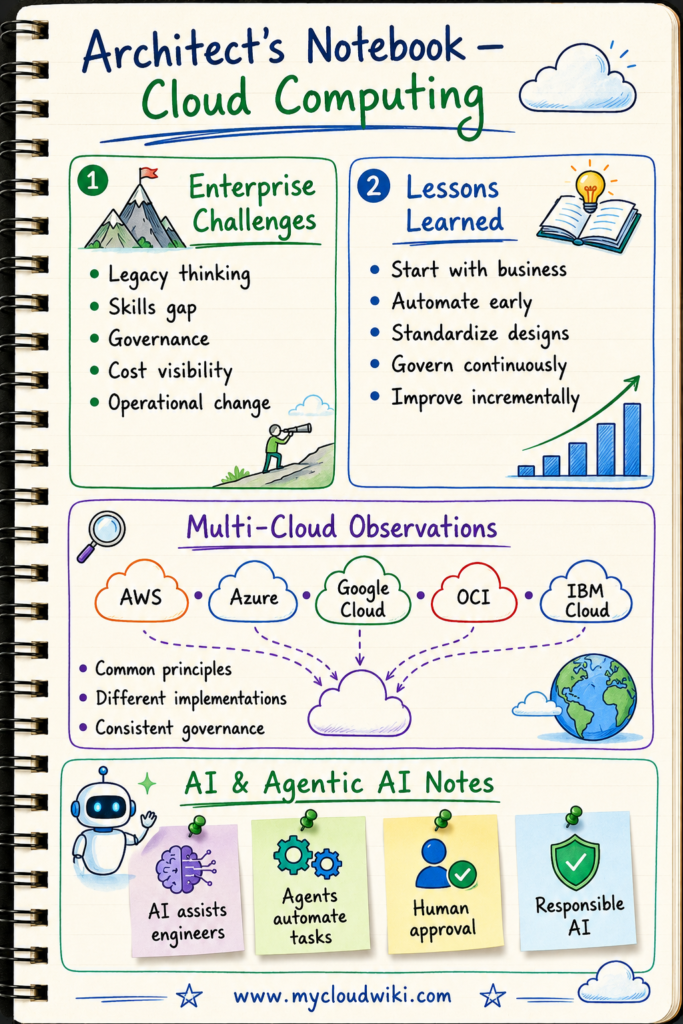
📝 Architect’s Notebook
Senior Architect’s Observation
Cloud computing succeeds when organizations change the way they think about delivering technology—not simply where technology runs. The most successful enterprises establish common architecture principles, automate operational processes, and govern consistently across multiple cloud providers. Technology evolves quickly, but sound engineering practices and strong architectural thinking remain timeless.
Key Takeaways
After completing this lesson, you should understand the following core concepts:
- Cloud computing delivers IT resources as on-demand services, enabling organizations to respond faster to changing business needs.
- Cloud adoption is driven by business outcomes, including agility, scalability, reliability, innovation, and better cost management—not simply by replacing data centers.
- Cloud concepts are consistent across AWS, Microsoft Azure, Google Cloud, Oracle Cloud Infrastructure (OCI), and IBM Cloud, even though service names and implementations differ.
- Cloud engineers and cloud architects have complementary responsibilities. Engineers build and operate cloud platforms, while architects design, govern, and optimize them for long-term success.
- Well-Architected principles provide a common enterprise framework for designing secure, reliable, high-performing, and cost-effective cloud solutions across multiple cloud providers.
- AI and Agentic AI enhance cloud operations by improving productivity and automating approved workflows, but human oversight remains essential for governance and decision-making.
- Successful cloud adoption is a continuous transformation, requiring modern operating models, automation, governance, and continuous improvement rather than a one-time migration project.
💡 Remember These Principles
- Think concepts first, providers second.
- Always begin with the business problem.
- Cloud adoption is an operating model, not just a technology upgrade.
- Successful cloud platforms require collaboration between engineers and architects.
- Apply Well-Architected principles throughout the solution lifecycle.
- Use AI responsibly while maintaining governance and human oversight.
- Always think from a multi-cloud perspective.
Continue Your Multi-Cloud Learning Journey
Understanding cloud computing is the first step toward building a strong multi-cloud foundation.
The next lesson explores why cloud computing became necessary by comparing traditional on-premises data centers with modern cloud environments.
You’ll learn:
- How traditional data centers operate
- The limitations of on-premises infrastructure
- What fundamentally changed with cloud computing
- Why enterprises began adopting cloud platforms
- How MyRetail begins planning its cloud transformation
This comparison provides the context needed to understand the cloud service models and technologies introduced in the following lessons.
Next Lesson
Traditional Data Centers vs Cloud Computing:
What Really Changed?
Discover why organizations moved beyond traditional data centers and how cloud computing transformed infrastructure, operations, scalability, and business innovation.
Continue to the Next Lesson →
