
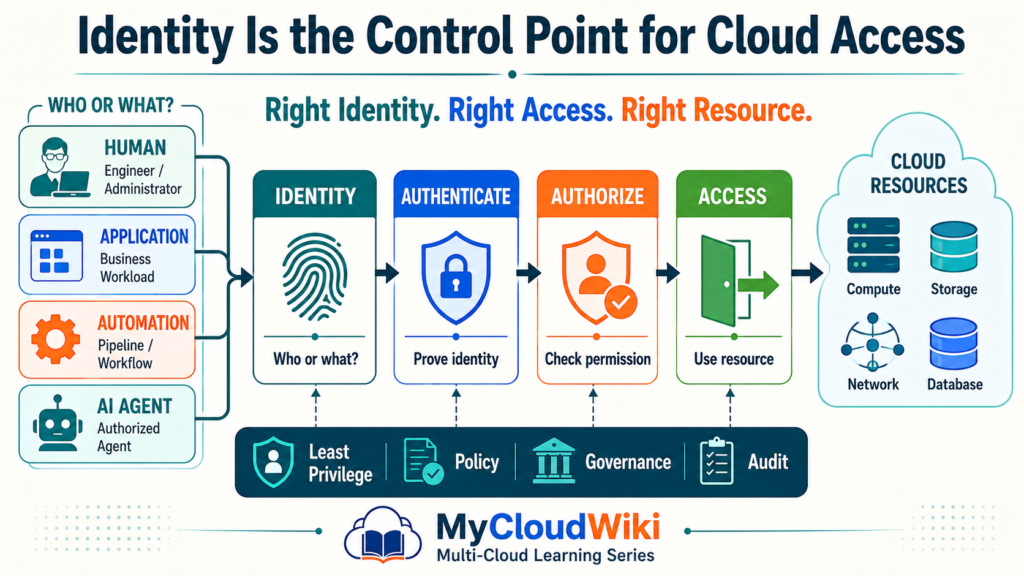
In Resource Provisioning Across Multi-Cloud, you learned how humans, automation, Infrastructure as Code, and AI-assisted workflows can create cloud resources.
But before any provisioning request is allowed to execute, the cloud platform must answer another question: who—or what—is allowed to perform the action?
Introduction
Every interaction with a cloud platform begins with an identity.
An engineer signing in, an application reading data, a deployment pipeline creating infrastructure, and an AI agent invoking an approved tool all need identities.
The cloud platform then needs to answer four questions:
- Who or what is making the request?
- Can the identity be verified?
- What is it permitted to do?
- Which resources can it access?
This is the role of Identity and Access Management (IAM).
A useful mental model is:
Identity → Authentication → Authorization → Access
IAM therefore becomes the control point between a request and the permission to act.
As MyRetail expands the governed provisioning model introduced in Resource Provisioning Across Multi-Cloud, this becomes a real business challenge.
MyRetail Business Challenge
MyRetail now has engineers, applications, automation workflows, and cloud services interacting with its growing environment.
Giving all of them broad access would be easy—but it would create significant security and governance risk.
MyRetail Business Challenge
Giving every identity the right level of cloud access
Business Problem
- People and systems require different levels of cloud access.
- Automation and AI introduce more machine identities.
Business Impact
- Excessive permissions increase security risk.
- Inconsistent access makes governance harder.
Planned Solution
- Establish a common enterprise identity model.
- Use roles, policies, federation, and least privilege.
Expected Outcome
- Right identity. Right access. Right resource.
- Human and machine access becomes auditable.
MyRetail therefore needs IAM that works for more than employees.
It must govern:
- Cloud engineers.
- Administrators.
- Applications.
- Deployment pipelines.
- Automation.
- External identities where required.
- AI agents.
The goal is not to eliminate access problems by giving everyone more permissions.
It is to give each identity only the permissions required for its responsibility.
That principle is called least privilege, and it will become even more important when MyRetail reaches Cloud Security Fundamentals later in the learning journey.
Understanding Cloud Identity and Access Management
IAM becomes easier when four related ideas are separated.
- Identity — who or what is making the request.
- Authentication — proving the identity.
- Authorization — determining permitted actions.
- Access — interacting with the resource.
What Is IAM?
Identity and Access Management is the set of processes and controls used to manage identities and their access to resources.
A simple way to remember it is:
Who are you?
→ Identity
Can you prove it?
→ Authentication
What can you do?
→ Authorization
Once those questions are answered, the platform can decide whether the requested access should proceed.
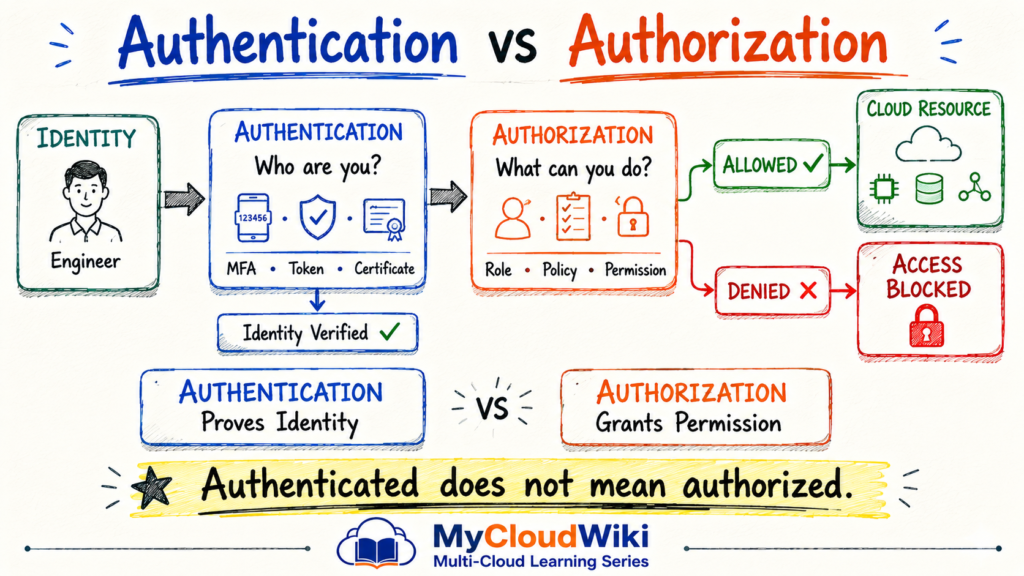
Authentication vs Authorization
Authentication and authorization are closely related, but they solve different problems.
Authentication proves identity. Authorization determines permission.
The distinction is easier to understand visually before looking at the details.
Authentication
Authentication answers:
Can you prove you are the identity you claim to be?
Common mechanisms include:
- Passwords.
- MFA.
- Security keys.
- Certificates.
- Tokens.
- Federated authentication.
Successful authentication establishes the identity making the request.
Authorization
Authorization answers:
What is this identity allowed to do?
Permissions might allow an identity to:
- Read.
- Create.
- Modify.
- Delete.
- Administer.
An engineer can therefore authenticate successfully and still be denied access to a production database.
The engineer’s identity is known—the required permission simply has not been granted.
This distinction prepares us for the next question:
What happens when the identity is not a person at all?
Types of Identities: Human, Workload, Automation & AI Agent
n a modern enterprise, identities can be grouped into four practical categories:
- Human identities — employees, engineers, administrators, and partners.
- Workload identities — applications, services, containers, and other software workloads.
- Automation identities — pipelines, Infrastructure as Code, and operational workflows.
- AI agent identities — agents that use approved tools or perform authorized actions.
These identities serve different purposes, but they share the same fundamental requirement:
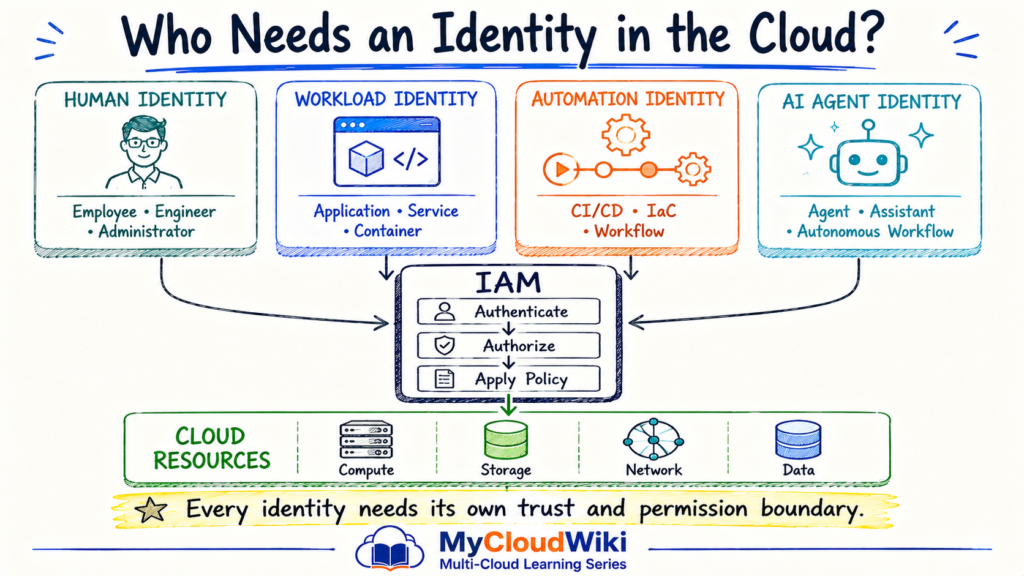
The four identities serve different purposes.
Human Identity
Represents a person such as:
- Employee.
- Developer.
- Cloud engineer.
- Administrator.
- External user.
Human identities typically authenticate interactively and should receive permissions based on their responsibilities.
Workload Identity
Represents software rather than a person.
Examples include:
- Applications.
- Services.
- Virtual machines.
- Containers.
- Serverless workloads.
A workload should normally use its own identity rather than borrowing a human user’s credentials.
This becomes particularly important when applications need to access databases, storage, APIs, or other cloud services.
Automation Identity
Provisioning and operational workflows also need identities.
Examples include:
- CI/CD pipelines.
- Infrastructure as Code workflows.
- Deployment automation.
- Scheduled operations.
This connects directly with Resource Provisioning Across Multi-Cloud: automation should receive only the permissions required to perform its approved provisioning tasks.
AI Agent Identity
AI agents introduce another machine identity into the enterprise.
An agent that can interact with cloud systems may need permission to:
- Read information.
- Invoke an approved tool.
- Query resource state.
- Start a workflow.
- Perform an approved action.
The important principle is the same:
AI capability does not equal authorization.
An agent should receive a defined identity and bounded permissions appropriate to its responsibility.
Types of Access Permissions: Users, Groups, Roles and Policies
Once an identity exists, the enterprise needs a scalable way to determine what it can do.
IAM commonly uses concepts such as users, groups, roles, and policies to organize access.
Provider implementations differ, so the goal here is to understand the concepts rather than memorize a single provider’s hierarchy.
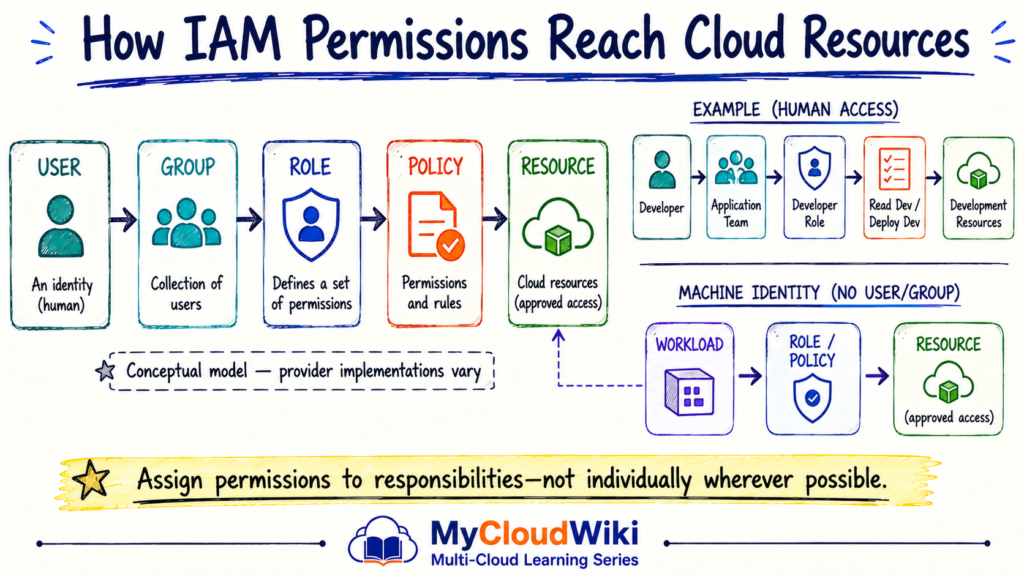
User
A user usually represents an individual identity.
For example:
- Developer.
- Administrator.
- Analyst.
Directly managing every permission for every individual becomes difficult as an organization grows.
Group
A group collects identities that share a common purpose or responsibility.
Examples might include:
- Cloud Engineers.
- Database Administrators.
- Application Developers.
Groups can simplify access management by allowing permissions to be managed collectively where the platform supports that model.
Role
A role represents a responsibility or access pattern.
Examples might include:
- Developer.
- Auditor.
- Database Operator.
- Network Administrator.
Roles help separate who someone is from what responsibility they are performing.
Policy
A policy describes access rules.
It can answer questions such as:
- Which actions are permitted?
- Which resources can be accessed?
- Are there conditions on the access?
- Should an action be denied?
The exact policy model differs across cloud providers.
The principle remains consistent: access should be defined intentionally rather than granted broadly.
The Principle of Least Privilege
Least privilege is one of the most important principles in IAM.
It means:
Give an identity only the permissions required to perform its approved task—and no more.
This applies equally to humans, applications, automation, and AI agents.
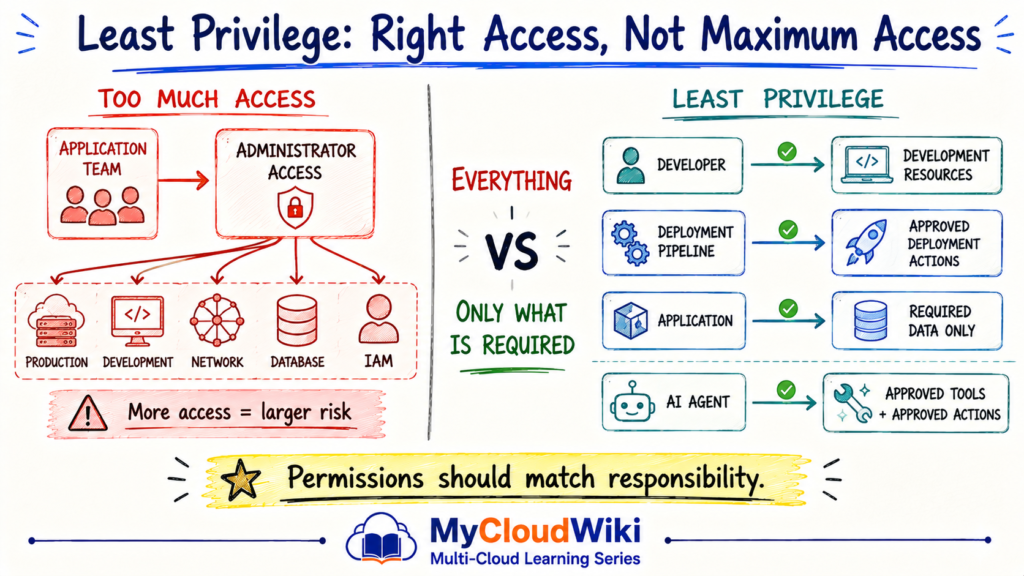
Least privilege reduces the potential impact of:
- Compromised credentials.
- Human mistakes.
- Misconfigured automation.
- Application vulnerabilities.
- Unexpected AI-agent behavior.
The principle is especially important for privileged and automated identities because those identities may perform actions without continuous human interaction.
Permissions Should Follow Responsibility
A developer may need to deploy an application without administering enterprise identity.
A database operator may need to manage databases without modifying network security.
A deployment pipeline may need permission to deploy an approved workload without receiving unrestricted administrator access.
An AI agent may need to inspect resource state without being allowed to delete resources.
The objective is therefore not:
How much access can we safely give this identity?
A better question is:
What is the minimum access this identity needs to perform its responsibility?
This principle will become an important foundation for Cloud Security Fundamentals, where identity becomes one layer of the broader enterprise security model.
Federation and Single Sign-On
As MyRetail adopts multiple cloud platforms, creating separate employee credentials in every environment would increase identity sprawl.
Enterprise IAM therefore commonly connects cloud access to an organization’s existing identity system through federation and Single Sign-On (SSO).
The visual should establish the architecture before we discuss the benefits.
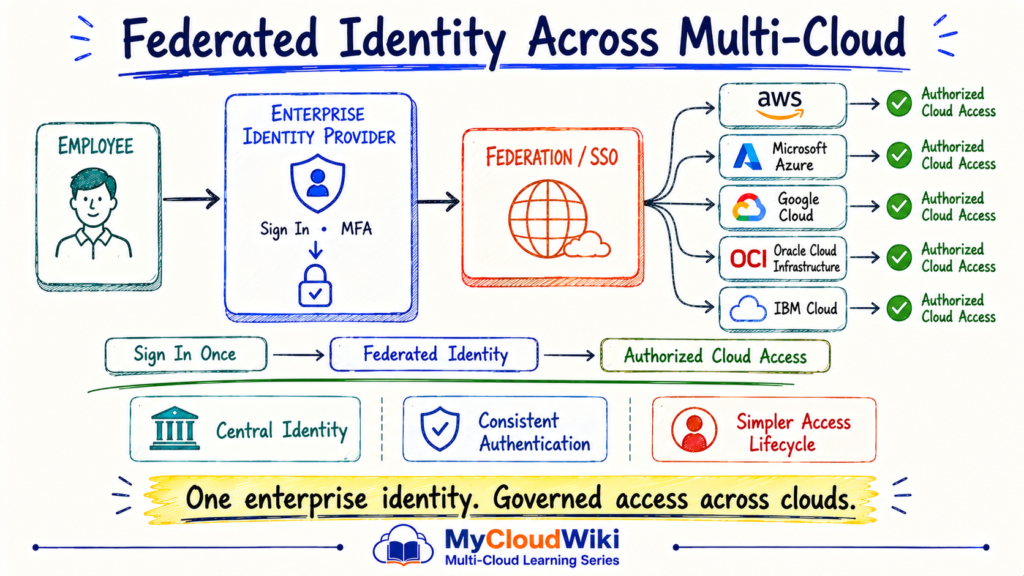
Federation allows one identity system to establish trust with another.
For employees, this can support:
- Central sign-in.
- Consistent authentication controls.
- MFA.
- Faster onboarding.
- Faster access removal.
- Reduced credential sprawl.
This becomes particularly valuable in multi-cloud environments because the organization can maintain a stronger enterprise identity lifecycle while still using provider-specific authorization models.
Workload Identity & Temporary Credentials
Applications need access to cloud resources just like people do.
But applications should not depend on a developer’s username, password, or permanently embedded access key.
A stronger pattern is:
Workload → Trusted Identity → Temporary Access → Cloud Resource
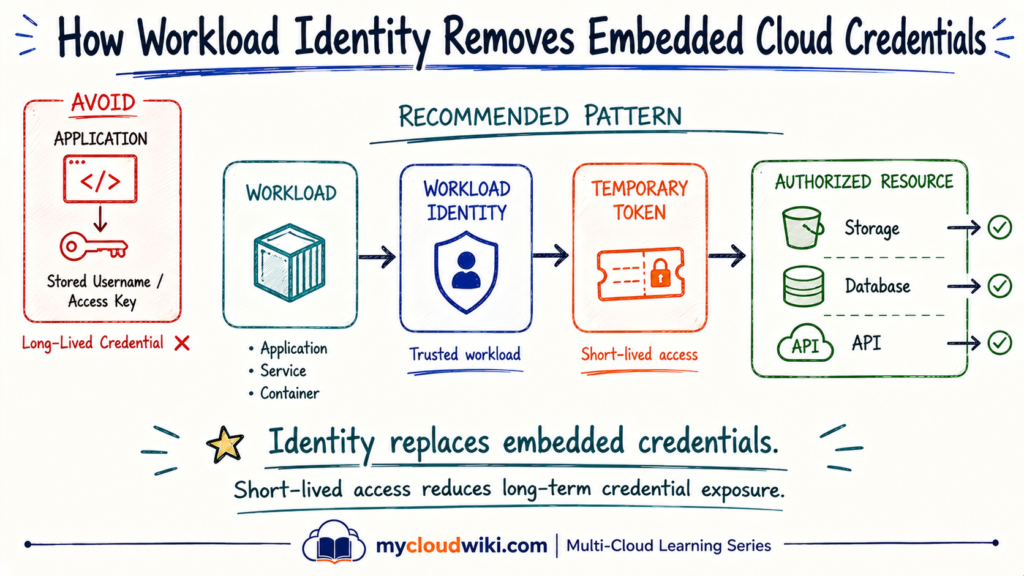
Why Workload Identity Matters
Applications often need permission to:
- Read storage.
- Query databases.
- Call APIs.
- Publish messages.
- Retrieve configuration.
- Interact with other cloud services.
Embedding permanent credentials creates a lifecycle problem.
Credentials can be:
- Accidentally exposed.
- Copied into repositories.
- Difficult to rotate.
- Shared between workloads.
- Left active after applications change.
Workload identity provides a stronger model by allowing the platform to establish trust with the workload itself.
Temporary credentials can then be issued when access is required.
The Preferred Mental Model
Avoid:
Application → Stored Credential → Cloud Resource
Prefer:
Application → Workload Identity → Temporary Access → Resource
The exact mechanism differs between providers.
The underlying architecture is consistent: establish trust without depending on permanently stored application credentials.
This concept will connect naturally with Cloud Security Fundamentals, where secrets, encryption, credential protection, and Zero Trust controls will be explored more deeply.
Privileged Access
Not every permission carries the same level of risk.
Reading development logs and changing production identity policies should not be treated as equivalent actions.
Privileged access covers higher-impact activities such as:
- IAM administration.
- Production changes.
- Security configuration.
- Network administration.
- Resource deletion.
- Sensitive data access.
The goal is not simply to identify administrators.
It is to control when elevated authority is available, who can use it, and how the activity is recorded.
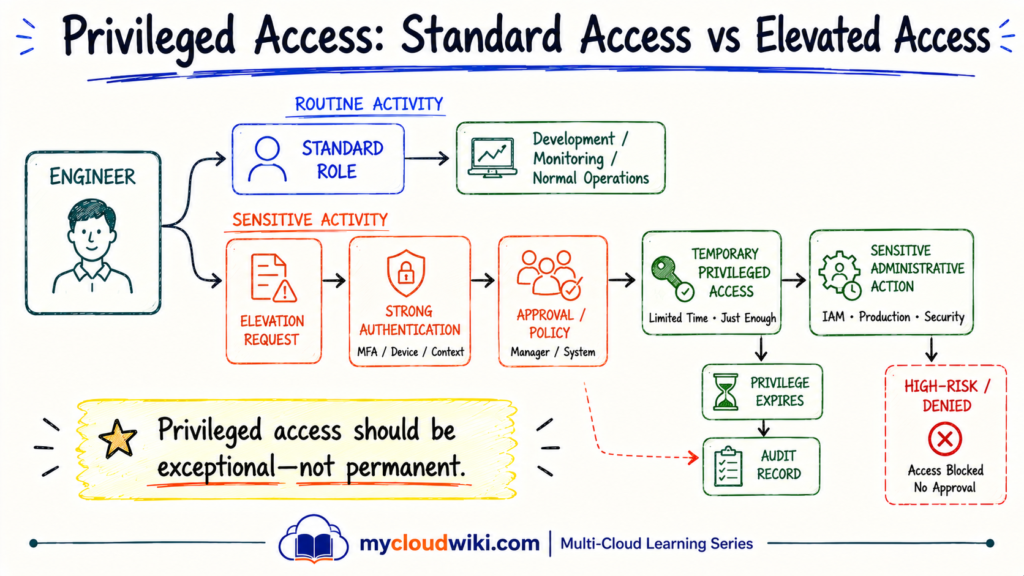
Strong Privileged Access Practices
Enterprise identity models typically strengthen privileged access through combinations of:
- Strong authentication.
- Smaller administrator populations.
- Separation of duties.
- Temporary elevation where possible.
- Approval for sensitive actions.
- Restricted administrative paths.
- Comprehensive audit logs.
Permanent broad administrator access creates a larger attack surface.
A safer principle is:
Use normal access by default. Elevate only when the task requires it.
This principle applies to people and increasingly to automation and AI agents.
An AI agent should not receive permanent administrator access simply because one of its possible tasks might occasionally require an elevated operation.
Multi-Cloud Perspective
The terminology changes across cloud providers.
The identity questions remain remarkably similar:
Who or what is requesting access?
How is the identity authenticated?
Which permissions apply?
Which resource is being accessed?
This is why IAM should be learned as an architectural capability first and mapped to provider products second.
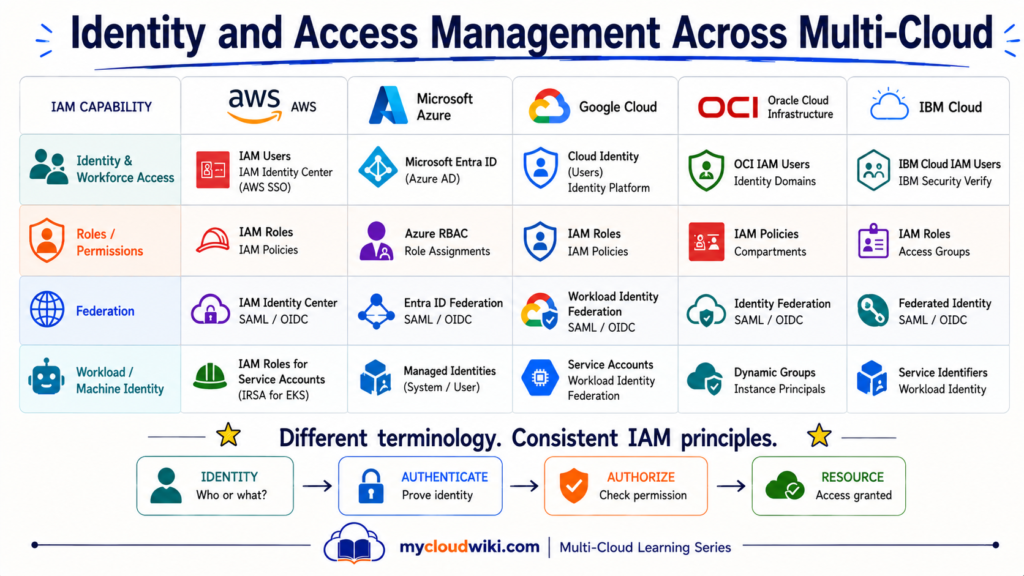
Provider terminology can evolve, so this table should be validated against current provider documentation immediately before publication.
What Matters More Than the Product Name
Across AWS, Microsoft Azure, Google Cloud, OCI, and IBM Cloud, architects repeatedly encounter the same concerns:
- Workforce identity.
- Machine identity.
- Authentication.
- Roles and permissions.
- Federation.
- Workload access.
- Privileged administration.
- Auditability.
The implementation details vary.
The architecture principle does not:
Every request should have a known identity and an intentionally defined permission boundary.
That capability-first understanding makes it easier to move between cloud platforms without relearning IAM from zero.
Multi-Cloud IAM Design Principle
Multi-cloud IAM does not mean every provider must use an identical identity model.
A better enterprise objective is consistency in principles:
- Centralize workforce identity where practical.
- Federate rather than duplicate employee credentials.
- Apply least privilege.
- Separate human and workload identities.
- Avoid unnecessary long-lived credentials.
- Audit privileged activities.
- Give automation and AI agents bounded permissions.
Provider-native capabilities can still be used where they are the best fit.
The architecture remains governed by a common identity strategy.
Engineer & Architect Perspective
IAM succeeds when architecture standards and engineering implementation stay aligned.
Engineers configure identities, roles, policies, federation, and workload access. Architects define the trust model, permission boundaries, privileged-access rules, and multi-cloud identity strategy.
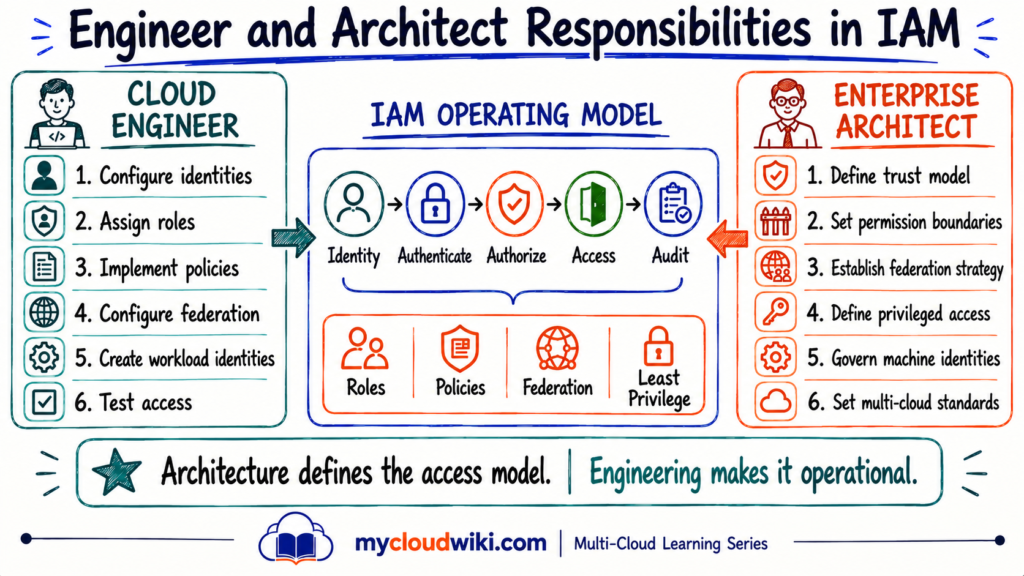
Engineers make access work.
They focus on:
- Identity configuration.
- Roles and permissions.
- Workload access.
- Federation setup.
- Troubleshooting.
Architects make access governable.
They focus on:
- Trust boundaries.
- Least privilege.
- Privileged-access principles.
- Multi-cloud consistency.
- Human and machine identity strategy.
The strongest IAM programs connect both perspectives.
Well-Architected Perspective
IAM affects far more than the Security pillar.
A weak identity model can increase operational risk, reduce reliability, enable uncontrolled spending, and make cloud environments difficult to govern.
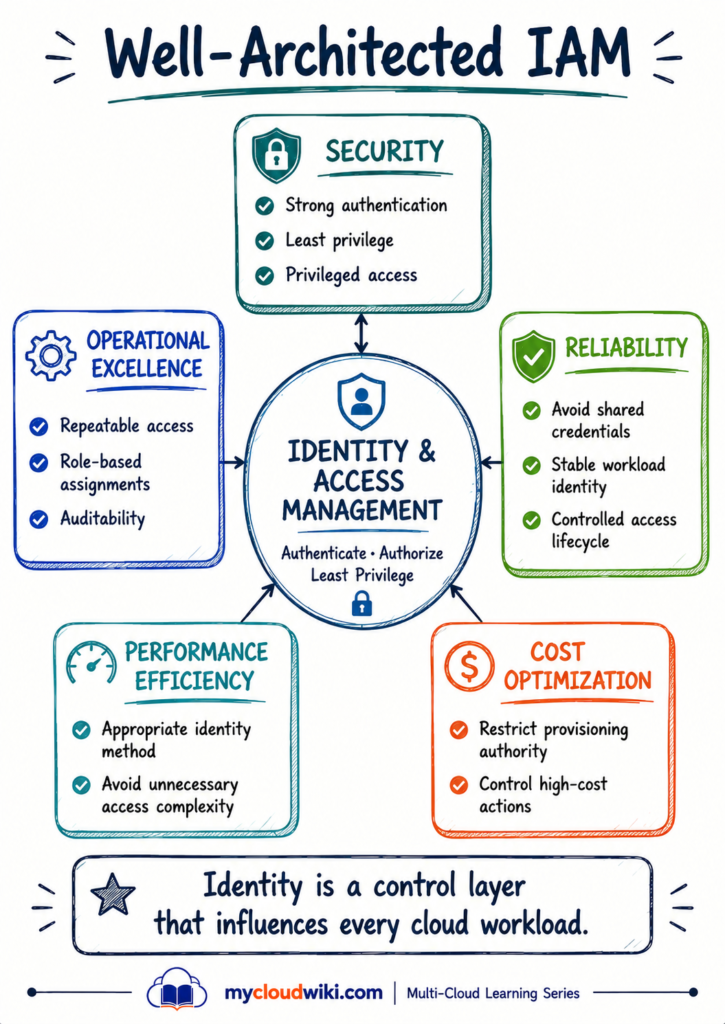
What IAM Contributes
IAM supports Well-Architected design through a few fundamental practices:
- Security — authenticate strongly and apply least privilege.
- Operational Excellence — make access assignment repeatable and auditable.
- Reliability — avoid fragile shared credentials and unmanaged access dependencies.
- Performance Efficiency — use identity mechanisms appropriate to workloads and automation.
- Cost Optimization — restrict who or what can create expensive resources.
This reinforces an important idea from Resource Provisioning Across Multi-Cloud: resource creation and identity governance are closely connected.
AI & Agentic AI Perspective
AI agents introduce a new identity category, but they do not require a new security philosophy.
An agent that can call tools, read cloud state, trigger workflows, or modify infrastructure must have a defined identity and a limited permission boundary.
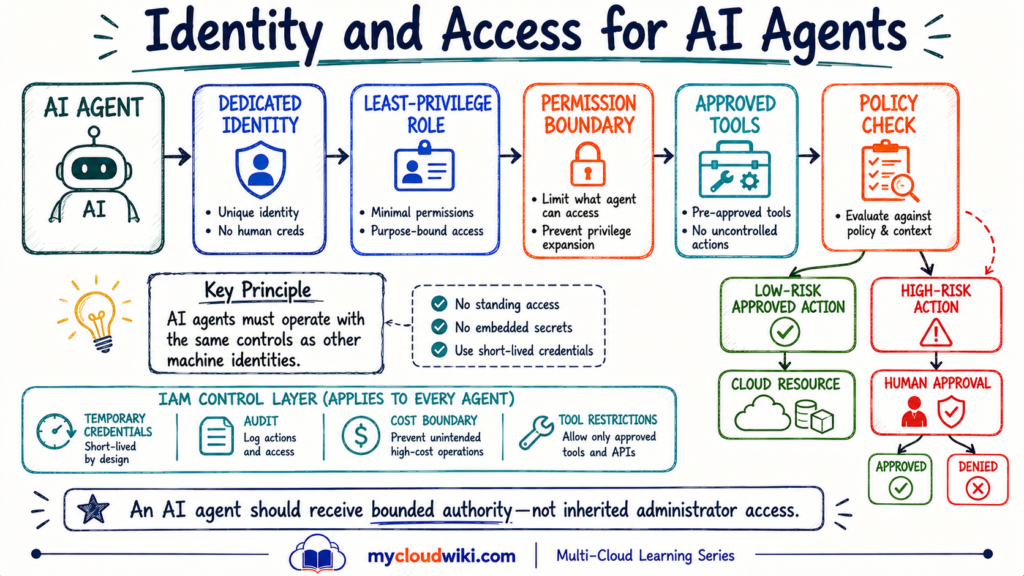
IAM Rules for AI Agents
The same core principles apply:
- Give the agent a dedicated identity.
- Grant only required permissions.
- Prefer temporary credentials.
- Restrict accessible tools.
- Restrict accessible environments.
- Log every action.
- Require approval for higher-risk operations.
This extends the model introduced in Resource Provisioning Across Multi-Cloud, where AI-assisted and agentic provisioning remained inside the enterprise control plane.
The critical distinction is:
AI capability determines what an agent can understand.
IAM determines what it is allowed to do.
Architect’s Notebook
IAM decisions become difficult when identities, roles, automation, federation, and privileged access grow independently.
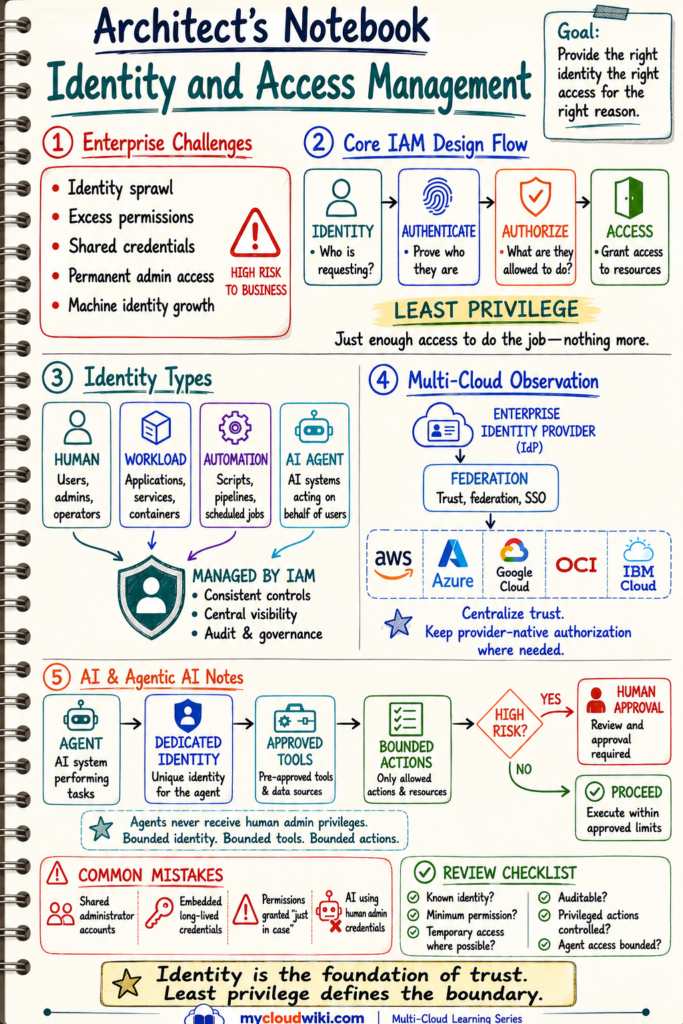
MyRetail Business Solution & Progress
MyRetail started this lesson with a new challenge: provisioning was becoming more structured, but access to those resources also needed to become governed.
The IAM foundation now gives MyRetail a clear direction:
- Centralize workforce identity where practical.
- Federate employee access across cloud environments.
- Use roles and policies instead of broad direct permissions.
- Separate human, workload, automation, and AI-agent identities.
- Apply least privilege.
- Prefer temporary access over embedded long-lived credentials.
- Strengthen privileged access.
- Make access auditable.
The transformation is still progressing. MyRetail has established the identity foundation, but networking, security, observability, automation, and later platform capabilities are still ahead.
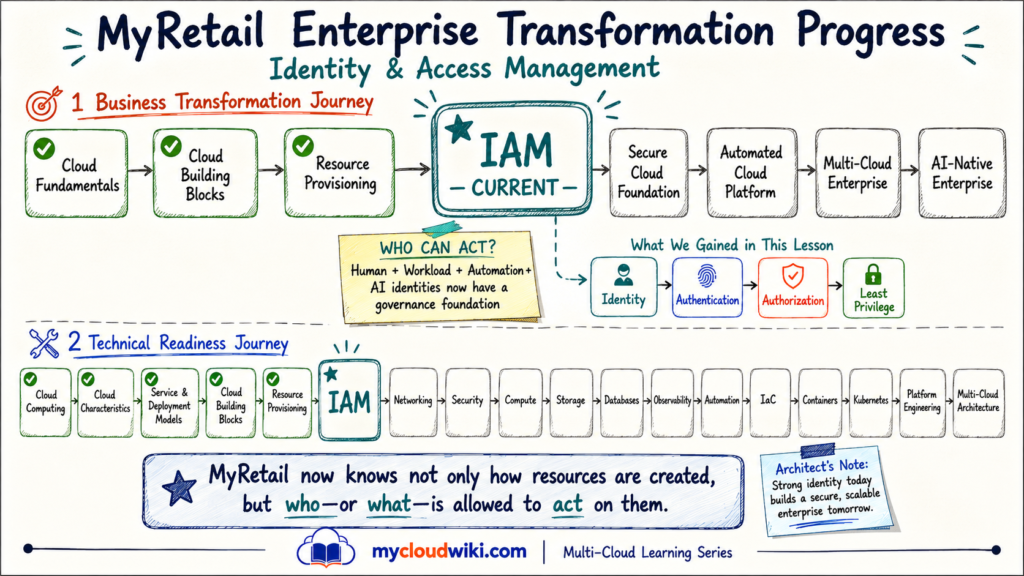
The IAM lesson moves MyRetail from:
Governed Resource Provisioning
to:
Governed Identity + Access
That foundation will support the security, networking, automation, and AI capabilities introduced later in the transformation.
Knowledge Check
Question 1
💡 Show Answer
Question 2
💡 Show Answer
Question 3
💡 Show Answer
Question 4
💡 Show Answer
Question 5
💡 Show Answer
Question 6
💡 Show Answer
Key Takeaways
- Identity establishes who—or what—is making a request.
- Authentication verifies identity; authorization determines permission.
- Users, groups, roles, and policies help organize access at enterprise scale.
- Least privilege means granting only the permissions required for a responsibility.
- Federation can connect enterprise workforce identity with multiple cloud environments.
- Workloads and automation should use dedicated identities rather than borrowed human credentials.
- Privileged access should be tightly controlled and temporary where practical.
- AI agents require the same IAM foundations: identity, bounded permissions, policy, and auditability.
The central lesson is simple:
Identity establishes trust. Authorization defines the boundary.

 works across major cloud providers. Understand authentication, authorization, federation, identity governance, multi-cloud identity strategies, and the growing role of Agentic AI in IAM operations.)