
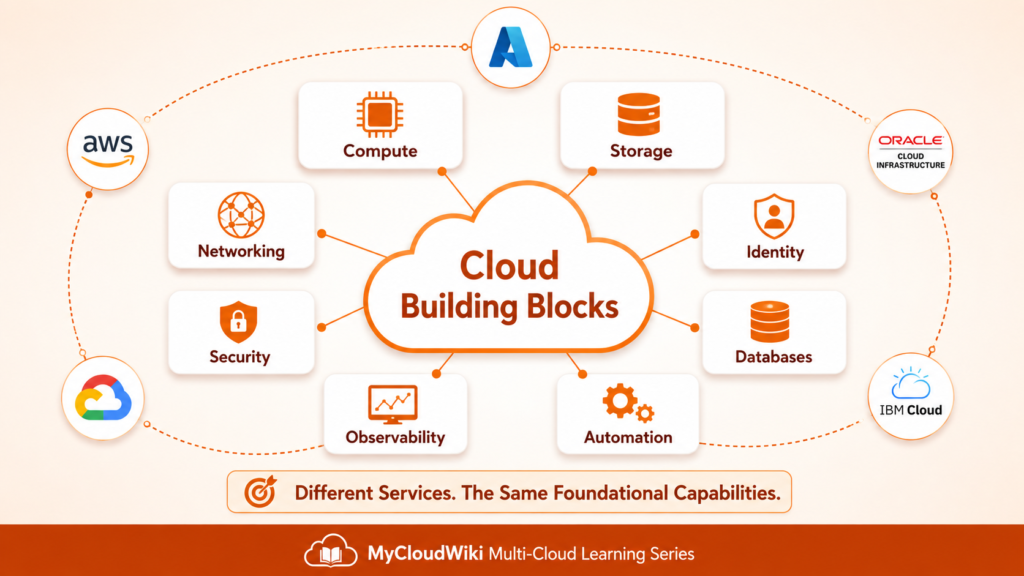
In Cloud Service Models and Deployment Models, you learned how cloud capabilities are delivered and where workloads can operate. This lesson shifts from delivery models to the reusable building blocks used to assemble every cloud solution.
Introduction
Cloud platforms contain hundreds of services. Most of them extend, combine, or manage a much smaller set of foundational capabilities.
Every modern application needs answers to the same questions:
- Where will the workload run?
- Where will its data persist?
- How will users and services connect?
- Who will be allowed to access it?
- How will the environment be protected?
- Where will application data be organized?
- How will teams understand system health?
- How will resources be deployed consistently?
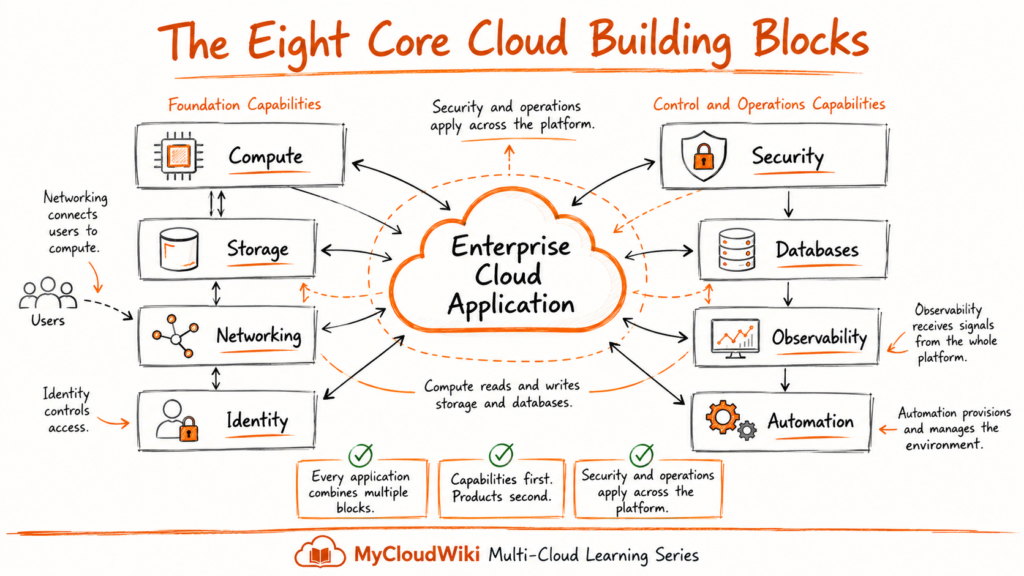
These questions lead to eight core cloud building blocks:
- Compute — runs workloads.
- Storage — persists files and data.
- Networking — connects users, applications, and services.
- Identity — authenticates users and controls access.
- Security — protects workloads, communications, and information.
- Databases — stores and retrieves application data.
- Observability — reveals health, behavior, and performance.
- Automation — creates and manages resources consistently.
The individual products differ across AWS, Microsoft Azure, Google Cloud, Oracle Cloud Infrastructure, and IBM Cloud.
The architectural capabilities remain recognizable across all five providers.
Why Learn the Building Blocks First?
A capability-first mental model makes cloud easier to learn.
It helps you:
- Understand what a solution actually requires.
- Separate architectural needs from vendor terminology.
- Compare providers using common criteria.
- Recognize how different capabilities depend on one another.
- Prepare for detailed lessons without learning every topic at once.
For example:
- A website needs compute to run its application code.
- It needs networking so customers can reach it.
- It needs identity to control administrative access.
- It needs storage and databases to retain information.
- It needs security across every layer.
- It needs observability to detect failures.
- It needs automation to create repeatable environments.
This lesson introduces the complete architectural map.
Future lessons such as
- Cloud Compute Fundamentals,
- Cloud Storage Fundamentals,
- Cloud Networking Fundamentals,
- Identity and Access Management, and
- Cloud Security Fundamentals
will examine each capability in greater depth.
The Eight Core Cloud Building Blocks
Every cloud solution is assembled from the same eight foundational capabilities.
The first four establish where workloads run, where data persists, how systems communicate, and who can access them:
- Compute
- Storage
- Networking
- Identity
The remaining four—security, databases, observability, and automation—will follow next
Compute
Compute is the capability that runs workloads.
Every application, API, container, serverless function, and AI model needs processing capacity to execute instructions.
Key Components
- Virtual machines — Full operating-system environments with maximum control.
- Containers — Lightweight application packages that share the host operating system.
- Kubernetes — Coordinates containers across clusters.
- Serverless functions — Run event-driven code without managing servers.
- GPUs and AI accelerators — Provide high-throughput processing for AI and specialized workloads.
Why It Matters
The compute model affects:
- Scaling behavior
- Deployment speed
- Operational overhead
- Failure isolation
- Performance
- Cost
A single enterprise application may use several compute models at the same time.
For example:
- Virtual machines for legacy services
- Containers for modern APIs
- Serverless functions for event processing
- GPUs for AI inference
Architect’s Note
The compute model chosen early in a project influences the platform’s scaling behavior, incident blast radius, deployment cadence, and monthly cost.
Treat compute as a design decision—not a default selection.
Detailed compute patterns will be covered in Cloud Compute Fundamentals.
Storage
Storage is the capability that preserves data beyond the life of a running workload.
Applications restart. Containers are replaced. Virtual machines fail. Storage ensures that files, backups, logs, and business information survive those events.
Key Components
- Object storage — Files, images, backups, logs, media, and data lakes.
- Block storage — High-performance disk volumes for virtual machines and databases.
- File storage — Shared network file systems for applications requiring concurrent access.
- Archive storage — Low-cost retention for data that is rarely accessed.
- Backup storage — Protected copies used for recovery and continuity.
Why It Matters
Storage design affects:
- Application performance
- Data durability
- Recovery options
- Compliance
- Retention
- Long-term cost
Different workloads require different storage patterns.
Examples include:
- Product images in object storage
- Operating-system disks in block storage
- Shared application files in file storage
- Historical records in archive tiers
Architect’s Note
Storage decisions become expensive to reverse after large volumes of data accumulate.
Define access patterns, retention periods, lifecycle rules, and recovery requirements before production use.
These patterns will be explored further in Cloud Storage Fundamentals.
Networking
Networking is the capability that connects everything.
Users reach applications through networking. Applications reach databases through networking. Regions, data centers, and cloud providers also communicate through networking.
Key Components
- Virtual networks — Private address spaces inside cloud environments.
- Subnets — Divide networks into controlled segments.
- Routing — Determines how traffic moves between destinations.
- Load balancers — Distribute traffic across multiple application instances.
- DNS — Translates service names into network addresses.
- Private connectivity — Connects cloud environments to data centers and other clouds.
Why It Matters
Networking determines:
- How applications are reached
- Which systems can communicate
- Where security boundaries exist
- How failures are isolated
- How regions and clouds connect
- How users experience latency
Poor network design is difficult to correct after workloads have been deployed.
Common early decisions include:
- IP address ranges
- Network segmentation
- Region-to-region connectivity
- On-premises connectivity
- Inbound and outbound traffic paths
Architect’s Note
Networking mistakes often remain invisible until they cause outages, security gaps, or migration delays.
Plan addressing, segmentation, routing, and hybrid connectivity before deploying production workloads.
The next deep-dive lesson, Cloud Networking Fundamentals, will expand these concepts.
Identity
Identity is the capability that answers two questions:
- Who are you?
- What are you allowed to do?
Every action in a cloud environment is authenticated and authorized through an identity system.
Key Components
- Users and groups — Represent people and organize access.
- Roles — Grant permissions based on responsibilities.
- Service accounts and managed identities — Provide identities for applications and automation.
- Policies — Define allowed and denied actions.
- Federation and single sign-on — Connect cloud access to enterprise directories.
- Multi-factor authentication — Adds another layer of identity verification.
Why It Matters
Identity controls access to:
- Cloud consoles
- Applications
- APIs
- Databases
- Automation pipelines
- Administrative operations
A strong identity design reduces reliance on network location as the primary security boundary.
Core practices include:
- Least privilege
- Centralized identity
- Strong authentication
- Short-lived credentials
- Separation of duties
- Regular access reviews
Architect’s Note
Many cloud security failures begin with excessive permissions, unmanaged credentials, or poorly governed machine identities.
Least privilege is not a one-time setting. It is an operating discipline.
Identity architecture will be covered in detail in Identity and Access Management Across Multi-Cloud.
How These Four Building Blocks Connect
These capabilities already form a basic application foundation:
- Networking receives the user request.
- Identity verifies the user or service.
- Compute executes the application logic.
- Storage preserves files and durable information.
The application is still incomplete.
It also requires:
- Security controls
- Databases
- Observability
- Automation
Remaining building-block model shows how the remaining capabilities protect, operate, and manage the platform.
Security
Security is not a single cloud service.
It is a collection of controls applied across every other building block to protect workloads, identities, networks, applications, and data throughout their lifecycle.
Every cloud capability depends on security.
Without it, the platform cannot be trusted.
Key Components
- Encryption — Protects data at rest and in transit.
- Network security — Firewalls, security groups, and network policies control traffic.
- Identity protection — MFA, conditional access, privileged access, and least privilege.
- Threat detection — Continuously monitors workloads for suspicious activity.
- Security monitoring — Collects and analyzes security events.
- Compliance controls — Helps satisfy regulatory and organizational requirements.
Why It Matters
Security protects:
- Customer information
- Business applications
- Enterprise identities
- Financial data
- Intellectual property
- Cloud infrastructure
It also supports:
- Business continuity
- Regulatory compliance
- Risk reduction
- Customer trust
Modern cloud security is based on layered defense rather than a single perimeter.
Security Applies Everywhere
Security strengthens every building block.
Examples include:
- Compute → vulnerability management and endpoint protection.
- Storage → encryption and access control.
- Networking → firewalls and traffic inspection.
- Identity → authentication and authorization.
- Databases → encryption, auditing, and access policies.
- Observability → security monitoring and incident detection.
- Automation → policy enforcement and secure deployments.
Architect’s Note
Security should be designed into the platform from the beginning.
Adding security after deployment increases cost, operational complexity, and business risk.
The Cloud Security Fundamentals lesson explores these controls in greater depth.
Databases
Databases store and organize the information that powers business applications.
Orders, customers, inventory, payments, analytics, and AI applications all rely on databases to store and retrieve information efficiently.
While cloud providers manage much of the operational work, the responsibility for good data design remains with architects and developers.
Key Components
- Relational databases — Structured tables with SQL and transactional consistency.
- NoSQL databases — Flexible schemas designed for scale and high throughput.
- Data warehouses — Optimized for reporting and business analytics.
- In-memory databases — Extremely fast access for frequently used information.
- Managed database platforms — Reduce operational overhead through automation.
Why It Matters
Database architecture influences:
- Application performance
- Scalability
- Availability
- Recovery
- Reporting
- AI and analytics capabilities
Different workloads often require different database technologies.
Examples include:
- Customer orders in relational databases.
- Shopping carts in NoSQL databases.
- Sales reporting in data warehouses.
- Session data in in-memory databases.
Database Responsibilities
Even when using managed services, architects remain responsible for:
- Data modeling
- Schema design
- Indexing
- Backup strategy
- High availability design
- Performance optimization
Cloud providers manage the platform.
Architects design the data.
Architect’s Note
Selecting the correct database type is often more important than selecting the cloud provider.
Good data architecture simplifies application growth, while poor design creates long-term performance and scalability problems.
Future lessons will explore database categories and architectural patterns across multiple cloud providers.
Observability
Observability is the capability that tells you what your platform is doing.
Without observability, engineers cannot quickly determine whether an application is healthy, why performance changed, or which component caused an incident.
Modern cloud operations rely on observability to maintain reliable services.
Key Components
- Metrics — Numerical measurements such as CPU usage, latency, memory utilization, and error rates.
- Logs — Time-stamped records generated by applications and infrastructure.
- Distributed traces — Track a request as it moves across multiple services.
- Dashboards — Visualize operational health.
- Alerts — Notify teams when predefined thresholds or conditions are met.
Why It Matters
Observability enables teams to:
- Detect failures quickly.
- Troubleshoot production incidents.
- Measure application performance.
- Understand user experience.
- Improve operational reliability.
- Support proactive monitoring.
Good observability reduces downtime and shortens incident response.
The Three Pillars of Observability
Modern platforms rely on three complementary signals:
- Metrics → What is happening?
- Logs → What happened?
- Traces → Where did it happen?
Together, they provide a complete operational picture.
Architect’s Note
Observability should be implemented before applications reach production.
Monitoring is significantly more effective when metrics, logs, dashboards, and alerts are designed alongside the application rather than added later.
The Cloud Observability Fundamentals lesson expands on monitoring strategies, telemetry, and operational best practices.
Automation
Automation creates, configures, and manages cloud environments without manual intervention.
As organizations scale, manual deployment becomes slow, inconsistent, and difficult to audit.
Automation transforms cloud infrastructure into repeatable, version-controlled systems.
Key Components
- Infrastructure as Code (IaC) — Define infrastructure using declarative templates.
- CI/CD pipelines — Automate application build, testing, and deployment.
- Policy as Code — Apply governance automatically during deployment.
- Configuration management — Maintain consistent system configuration.
- Auto Scaling — Automatically adjust capacity based on demand.
- Scheduled automation — Execute operational tasks without manual effort.
Why It Matters
Automation improves:
- Deployment consistency
- Operational efficiency
- Governance
- Compliance
- Recovery
- Platform scalability
It also reduces:
- Human error
- Configuration drift
- Deployment time
- Operational cost
Automation enables enterprise platforms to operate at cloud scale.
Automation Across the Platform
Automation interacts with every building block.
Examples include:
- Provisioning compute resources.
- Creating storage automatically.
- Configuring networks.
- Assigning identities and permissions.
- Applying security policies.
- Deploying databases.
- Configuring monitoring and alerts.
Rather than replacing engineers, automation allows teams to focus on architecture and innovation.
Architect’s Note
If infrastructure can be changed manually outside the approved automation process, governance gaps will eventually appear.
Automation is not simply an operational convenience—it is a foundational enterprise control.
The Cloud Automation Fundamentals lesson explores Infrastructure as Code, GitOps, Policy as Code, and enterprise automation strategies.
Bringing the Eight Building Blocks Together
The eight cloud building blocks work as a unified platform rather than independent capabilities.
Each building block contributes a specific responsibility.
Together, they create a complete cloud environment.
No enterprise application relies on only one building block.
Instead, cloud solutions are created by combining these capabilities into secure, scalable, and well-governed architectures.
In the next section, you’ll see how these same building blocks appear across AWS, Microsoft Azure, Google Cloud, Oracle Cloud Infrastructure (OCI), and IBM Cloud, demonstrating that while service names differ, the underlying architectural capabilities remain remarkably consistent.
Multi-Cloud Perspective
The eight building blocks remain consistent across every major cloud provider.
What changes is the service name, management experience, and the surrounding ecosystem—not the architectural capability itself.
Thinking in terms of capabilities first makes it much easier to learn new cloud platforms, compare services, and design portable enterprise architectures.
Instead of memorizing hundreds of product names, architects first identify the required capability and then select the most appropriate service from their chosen cloud provider.
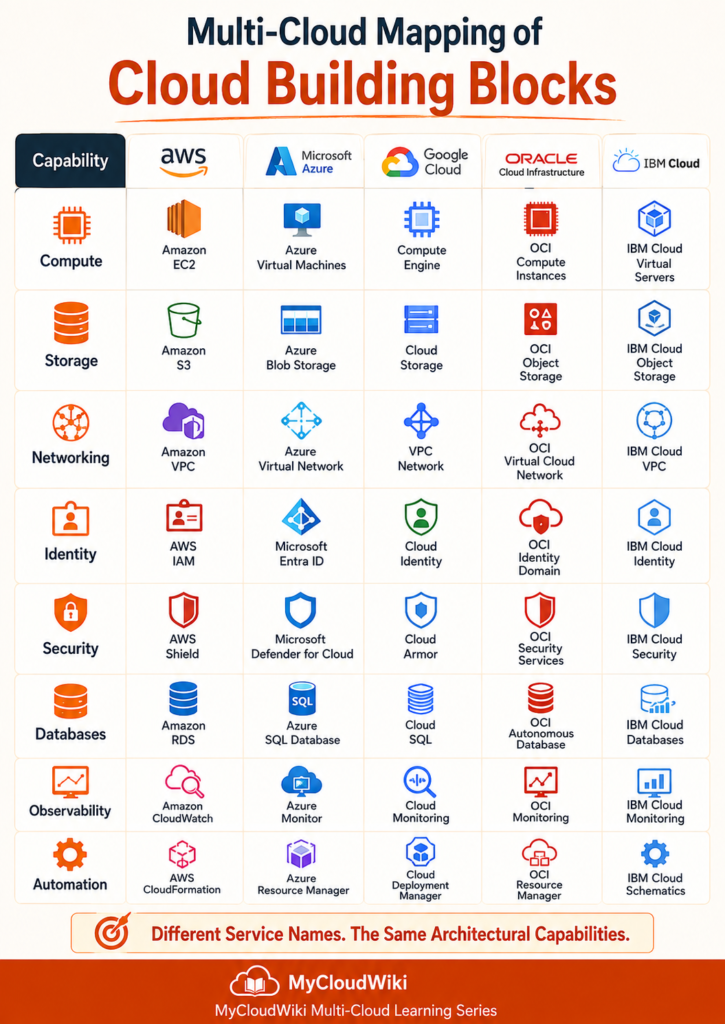
Cloud Building Blocks Across Major Cloud Providers
Although each cloud provider uses different terminology, the architectural capabilities remain remarkably consistent.
The table below maps each building block to its primary service across the five major public cloud providers.
What This Comparison Teaches
The names change.
The architectural responsibilities do not.
Instead of asking:
“Which cloud provider has the best service?”
Enterprise architects usually ask:
- Which capability do we need?
- Which service satisfies that capability?
- Does it meet our governance requirements?
- Does it integrate with the rest of our platform?
- Is it the best operational choice for this workload?
This capability-first mindset scales across every cloud provider.
It also reduces the learning curve when organizations adopt hybrid or multi-cloud strategies.
Why Capability-First Thinking Matters
Engineers often begin by learning product names.
Architects begin by understanding capabilities.
That small change in thinking has a significant impact on enterprise design.
Engineers typically ask
- Which service should I deploy?
- How do I configure it?
- Which features does it provide?
Architects typically ask
- Which capability does the business need?
- What design pattern fits this workload?
- What are the operational implications?
- How portable is this solution?
- How does this fit into the enterprise platform?
Neither perspective is more important.
They simply answer different questions.
Understanding the building blocks provides the common language that allows both engineers and architects to collaborate effectively.
Key Insight
Cloud providers compete by offering different implementations of the same architectural capabilities.
Once you understand the building blocks, learning a new cloud platform becomes significantly easier because you already understand what the platform must provide.
The remaining task is simply learning how that provider delivers each capability.
In the next section, we’ll shift from provider comparisons to the Engineer & Architect Perspective, exploring how different roles use these building blocks when designing, deploying, and operating enterprise cloud platforms.
Engineer & Architect Perspective
Cloud building blocks are used by everyone working with cloud platforms.
The difference lies in how they use them.
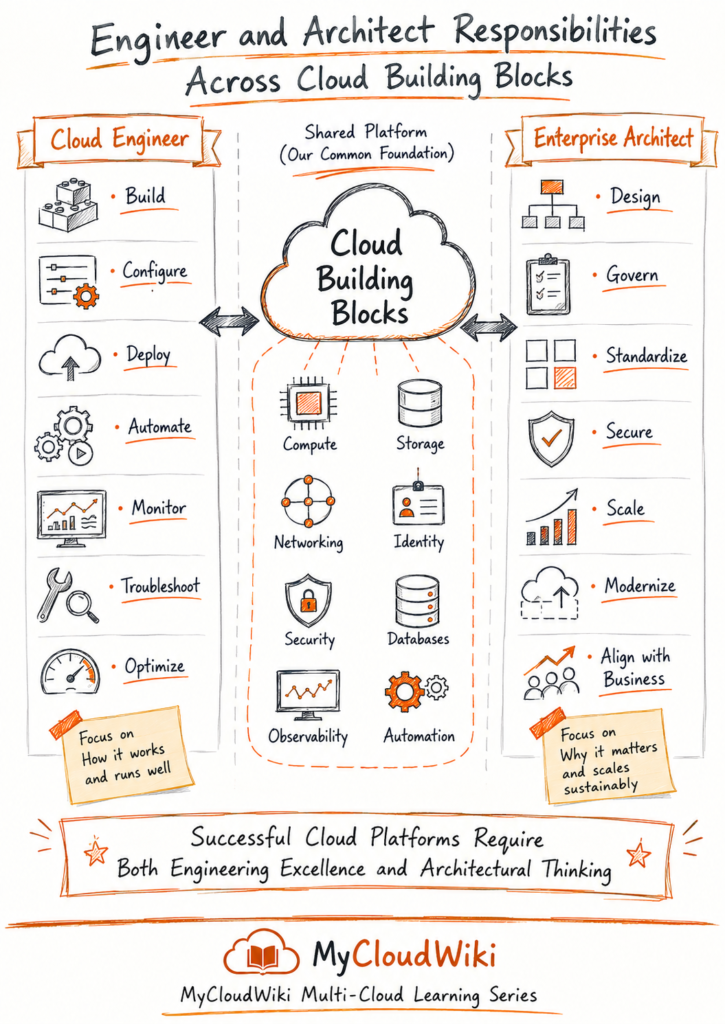
Cloud engineers focus on implementing and operating individual building blocks.
Cloud architects focus on combining those building blocks into secure, scalable, and business-aligned enterprise platforms.
Both roles are essential.
One delivers the solution.
The other designs the solution.
Cloud Engineer Perspective
Cloud engineers work directly with cloud services and infrastructure.
Their daily responsibilities focus on implementation, operations, automation, and reliability.
Typical responsibilities include:
- Provision compute resources.
- Configure storage.
- Build virtual networks.
- Deploy applications.
- Configure IAM roles and permissions.
- Monitor workloads.
- Troubleshoot production issues.
- Automate infrastructure deployments.
- Apply security controls.
- Optimize platform performance.
Cloud engineers ask questions such as:
- Which service should I deploy?
- How should I configure it?
- How do I automate this deployment?
- Why is this workload failing?
- How do I improve reliability?
Their success is measured by stable, reliable, and repeatable platform operations.
Enterprise Architect Perspective
Enterprise architects rarely think about individual services first.
Instead, they focus on capabilities, business outcomes, governance, and long-term platform evolution.
Typical responsibilities include:
- Select architectural patterns.
- Define cloud standards.
- Design multi-cloud platforms.
- Balance cost, security, and resilience.
- Establish governance.
- Review enterprise risks.
- Create reusable landing zones.
- Align technology with business strategy.
- Plan future platform capabilities.
Enterprise architects ask questions such as:
- Which capabilities does the business require?
- Should this workload run in one cloud or multiple clouds?
- How should security be applied across the platform?
- Which operational model supports long-term growth?
- How can this design remain maintainable for the next five years?
Their success is measured by sustainable, scalable, and well-governed enterprise platforms.
Working Together
Enterprise cloud platforms are successful only when engineers and architects work together.
Architects provide the design.
Engineers transform that design into a reliable operational platform.
The relationship is continuous rather than sequential.
Examples include:
- Architects define networking standards.
- Engineers implement virtual networks.
- Architects establish identity governance.
- Engineers configure identities and access policies.
- Architects design automation strategy.
- Engineers build Infrastructure as Code pipelines.
- Architects define security controls.
- Engineers deploy and maintain those controls.
The strongest cloud organizations encourage collaboration rather than separating architecture from implementation.
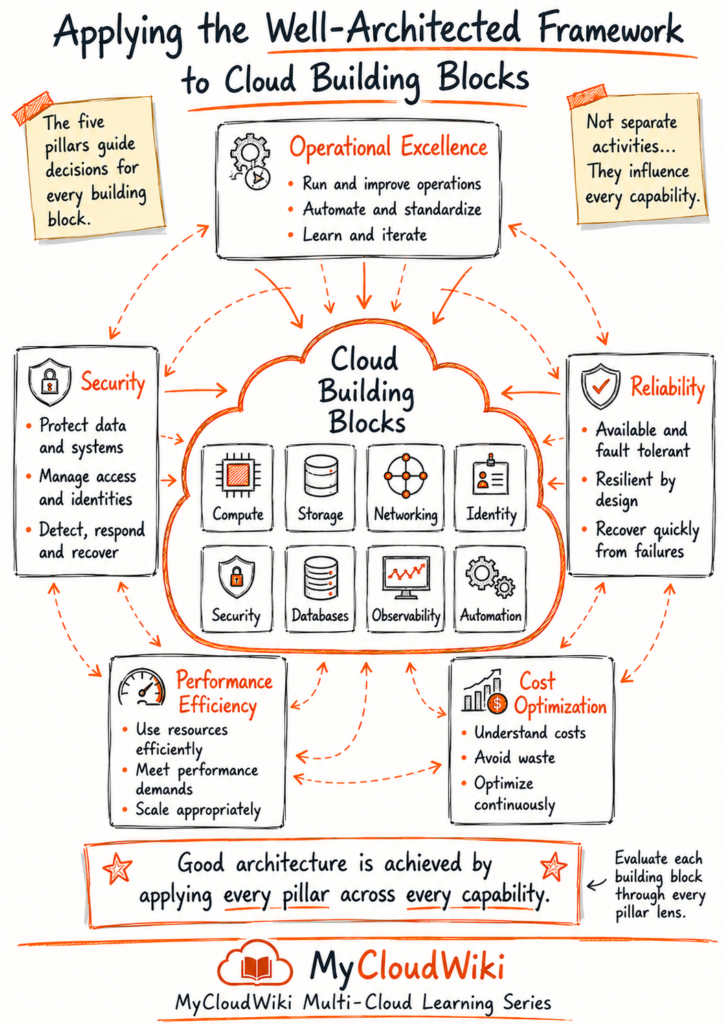
Well-Architected Perspective
Cloud building blocks provide the technical capabilities of a platform.
The Well-Architected Framework provides the principles for using those capabilities effectively.
Rather than asking what a building block does, the Well-Architected Framework asks:
- Is it secure?
- Is it reliable?
- Is it efficient?
- Is it operationally excellent?
- Is it cost optimized?
Together, these questions guide architects toward building platforms that remain reliable and sustainable as they grow.
No individual building block satisfies a Well-Architected pillar on its own.
The pillars emerge from how the building blocks are combined and operated.
AI & Agentic AI Perspective
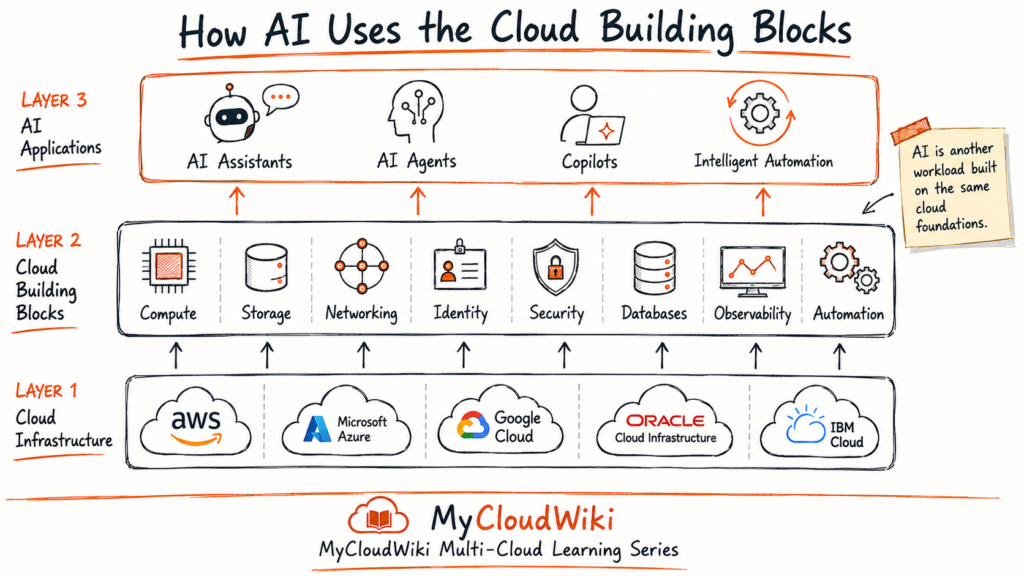
Artificial Intelligence is changing how cloud platforms are designed, deployed, and operated.
Instead of replacing the cloud building blocks, AI works through them.
Modern AI systems depend on every foundational capability introduced in this lesson.
AI Uses Every Building Block
AI applications require:
- Compute for model training and inference.
- Storage for datasets and model artifacts.
- Networking for secure communication.
- Identity for user and agent authentication.
- Security to protect prompts, models, and sensitive information.
- Databases to store structured and vector data.
- Observability to monitor AI behavior and performance.
- Automation to deploy and manage AI workloads consistently.
Agentic AI extends this model by allowing software agents to coordinate tasks, invoke tools, and automate business workflows while still relying on the same underlying cloud capabilities.
Cloud building blocks remain the foundation of AI-native platforms.
AI simply adds a new layer of intelligent capabilities above them.
Architect’s Notebook
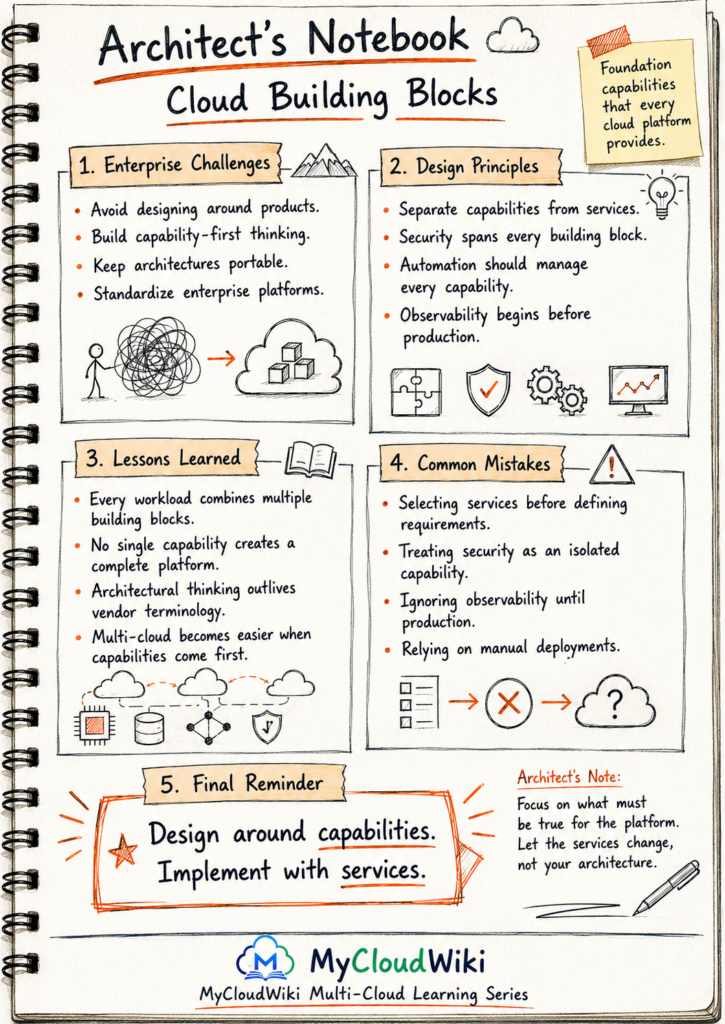
Every cloud platform offers hundreds of services.
Enterprise architects rarely begin with those services.
They begin with capabilities.
Understanding the eight cloud building blocks provides a mental model that remains useful regardless of cloud provider, new product launches, or changing technology trends.
The services will evolve.
The capabilities remain.
MyRetail Enterprise Transformation Progress
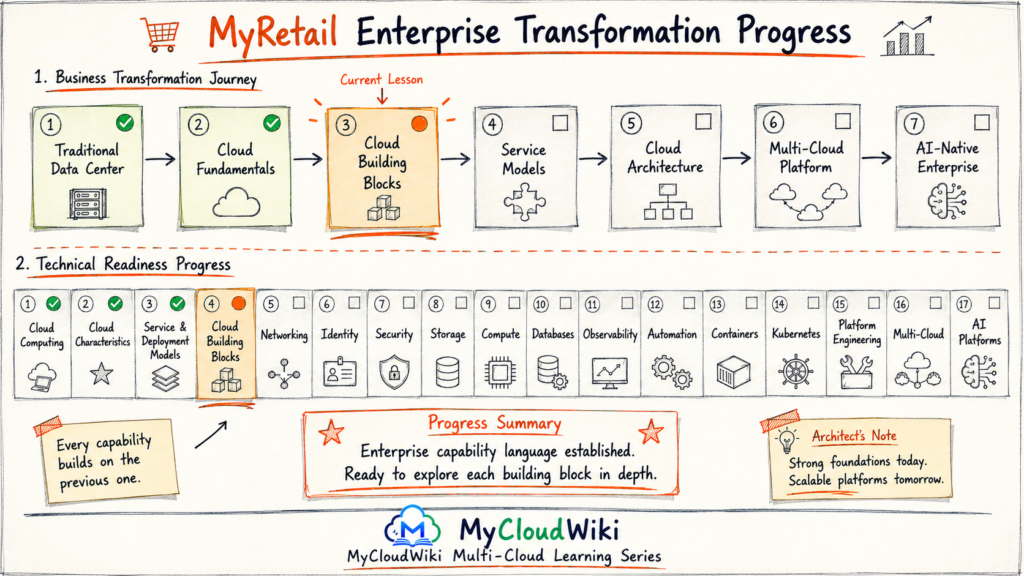
The MyRetail architecture team now shares a common capability language.
Instead of discussing individual cloud products, teams can identify the architectural capability they need before selecting a provider-specific service.
This improves collaboration across engineering, architecture, security, and operations while preparing the organization for future multi-cloud expansion.
Key Takeaways
- Every cloud platform is built from the same eight foundational capabilities.
- Compute, storage, networking, identity, security, databases, observability, and automation work together to deliver enterprise applications.
- Cloud providers use different service names, but the architectural capabilities remain consistent.
- Architects design around capabilities first and choose services second.
- Security and automation influence every building block rather than existing independently.
- Understanding these building blocks makes learning new cloud platforms significantly easier.
- These foundational capabilities provide the platform on which modern AI and Agentic AI solutions are built.
Question 1
💡 Show Answer
Question 2
💡 Show Answer
Question 3
💡 Show Answer
Question 4
💡 Show Answer
Question 5
💡 Show Answer
Question 6
💡 Show Answer
Question 7
💡 Show Answer
Continue the Multi-Cloud Learning Journey
Every cloud capability must eventually become a real cloud resource.
Resource Provisioning Across Multi-Cloud
Now that you understand the building blocks of cloud architecture, the next step is learning how those building blocks become real cloud resources. You’ll discover how cloud platforms create infrastructure through portals, command-line tools, APIs, SDKs, Infrastructure as Code, automation, and AI-powered provisioning.
🎯 What You’ll Learn
- What resource provisioning means
- Manual vs automated provisioning
- Cloud Console, CLI and SDKs
- APIs behind every cloud operation
- Infrastructure as Code fundamentals
- AI-assisted and Agentic AI provisioning
🛍️ MyRetail Story Progress
MyRetail’s architecture team now speaks a common capability language. The next milestone is learning how those capabilities are provisioned consistently across multiple cloud providers using modern engineering practices and automation.

