
Introduction: Where Cloud Applications Run
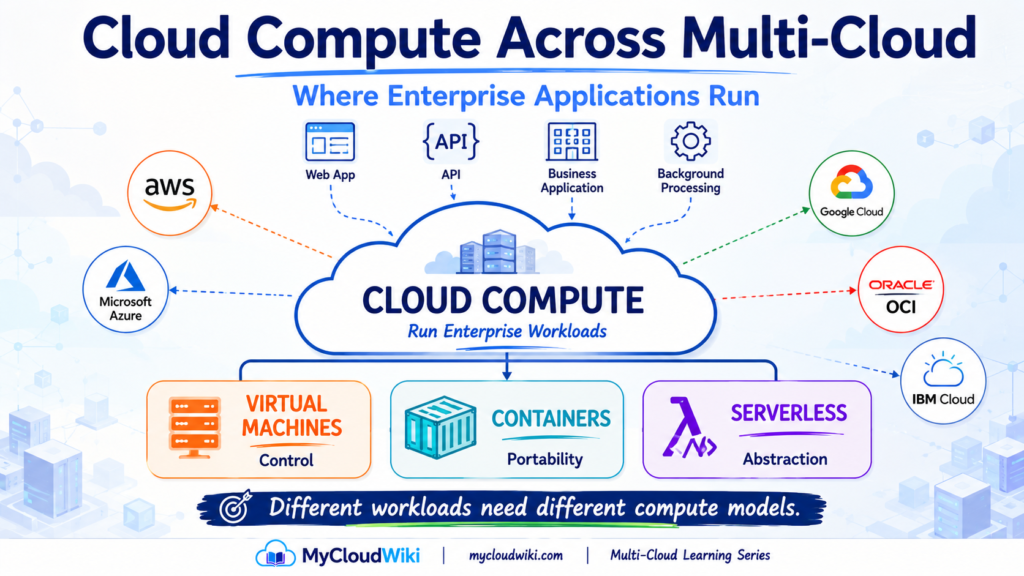
A cloud application needs more than networking, identity, and security. At some point, its application code must execute somewhere.
That execution environment is provided by cloud compute.
A simple architecture looks like this:
User → Application → Compute → Data
Compute provides the processing resources that run application logic, APIs, background jobs, business services, and many other workloads.
This builds directly on Cloud Building Blocks, where compute was introduced as one of the foundational capabilities available across every major cloud platform. Now we can examine that building block from an architecture perspective.
From Provisioning Resources to Running Workloads
In Resource Provisioning Across Multi-Cloud, you learned how cloud resources can be created through consoles, CLIs, APIs, Infrastructure as Code, automation, and increasingly AI-assisted workflows.
Provisioning answers:
How do we create the resource?
Compute introduces a different question:
What type of resource should run the workload?
Enterprises have several ways to consume compute capacity. At this stage, three models are especially important:
Virtual Machines
→ Run applications within a virtualized operating-system environment.
Containers
→ Package applications and their dependencies into portable runtime units.
Serverless
→ Run code or application components while the provider abstracts more of the underlying infrastructure.
Managed application platforms can provide another level of abstraction between these models, but the important concept is that the application does not always need the same type of execution environment.
MyRetail Business Challenge
MyRetail has now established several important cloud foundations.
It can provision resources, control access through Identity and Access Management Across Multi-Cloud, connect workloads through Cloud Networking Across Multi-Cloud, and apply the protection principles introduced in Cloud Security Fundamentals Across Multi-Cloud.
But MyRetail still needs somewhere to run its applications.
This is the point where MyRetail moves from building its cloud foundation to running business workloads on that foundation.
Understanding Cloud Compute
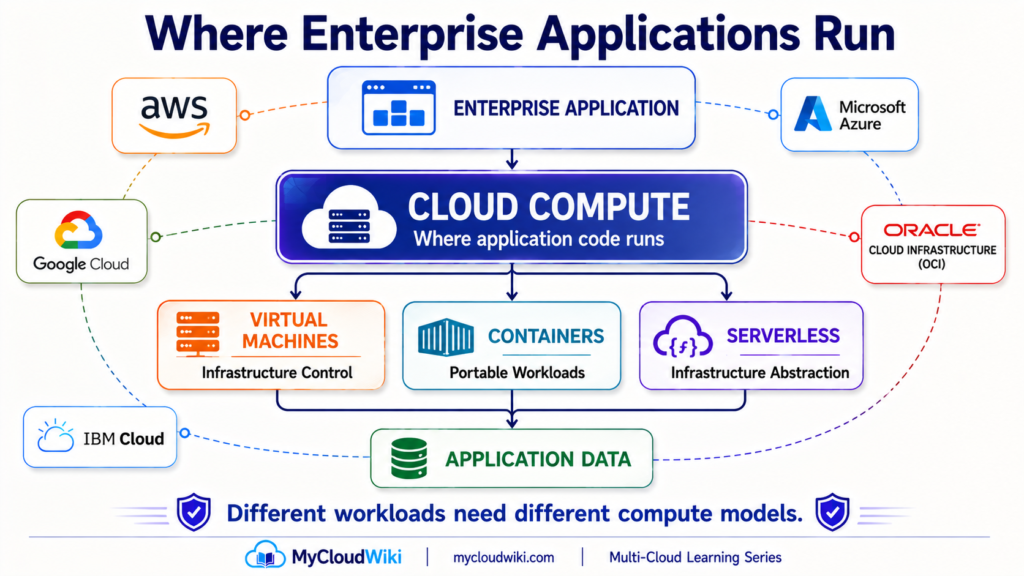
At its simplest, compute provides the processing environment required to execute a workload.
But cloud compute should not be thought of only as renting a remote server.
Modern cloud platforms provide compute at several levels of abstraction, allowing architects to decide how much of the underlying environment they need to control and how much they want the cloud platform to manage.
What Compute Provides
Four concepts are enough to establish the foundation.
CPU — Processing
The processor executes the instructions required by the workload.
Applications that perform more computational work generally require more processing capacity.
Memory — Working Space
Memory holds information that applications need while they are executing.
Different workloads can have very different memory requirements.
Runtime — Execution Environment
The runtime provides the environment required for application code to execute.
Depending on the compute model, the enterprise may manage much of this environment or rely more heavily on the cloud provider.
Capacity — Available Resources
Capacity represents the compute resources available to handle workload demand.
As demand changes, enterprises may need to increase or decrease that capacity.
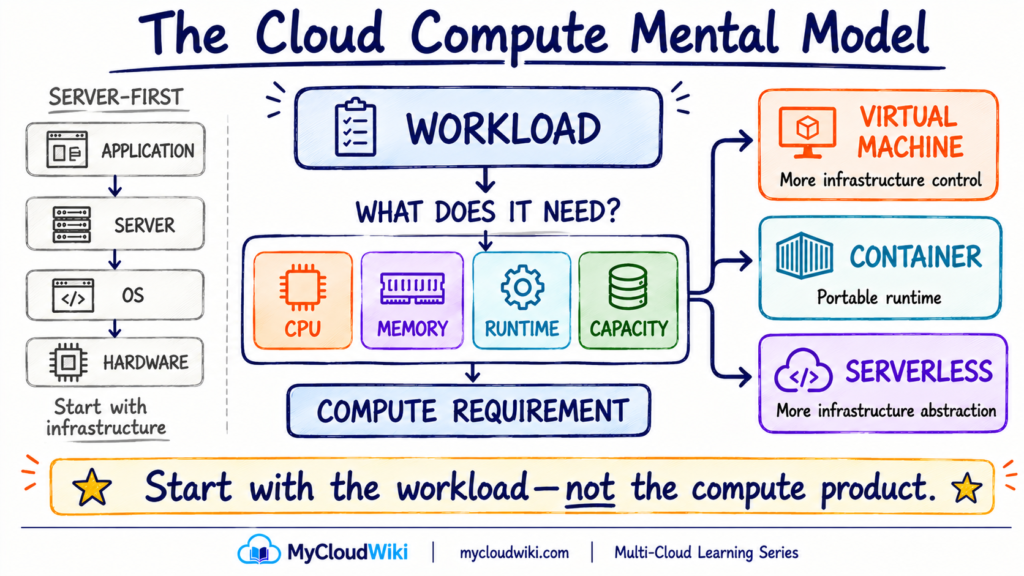
These four concepts give us a simple mental model:
Workload → CPU + Memory + Runtime + Capacity
From Servers to Compute Capabilities
Traditional infrastructure often encouraged teams to think first about the server:
Application
↓
Server
↓
Operating System
↓
Hardware
Cloud architecture allows a different starting point.
Begin with:
What does the workload require?
Then select the appropriate compute capability.
The result might be:
WORKLOAD
↓
COMPUTE REQUIREMENT
↓
Virtual Machine | Container | Serverless
This capability-first approach follows the same principle introduced in Cloud Building Blocks: understand the architectural capability before memorizing provider-specific service names.
The key shift is therefore not from physical servers to virtual machines.
It is from:
“Which server should we deploy?”
to:
“What does this workload need, and which compute model provides it appropriately?”
Choosing the Right Compute Model
Once a workload’s compute requirements are understood, the next decision is how that compute should be delivered.
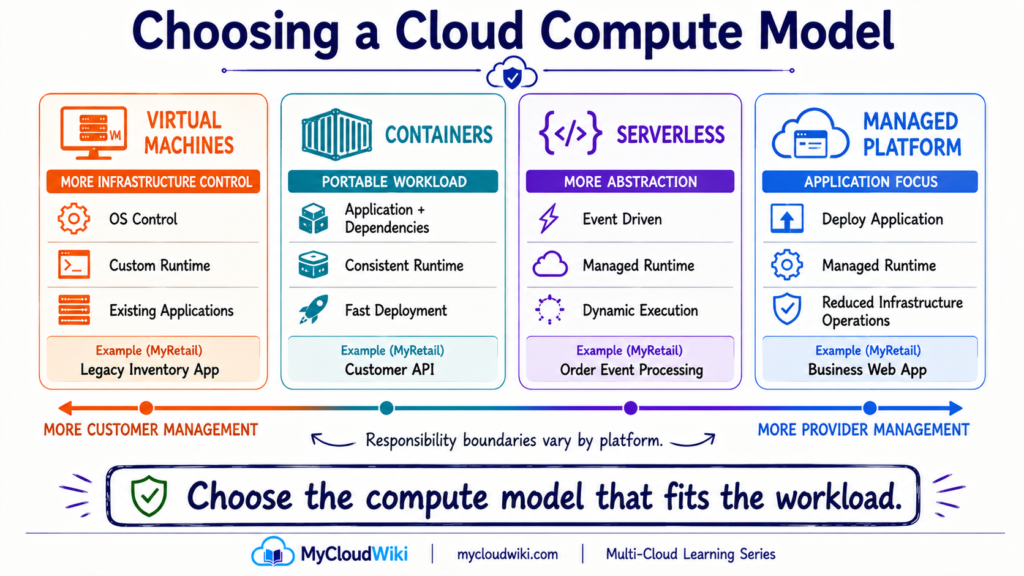
Modern cloud platforms provide several execution models, but four are especially useful for building an enterprise mental model:
Virtual Machines → Containers → Serverless → Managed Application Platforms
These are not maturity levels, and one is not automatically better than another. They provide different combinations of control, portability, operational responsibility, and infrastructure abstraction.
The architecture principle is simple:
Choose the compute model that fits the workload—not the newest technology.
Virtual Machines
A virtual machine (VM) provides a virtualized computing environment with its own operating system.
A simplified stack looks like:
Physical Infrastructure
↓
Hypervisor
↓
Virtual Machine
↓
Operating System
↓
Application
The cloud provider operates the physical infrastructure and virtualization platform, while the customer retains significant control over the virtual machine.
That control makes VMs useful when workloads require:
- Specific operating systems.
- OS-level configuration.
- Existing enterprise software.
- Custom runtime dependencies.
- Greater infrastructure control.
VMs are especially important during enterprise cloud adoption because many existing applications can move to cloud infrastructure without first being redesigned as cloud-native applications.
For example, MyRetail may have an existing inventory application that depends on a particular operating system and application runtime.
Running that application on a VM could allow MyRetail to modernize its infrastructure while preserving the application’s current architecture.
However, greater control also creates greater operational responsibility.
Depending on the service and operating model, teams may still need to manage areas such as operating-system configuration, patching, runtime software, monitoring, capacity, and application availability.
Containers
Containers change the unit of deployment.
Instead of treating an entire operating-system environment as the application boundary, teams package the application and the dependencies it needs to run into a container image.
A simplified model is:
Compute Infrastructure
↓
Container Runtime / Platform
↓
Container
↓
Application + Dependencies
This provides several useful characteristics:
- Consistent application packaging.
- Faster deployment and replacement.
- Better workload portability.
- Efficient use of compute resources.
- Clearer separation between application and underlying infrastructure.
For MyRetail, a modern customer-facing API could be packaged as a container and deployed consistently across development, testing, and production environments.
Containers can also support portability across cloud environments because the application package is less tightly coupled to a particular virtual machine configuration.
But portability should not be confused with complete cloud independence.
Networking, identity, storage, security, observability, orchestration, and managed services surrounding the container can still differ significantly between providers.
A portable container does not automatically create a portable architecture.
Kubernetes and container orchestration will be covered in their dedicated lessons. Here, the important concept is simply that a container is another way of packaging and running a workload.
Serverless
Serverless moves more infrastructure responsibility behind the cloud service.
Instead of beginning with a server or long-running compute environment, teams can deploy code or application components into a provider-managed execution environment.
A simplified model is:
Event / Request
↓
Application Code
↓
Managed Runtime
↓
Execution
The cloud platform handles more of the underlying infrastructure provisioning and capacity management.
Serverless is commonly useful for workloads such as:
- Event-driven processing.
- APIs and application functions.
- Scheduled tasks.
- Automation.
- Data-processing events.
- Workloads with variable or intermittent execution patterns.
Consider MyRetail’s order-processing workflow.
When a customer places an order, an event could trigger application logic that performs a specific processing task. The underlying execution capacity can be provided when required rather than MyRetail maintaining dedicated compute capacity solely for that task.
The most important misconception to avoid is the name itself:
Serverless does not mean there are no servers. It means the underlying server infrastructure is more abstracted from the customer.
This abstraction reduces infrastructure management, but it also introduces platform constraints.
Runtime options, execution duration, resource limits, scaling behavior, integration models, and other characteristics depend on the service being used.
Serverless therefore represents a trade-off:
Less Infrastructure Management
↔
More Platform Abstraction
Managed Application Platforms
There is also a useful middle ground where teams deploy an application while the platform manages much of the underlying infrastructure and runtime environment.
The developer experience may look more like:
APPLICATION
↓
MANAGED APPLICATION PLATFORM
↓
COMPUTE INFRASTRUCTURE
rather than:
APPLICATION
↓
OPERATING SYSTEM
↓
VIRTUAL MACHINE
↓
INFRASTRUCTURE
These platforms can be valuable when teams want to focus primarily on application delivery without managing every infrastructure component themselves.
The exact responsibility boundary varies by service, which connects back to the shared-responsibility principles covered in Cloud Security Fundamentals Across Multi-Cloud.
The important point is not to create another category to memorize.
It is to recognize that:
Cloud compute exists across a spectrum of infrastructure control and provider abstraction.
The compute model determines how the workload runs.
The next question is different:
How much compute capacity should the workload have when demand changes?
That brings us to scaling.
Scaling Cloud Compute
Business demand rarely stays constant.
MyRetail’s customer-facing applications might experience normal traffic during most of the day, much higher traffic during a promotion, and extreme demand during major seasonal events.
If compute capacity remains fixed, two problems can occur.
Too little capacity
→ degraded performance or unavailable services.
Too much capacity
→ unnecessary infrastructure and cost.
Cloud architecture therefore needs a way to align:
Workload Demand ↔ Compute Capacity
Three concepts provide the foundation.
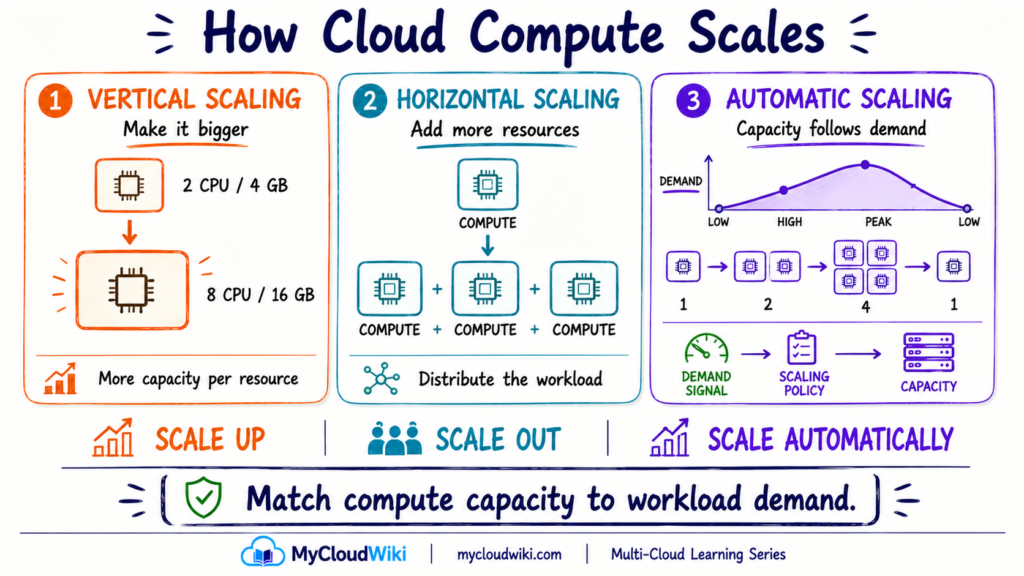
Vertical Scaling
Vertical scaling changes the capacity of an individual compute resource.
Think:
SMALL VM
↓
MORE CPU + MORE MEMORY
↓
LARGER VM
This is commonly described as scaling up.
The mental model is:
Make the resource bigger.
Vertical scaling can be useful when an application benefits from additional resources within the same compute environment.
However, individual resources still have practical limits, and making one machine larger does not by itself make an application resilient.
Horizontal Scaling
Horizontal scaling increases capacity by adding more compute resources.
Instead of:
1 SMALL RESOURCE → 1 LARGE RESOURCE
the architecture becomes:
COMPUTE 1
COMPUTE 2
COMPUTE 3
This is commonly called scaling out.
The mental model is:
Add more resources.
Horizontal scaling is particularly useful for applications designed to distribute work across multiple instances or execution environments.
It also creates an important connection to Cloud Networking Across Multi-Cloud because incoming requests often need to be distributed across those compute resources.
Automatic Scaling
Cloud platforms can also adjust compute capacity dynamically.
A simplified control loop is:
WORKLOAD DEMAND
↓
METRIC / SIGNAL
↓
SCALING POLICY
↓
ADD OR REMOVE CAPACITY
For example, MyRetail could define a policy that adds application capacity as customer demand increases and removes unnecessary capacity after demand falls.
This helps align infrastructure with actual workload behavior.
Automatic scaling is not limited to virtual machines. Different forms of dynamic scaling can appear across VM, container, managed-platform, and serverless environments.
The implementation changes.
The architecture objective remains:
Provide enough capacity for the workload without permanently maintaining unnecessary capacity.
Scaling Is Not the Same as Resilience
This distinction is important.
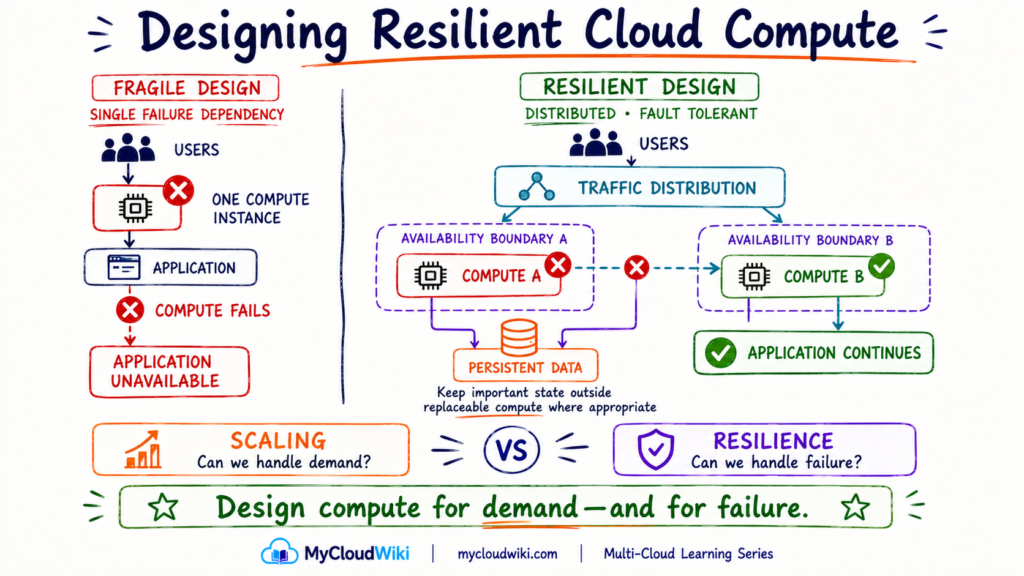
A workload can have enough compute capacity and still be vulnerable to failure.
For example:
One very large compute instance
may provide plenty of processing power.
But if that instance fails:
Application → Unavailable
Similarly, automatic scaling helps capacity respond to demand, but it does not automatically guarantee that workloads are distributed across appropriate failure boundaries.
So compute architecture needs to answer two separate questions:
Scaling
Can the workload obtain enough capacity when demand changes?
Resilience
Can the workload continue operating when part of the environment fails?
Designing Compute for Availability and Resilience
Scaling helps a workload obtain the capacity it needs. Resilience answers a different question: what happens when part of that compute environment fails?
Cloud compute resources should generally be treated as replaceable infrastructure rather than assumed to run forever.
An individual compute resource can fail. A platform component can become unavailable. A larger infrastructure failure can affect multiple resources at once.
Enterprise compute architecture therefore considers both:
Capacity for Demand
and
Capacity for Failure
Compute Can Fail
Consider a simple MyRetail application running on one compute instance:
Users → Application Instance
Even if that instance has enough CPU and memory for every customer request, it still represents a dependency on one execution environment.
If it becomes unavailable:
Instance Failure → Application Disruption
Making the instance larger does not remove that dependency.
A more resilient architecture distributes the workload:
Users
↓
Traffic Distribution
↓
Compute A + Compute B
When appropriate, those compute resources can be placed across separate availability or failure boundaries.
If one resource becomes unavailable, healthy resources can continue processing requests.
This builds naturally on Cloud Networking Across Multi-Cloud, because networking capabilities such as traffic distribution and load balancing help direct requests toward available application instances.
Failure Boundaries Matter
Cloud platforms organize infrastructure into different physical and logical boundaries.
At a foundational level, think about:
Compute Resource
→ individual execution environment.
Availability Zone / Failure Domain
→ separate infrastructure boundary within a broader location.
Region
→ larger geographic cloud boundary.
The exact terminology and implementation vary between providers, but the architecture principle remains consistent:
Avoid placing every critical workload component inside the same failure boundary.
Not every application requires multi-region architecture. The amount of redundancy should reflect the workload’s availability requirement and business importance.
Stateless and Stateful Workloads
Another useful distinction is whether the compute resource needs to preserve application state locally.
A stateless workload does not depend on one particular compute instance retaining important application state between requests.
That can make replacement and horizontal scaling easier:
Request → Any Healthy Compute Instance
If one instance disappears, another can process future requests.
A stateful workload maintains information that must persist or remain coordinated.
That requires additional consideration for where the state lives and how it remains available when compute changes or fails.
We will go deeper into persistent data in Cloud Storage Across Multi-Cloud and later database lessons.
For now, remember:
Compute should be replaceable wherever the application architecture allows it.
Making the Compute Placement Decision
Virtual machines, containers, serverless, and managed application platforms provide different ways to run workloads.
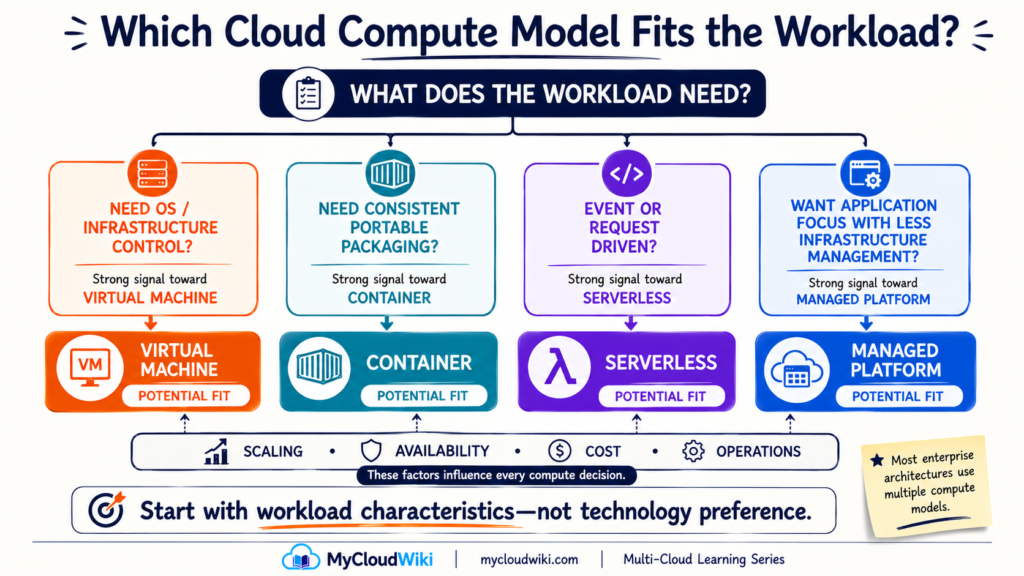
The architecture decision should therefore begin with the workload requirements, not with a preferred technology.
Six questions provide a practical starting point.
How Much Control Does the Workload Need?
Some workloads require direct operating-system configuration, specialized software, or control over the runtime environment.
That can point toward compute models offering greater infrastructure control.
Other applications need little awareness of the underlying operating system and may benefit from greater platform abstraction.
How Portable Should the Runtime Be?
Applications packaged into containers can create a more consistent runtime across environments.
That can help when teams want standardized application packaging.
But as discussed earlier:
Application portability and architecture portability are not the same thing.
A containerized application may still depend on provider-specific identity, networking, storage, databases, security, or other managed services.
What Is the Execution Pattern?
Ask whether the workload is:
Continuously Running
or
Event / Request Driven
A continuously running enterprise application may have different compute requirements from a small process that executes only when an event occurs.
Execution pattern can therefore influence whether persistent compute capacity or more dynamically invoked compute is appropriate.
How Does Demand Change?
A stable internal application may experience relatively predictable demand.
An online retail application may experience:
Normal Traffic → Promotion → Peak Event → Normal Traffic
The compute model should support the scaling behavior the business requires.
How Available Must the Workload Be?
Not every workload has the same business impact.
A temporary development workload and MyRetail’s production checkout platform should not automatically receive identical availability architectures.
Ask:
What happens to the business if this workload becomes unavailable?
The answer helps determine the required redundancy and failure-domain design.
What Are the Cost and Operational Trade-Offs?
Compute cost is not only the price of a resource.
Architecture decisions can also affect:
- Operational effort.
- Capacity utilization.
- Scaling efficiency.
- Platform management.
- Licensing.
- Engineering complexity.
A lower-priced compute option is not automatically the lower-cost architecture if it creates substantially more operational work.
These questions create a reusable decision sequence:
Workload Requirements
↓
Control + Portability + Execution + Scaling + Availability + Cost
↓
Compute Model
Compute Across Multi-Cloud
Once the compute pattern is understood, provider terminology becomes easier to navigate.
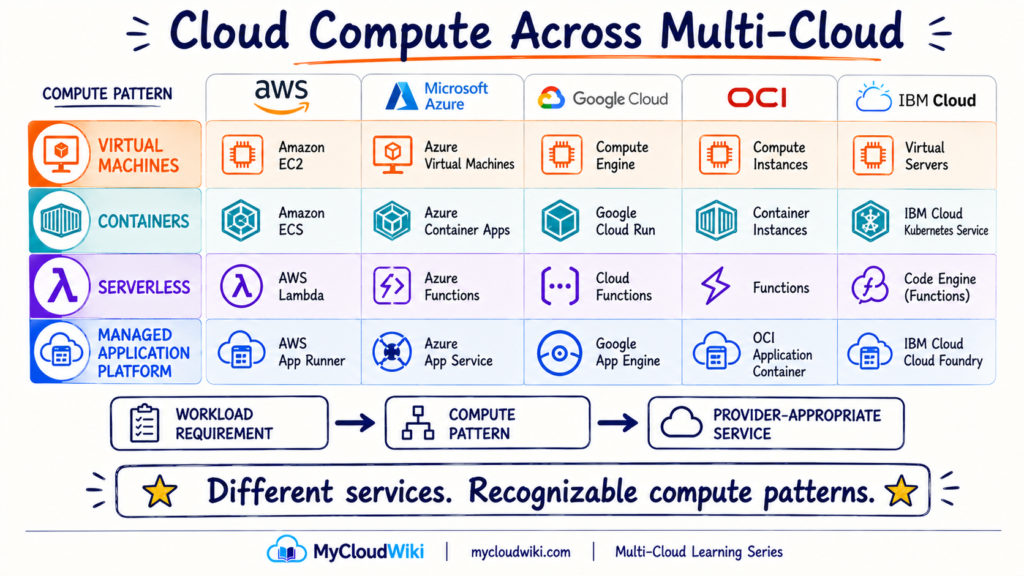
AWS, Microsoft Azure, Google Cloud, Oracle Cloud Infrastructure (OCI), and IBM Cloud all provide ways to run virtual machines, containers, serverless workloads, and applications through managed compute platforms.
The important skill is translating:
“Which provider product should I use?”
into:
“Which compute capability does this workload require?”
*Provider portfolios and service availability evolve. Exact services and capabilities should be validated against current provider documentation before publication.
The table is not intended to imply that every service is technically equivalent.
For example, container services may provide very different levels of abstraction—from managed container execution to full Kubernetes orchestration.
The capability-first mental model is what matters:
Need infrastructure-level compute?
→ Find the provider’s VM capability.
Need container execution?
→ Evaluate its container platform.
Need event-driven execution?
→ Evaluate its serverless options.
Need application-focused hosting?
→ Evaluate its managed application platforms.
Common Architecture, Different Implementations
Multi-cloud architecture does not require MyRetail to use the same compute model everywhere.
For example, MyRetail could eventually run:
Existing enterprise application
→ Virtual machine
Customer-facing API
→ Container
Order event processor
→ Serverless
Business web application
→ Managed application platform
Different cloud environments could implement those patterns through different native services.
The objective is therefore not:
Make every cloud identical.
It is:
Use consistent workload-selection principles while allowing provider-appropriate implementation.
This follows the same capability-first approach used throughout Cloud Building Blocks, Identity and Access Management Across Multi-Cloud, Cloud Networking Across Multi-Cloud, and Cloud Security Fundamentals Across Multi-Cloud.
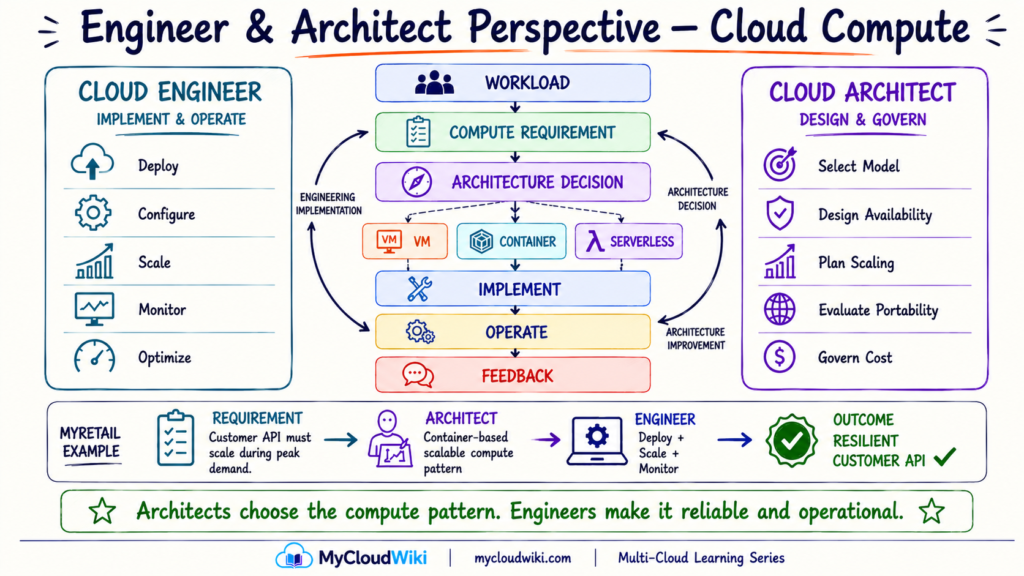
Engineer & Architect Perspective
Cloud compute decisions connect application requirements with infrastructure operations.
Cloud engineers focus on deploying, configuring, scaling, monitoring, and optimizing compute. Cloud architects determine the appropriate compute pattern, availability model, scaling strategy, and governance boundaries.
The relationship should remain continuous:
Workload Requirement → Architecture Decision → Engineering Implementation → Operational Feedback → Architecture Improvement
Well-Architected Perspective
A compute architecture should not be evaluated only by whether an application runs.
The selected compute model should also support the workload’s security, reliability, operational, performance, and cost requirements.
For MyRetail, this means choosing enough control and capacity to satisfy the business requirement without introducing unnecessary infrastructure or operational complexity.
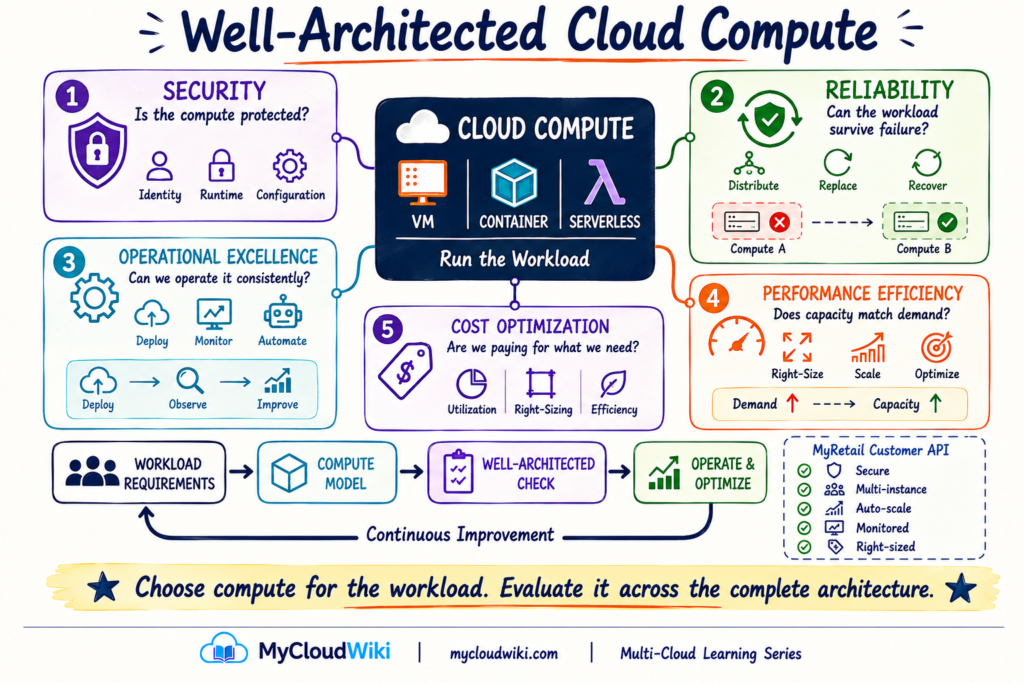
A well-architected compute decision therefore balances:
Control + Availability + Performance + Operations + Cost
rather than optimizing one factor in isolation.
AI & Agentic AI Perspective
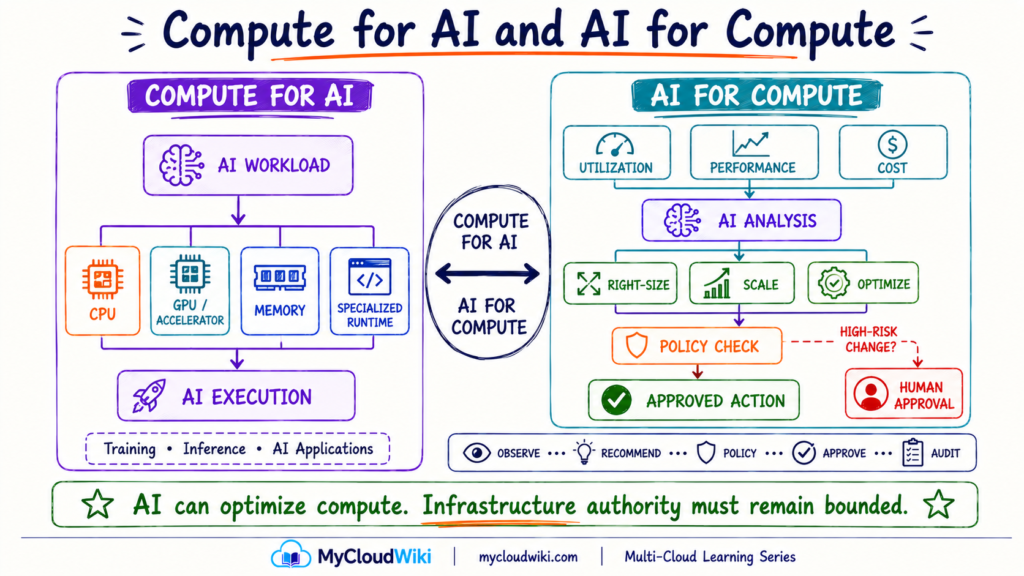
AI and cloud compute have a two-way relationship.
Some AI workloads need specialized compute resources. At the same time, AI and agents can help enterprises analyze and optimize the compute environments running other workloads.
The useful mental model is:
Compute for AI ↔ AI for Compute
Compute for AI
AI workloads can have different compute requirements from conventional business applications.
Depending on the workload, they may require combinations of:
CPU • GPU / Accelerators • Memory • Specialized Runtime
The exact infrastructure depends on whether the workload is performing activities such as model training, inference, data processing, or running AI-enabled applications.
The architecture principle remains familiar:
Start with the workload requirement before selecting the compute resource.
AI for Compute Operations
AI can also assist engineers with compute operations.
For example:
Observe
→ Analyze
→ Recommend
→ Policy Check
→ Approved Action
Potential uses include identifying underutilized compute, recommending right-sizing, analyzing scaling behavior, detecting configuration issues, or suggesting operational remediation.
Agentic AI may eventually perform some approved actions, but infrastructure-changing authority should remain controlled.
AI can optimize compute. It should not automatically receive unrestricted authority to change it.
Architect’s Notebook
Cloud compute becomes easier to reason about when architects stop beginning with instance families or provider products.
The reusable sequence is:
Understand the workload → Select the compute model → Plan capacity → Design for failure → Operate and optimize
That sequence applies even when the provider implementation changes.
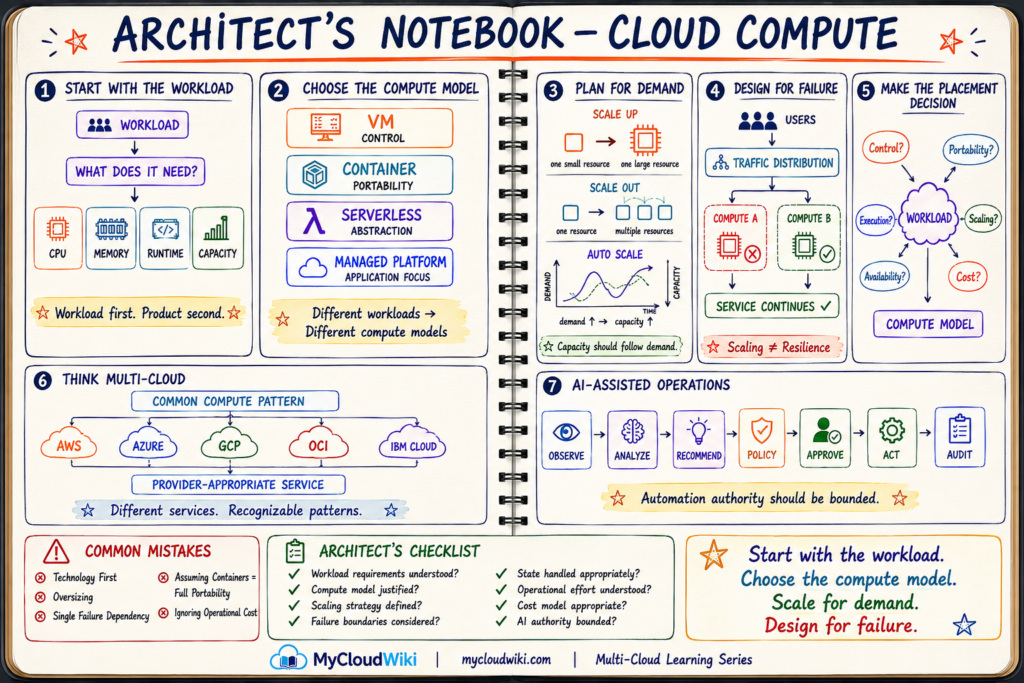
The Architect’s Notebook leaves a reusable compute decision sequence:
What does the workload need? → Which compute model fits? → How will it scale? → What happens when compute fails? → How will we operate and optimize it?
That sequence is more durable than memorizing individual compute product names.
MyRetail Business Solution & Progress
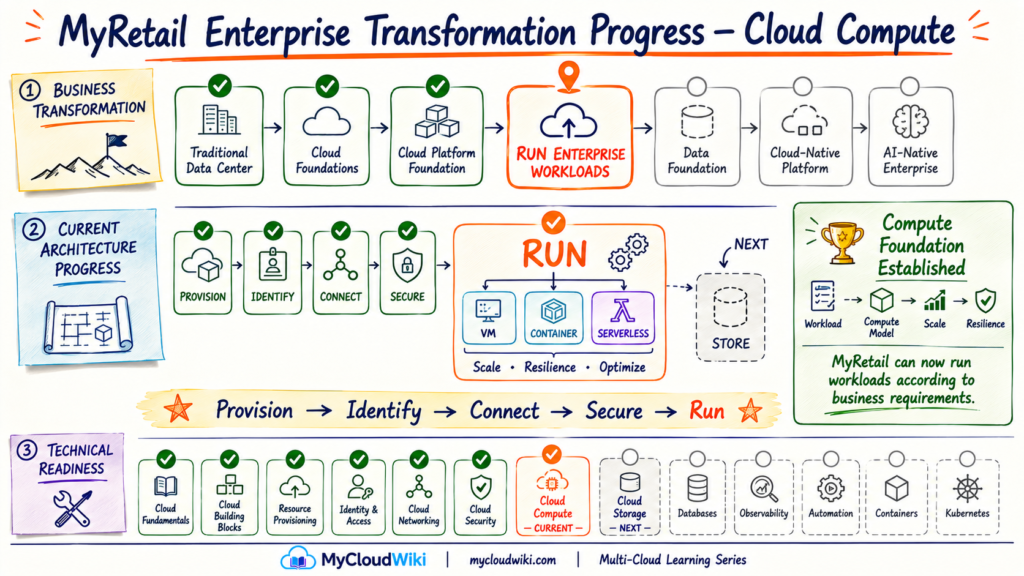
MyRetail began this lesson with the cloud foundation needed to provision, connect, control, and secure resources. The next challenge was deciding how its different applications should actually run.
The answer is not to standardize every workload on one compute technology. MyRetail can now evaluate each workload based on control, portability, execution pattern, scaling, availability, operational effort, and cost, then select an appropriate compute model.
The MyRetail journey has therefore progressed from:
Provision → Identify → Connect → Secure → Run
Compute gives MyRetail the Run capability. The transformation is not complete—the applications running on that compute now need persistent places to store their data.
Knowledge Check
The goal is to validate the compute mental model, not memorize cloud service names.
🎓 Knowledge Check
Test your cloud compute architecture understanding.
1. What is the primary purpose of cloud compute?
💡 Show Answer
2. When might a virtual machine be appropriate?
💡 Show Answer
3. What is a major architectural benefit of containers?
💡 Show Answer
4. Does serverless mean that no servers are involved?
💡 Show Answer
5. What is the difference between scaling and resilience?
💡 Show Answer
6. What should an architect consider before selecting a compute model?
💡 Show Answer
Key Takeaways
Cloud compute is easier to understand when you begin with the workload instead of the provider’s product catalog.
- Compute runs workloads by providing processing, memory, runtime, and capacity.
- Virtual machines provide greater control over the operating environment.
- Containers package applications and dependencies into consistent runtime units.
- Serverless abstracts more of the underlying infrastructure.
- Scaling aligns compute capacity with changing demand.
- Resilience prepares workloads for compute and infrastructure failures.
- Compute placement is a workload decision, balancing control, portability, execution, availability, operations, and cost.
- Across AWS, Microsoft Azure, Google Cloud, Oracle Cloud Infrastructure (OCI), and IBM Cloud, service names change while the fundamental compute patterns remain recognizable.
The architecture mental model to keep is:
Start with the workload. Choose the compute model. Scale for demand. Design for failure.
Continue Learning
Applications now have somewhere to run.
But applications also create and consume data that must survive beyond the lifetime of an individual compute resource.
That makes the next architectural question:
Where should that data live?

