
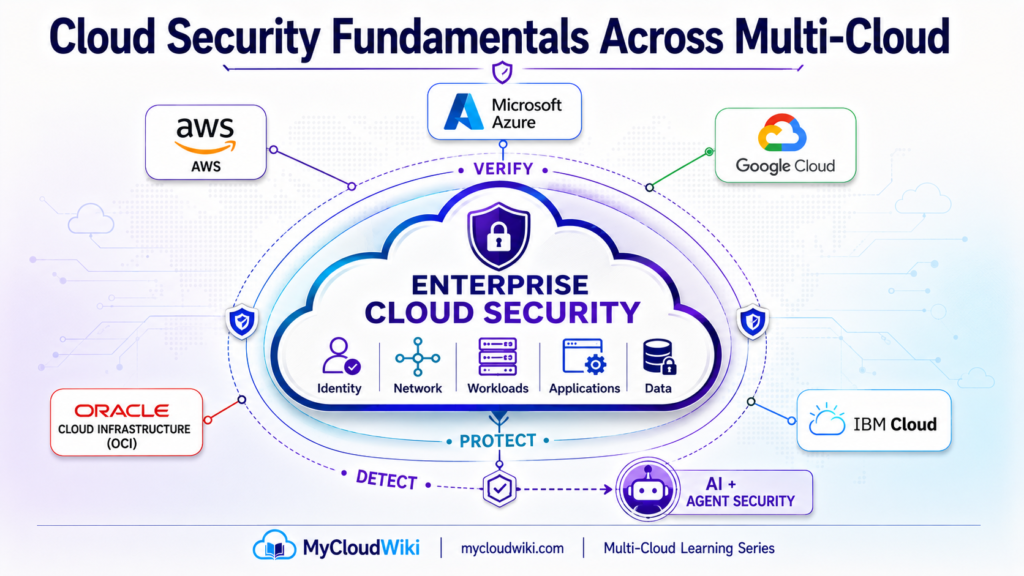
Introduction: What Does Cloud Security Protect?
In Cloud Building Blocks, we learned that security is not an isolated cloud service. It is a foundational capability that interacts with almost everything an enterprise builds in the cloud.
We then established two important parts of that foundation.
Identity and Access Management Across Multi-Cloud answered:
Who—or what—is allowed to act?
Cloud Networking Across Multi-Cloud answered:
Where can resources communicate, and how does traffic reach them?
Cloud security expands the question:
How do we protect the entire cloud environment?
It is easy to think of cloud security as firewalls, encryption, antivirus software, or security products.
That view is too narrow.
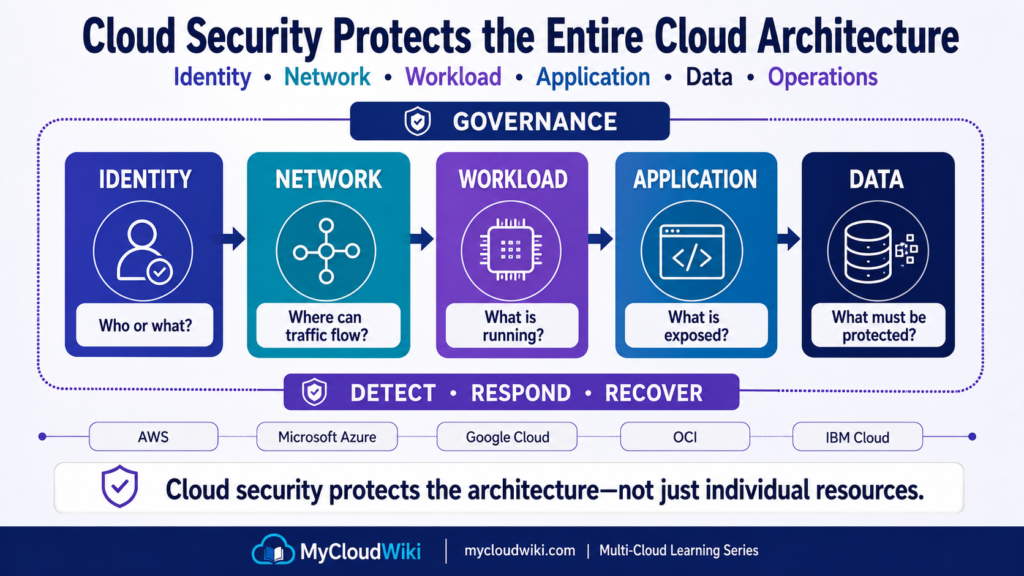
A modern cloud environment contains different layers that need protection:
Identity
People, workloads, automation, and AI agents accessing cloud resources.
Network
Communication paths between users, applications, services, data centers, and cloud environments.
Workload
Virtual machines, containers, serverless functions, and other compute resources running applications.
Application
Web applications, APIs, business services, and software exposed to users or other systems.
Data
Business information stored, processed, transmitted, backed up, or analyzed.
Operations
Monitoring, detection, investigation, response, recovery, and continuous improvement.
This gives us the first security mental model:
Identity → Network → Workload → Application → Data → Operations
Cloud security protects all of these layers together.
Security Is a System of Controls
The individual security layers are important, but the real architecture comes from how they work together.
Consider a MyRetail database.
Protecting it may involve:
Identity
Only approved identities can request access.
Network
The database is not directly exposed to unnecessary network paths.
Workload
The underlying compute or managed service is configured securely.
Application
Only approved application interactions reach the data service.
Data
Sensitive information is encrypted and access-controlled.
Operations
Suspicious behavior is monitored and investigated.
No single one of these controls represents “cloud security.”
Security emerges from multiple coordinated controls across the architecture.
This is the foundation for defense in depth, which we will build later in the lesson.
MyRetail Business Challenge
MyRetail can now provision resources through the governed approaches introduced in Resource Provisioning Across Multi-Cloud.
Its IAM foundation defines human, workload, automation, and AI agent identities. Its networking foundation creates structured communication paths between applications and services.
But MyRetail now faces another problem:
Connectivity and access do not automatically make an environment secure.
The objective is not to make every environment identical.
MyRetail needs common security principles that can be implemented appropriately across different cloud platforms.
Before selecting those controls, however, there is an even more fundamental question:
Who is responsible for securing each part of the cloud environment?
Shared Responsibility in Cloud Security
Moving to cloud does not transfer every security responsibility to the cloud provider.
At the same time, customers are no longer responsible for every physical and infrastructure layer they managed in a traditional data center.
Responsibility is shared.
Where Are We?
Start with two broad responsibilities.
Cloud Provider
Protects and operates the underlying cloud infrastructure.
Cloud Customer
Protects the resources, configurations, identities, applications, and data that remain under its control.
A useful mental model is:
The provider secures the cloud infrastructure. The customer secures what they configure, deploy, access, and store within the cloud.
The exact boundary changes depending on the service being consumed.
Security of the Cloud vs Security in the Cloud
A common way to understand shared responsibility is:
Security OF the Cloud
Generally associated with the cloud provider’s responsibility for underlying facilities and infrastructure.
This can include:
- Physical facilities.
- Physical hardware.
- Core infrastructure.
- Foundational cloud platform operations.
Security IN the Cloud
Includes the security responsibilities that remain with the customer.
Depending on the service model, these can include:
- Identities and permissions.
- Data.
- Application configuration.
- Network configuration.
- Workload configuration.
- Operating systems.
- Security policies.
The important phrase is:
Depending on the service model.
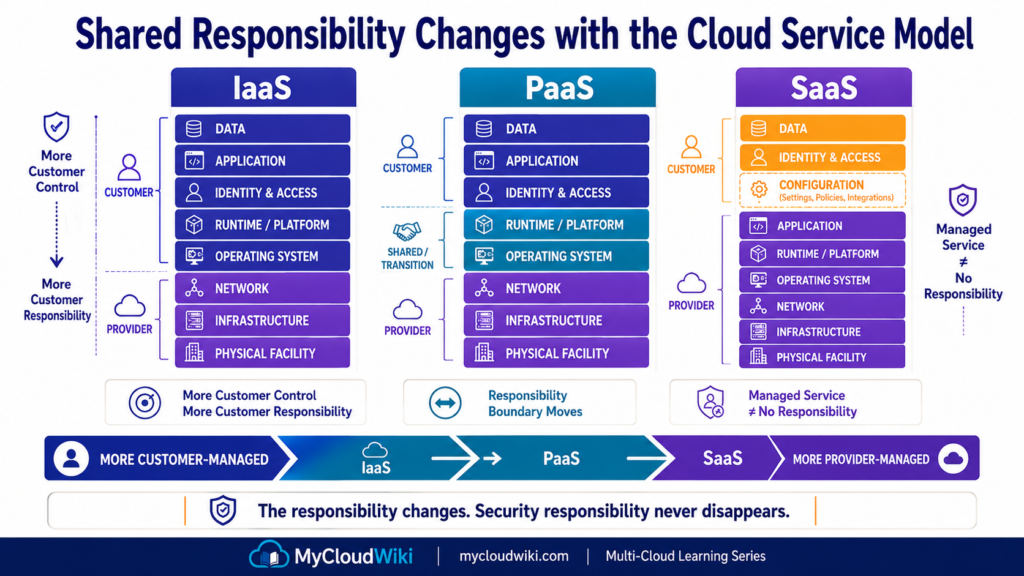
Customer responsibility is not identical across IaaS, PaaS, and SaaS.
How Service Models Change Responsibility
We introduced IaaS, PaaS, and SaaS in Cloud Service Models and Deployment Models.
Security responsibility follows the same abstraction model.
IaaS — More Customer Control, More Customer Responsibility
With Infrastructure as a Service, the provider manages the underlying cloud infrastructure.
The customer typically retains greater responsibility for areas such as:
- Operating systems.
- Workload configuration.
- Applications.
- Identities.
- Data.
- Network configuration.
The customer receives more infrastructure-level control, but that also means more security responsibility.
PaaS — More Infrastructure Is Managed
With Platform as a Service, the provider manages more of the underlying platform.
The customer can focus more heavily on:
- Application configuration.
- Identity and access.
- Data.
- Application security.
- Service configuration.
The responsibility does not disappear.
The boundary moves.
SaaS — Provider Manages More of the Technology Stack
With Software as a Service, the provider operates most of the underlying application platform.
The customer still has important responsibilities such as:
- User access.
- Identity configuration.
- Data handling.
- Tenant configuration.
- Security settings.
- Appropriate use of the service.
This leads to an important principle:
More managed does not mean no customer security responsibility.
Shared Responsibility Across Multi-Cloud
AWS, Microsoft Azure, Google Cloud, Oracle Cloud Infrastructure (OCI), and IBM Cloud each describe shared responsibility using their own terminology and service-specific guidance.
The architectural principle remains consistent:
Provider
→ protects the infrastructure and managed components for which it is responsible.
Customer
→ protects the identities, data, configurations, applications, and other components that remain under customer control.
The exact boundary must always be evaluated for the specific cloud service being used.
This is why multi-cloud architects should avoid assuming:
“We use a managed cloud service, so the provider handles security.”
A better question is:
Which security responsibilities still belong to us for this service?
That question should be asked whenever MyRetail adopts a new cloud capability.
From Responsibility to Protection
Shared responsibility tells MyRetail who is responsible.
It does not yet explain how the environment should be protected.
For example, knowing that MyRetail is responsible for protecting an application does not tell the architecture team whether one security control is enough.
It usually isn’t.
The next concept therefore moves from:
WHO SECURES IT?
to:
HOW SHOULD IT BE PROTECTED?
Core Cloud Security Principles
Shared responsibility tells us who is responsible for security.
The next question is:
How should those responsibilities be turned into protection?
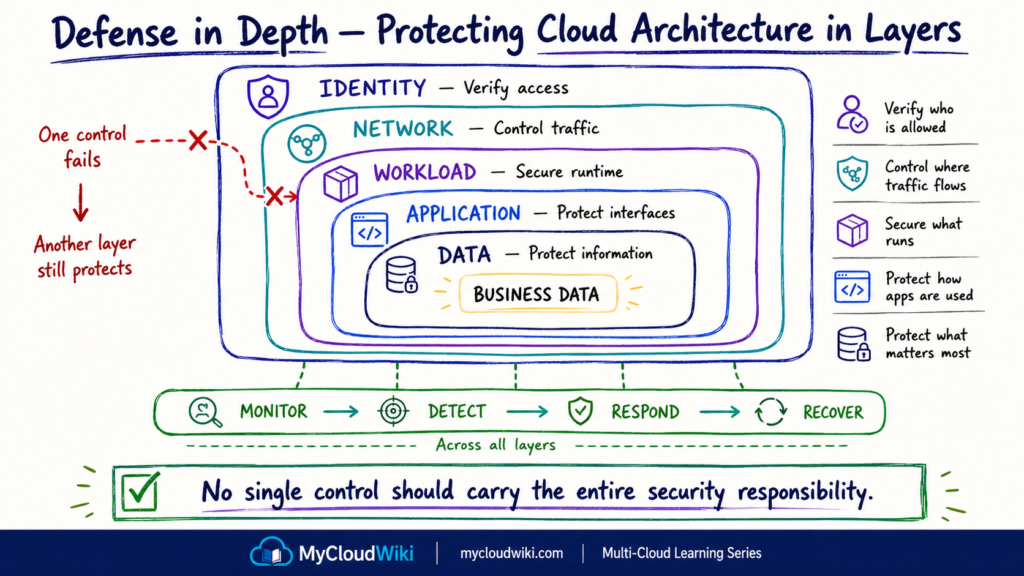
Enterprise security should not depend on one firewall, one identity control, or one security product. Instead, multiple controls work together so that failure of one control does not automatically expose the entire environment.
Two foundational principles help establish this model:
- Defense in Depth — protect the architecture through multiple security layers.
- Zero Trust — do not automatically trust an identity or request simply because of where it originates.
These principles complement each other.
Defense in Depth asks: Where should protection exist?
Zero Trust asks: How should access decisions be made?
Defense in Depth — Protect in Layers
Think back to the security architecture introduced in Part 1:
Identity → Network → Workload → Application → Data → Operations
Each layer has different risks.
For example, strong network controls cannot compensate for an administrator with excessive permissions. Strong IAM cannot protect an application that is dangerously misconfigured.
Defense in Depth therefore applies security controls across multiple layers.
Where Are We?
A useful structure is:
IDENTITY
↓
Protect who or what can act.
NETWORK
↓
Control where traffic can travel.
WORKLOAD
↓
Protect the systems running applications.
APPLICATION
↓
Protect business services and interfaces.
DATA
↓
Protect business information.
OPERATIONS
↓
Detect, respond, recover, and improve.
This builds directly on Identity and Access Management Across Multi-Cloud and Cloud Networking Across Multi-Cloud. Those capabilities now become layers within the broader security architecture rather than isolated technologies.
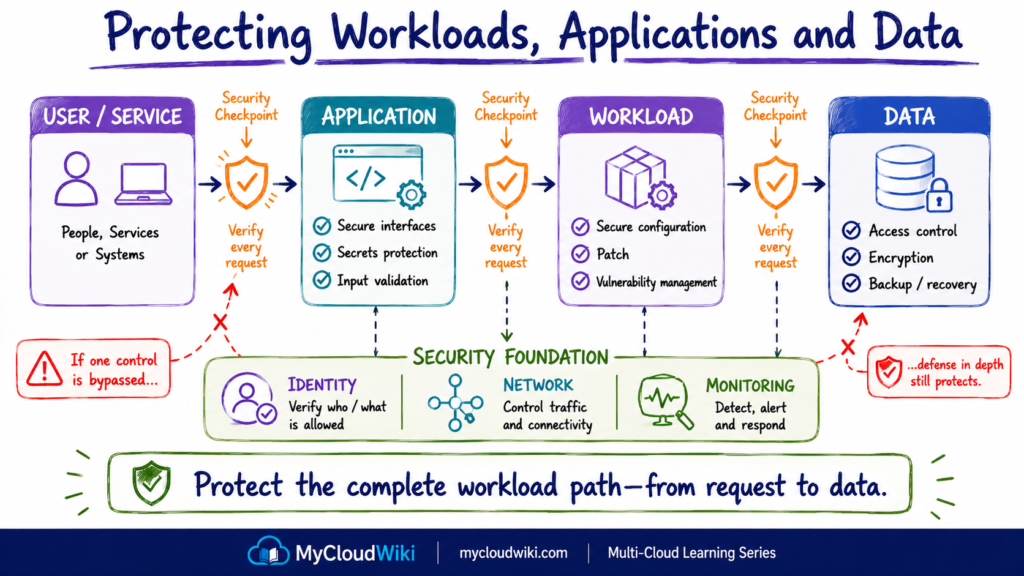
Defense in Depth means that security continues even when one control is bypassed or fails.
Why Layers Matter
Consider MyRetail’s customer database.
A layered security model might require:
Identity control
Only approved application and administrative identities can request access.
Network control
The database is reachable only through required network paths.
Workload or service control
The database platform is securely configured and maintained.
Application control
The application validates and controls how users interact with data.
Data control
Sensitive information is encrypted and access-controlled.
Operational control
Suspicious activity generates signals that can be investigated.
The strength comes from the combination of controls.
That is Defense in Depth.
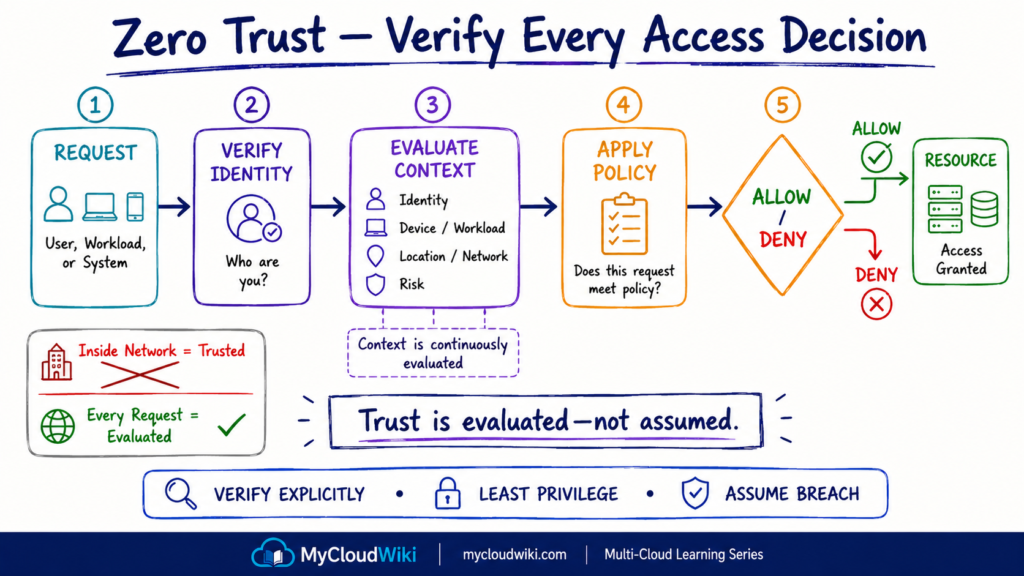
Zero Trust — Verify Before Granting Access
Defense in Depth explains where multiple layers of protection should exist.
Zero Trust focuses more directly on how trust and access decisions should work.
Traditional enterprise networks often relied heavily on network location.
The simplified assumption was:
Inside Corporate Network
→ More trusted
Outside Corporate Network
→ Less trusted
Cloud, remote work, SaaS, APIs, mobile devices, automation, and AI agents make that assumption increasingly unreliable.
A request should not automatically become trusted simply because it originates from a particular network.
Where Are We?
Zero Trust can be introduced through three foundational principles:
Verify Explicitly
Confirm relevant identity and context before granting access.
Use Least Privilege
Grant only the access required for the task.
Assume Breach
Design controls with the expectation that credentials, devices, workloads, or network locations could eventually be compromised.
The practical access model becomes:
REQUEST
↓
IDENTITY + CONTEXT
↓
POLICY
↓
ACCESS DECISION
↓
RESOURCE
This extends the least-privilege model introduced in Identity and Access Management Across Multi-Cloud.
Zero Trust Does Not Mean “Trust Nothing”
Zero Trust is sometimes misunderstood as preventing systems from trusting anything.
The practical objective is different.
Access is granted when the request satisfies the required security conditions.
For example:
Known Identity
Approved Context
Required Permission
Security Policy Satisfied
=
Access Granted
If those conditions change, the access decision may also need to change.
For MyRetail, this model applies not only to employees.
It can also apply to:
- Applications.
- Automation.
- Service identities.
- Administrative tools.
- AI agents.
That is why the identity categories introduced in Identity and Access Management Across Multi-Cloud become increasingly important as enterprise environments automate more operations.
Protecting Workloads, Applications and Data
We now have two important principles:
Defense in Depth
→ protection exists at multiple layers.
Zero Trust
→ access is explicitly evaluated.
The next step is to apply those principles to what MyRetail actually runs and stores.
At a high level, there are three important areas:
Workloads
→ the systems running the application.
Applications
→ the business services users and systems interact with.
Data
→ the information those applications process and store.
These areas require different controls, but they should form one security architecture.
Workload Protection
A workload is the compute environment where an application or service runs.
Depending on the architecture, that might eventually include virtual machines, containers, serverless functions, or managed compute platforms.
The exact protection responsibilities vary depending on how much of that environment the cloud provider manages.
At this foundation level, remember four workload-security practices:
- Use secure configurations.
- Keep customer-managed software appropriately patched.
- Identify and remediate relevant vulnerabilities.
- Avoid unnecessary services and exposure.
This will become more concrete in Cloud Compute Across Multi-Cloud, where we explore the different ways workloads can run.
The security principle is simple:
If you operate part of the workload stack, you also inherit responsibility for securing that part of the stack.
Application Protection
A securely configured cloud environment can still host an insecure application.
Application security therefore protects the business logic and interfaces that users, systems, and APIs interact with.
Common concerns include:
- Secure application configuration.
- API protection.
- Secrets handling.
- Input validation.
- Dependency security.
- Secure software delivery practices.
This is another example of Defense in Depth.
A network control can restrict who reaches an application, but it cannot replace secure application design.
Likewise, strong application security does not eliminate the need for IAM or network controls.
The layers reinforce each other.
Data Protection
For many enterprises, data is ultimately what the surrounding security architecture exists to protect.
MyRetail may eventually handle:
- Customer information.
- Product information.
- Orders.
- Payment-related information.
- Operational data.
- Business analytics.
Different data may require different levels of protection.
Where Is the Data?
A useful first classification is based on the state of the data.
Data at Rest
Data stored in databases, storage systems, backups, or other persistent services.
Data in Transit
Data moving between users, applications, services, networks, or cloud environments.
Data in Use
Data actively being processed by an application or workload.
This gives us another simple mental model:
STORE → TRANSFER → PROCESS
Security needs to consider all three.
Foundational Data Controls
At this stage, focus on four concepts:
Access Control
Only approved identities should access the data.
Encryption
Protect data using appropriate cryptographic controls.
Key Management
Control how encryption keys are created, protected, accessed, rotated, and managed.
Backup and Recovery
Maintain recoverable copies according to business and resilience requirements.
These concepts will become more practical in Cloud Storage Across Multi-Cloud and the later database lesson.
Encryption Does Not Replace Access Control
Encryption is one of the most important data-protection controls, but it should not be treated as the entire data-security strategy.
For example:
Encrypted Database
Overly Broad Administrative Access
still creates risk.
Likewise:
Strong IAM
Unprotected Sensitive Data
leaves another gap.
Defense in Depth combines the controls:
Identity
- Access Control
- Network Protection
- Encryption
- Key Management
- Monitoring
rather than relying on one of them.
MyRetail’s Security Architecture Is Becoming Layered
MyRetail can now think about security structurally.
Identity
determines who or what may request access.
↓
Network
controls communication paths.
↓
Workload
provides a securely configured execution environment.
↓
Application
controls how business functionality is exposed.
↓
Data
protects the information being stored and processed.
Across all of them:
Monitoring and security operations
provide visibility into what is happening.
This brings us to an important limitation of preventive security:
Even strong preventive controls cannot guarantee that a security event will never occur.
MyRetail therefore needs another capability.
It must be able to detect when something suspicious happens and respond appropriately.
Detecting and Responding to Security Events
The security controls covered so far are primarily designed to reduce the likelihood or impact of a security event.
MyRetail now has a layered model:
Identity → Network → Workload → Application → Data
But even well-designed security controls cannot guarantee that every attack, configuration mistake, compromised credential, vulnerable workload, or suspicious activity will be prevented.
Enterprise security therefore needs a second capability:
Detect what is happening and respond when something requires attention.
Where Are We?
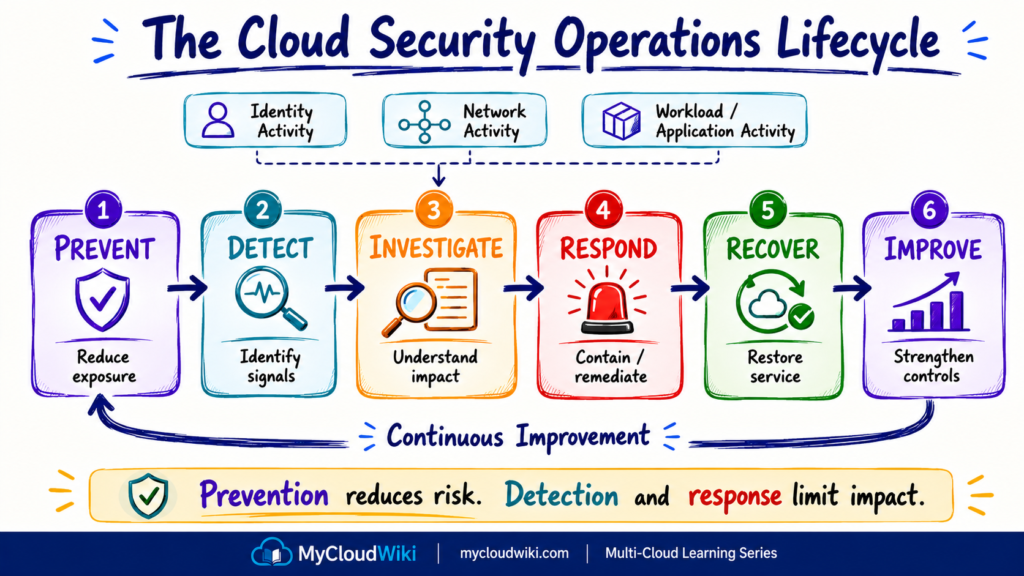
Think about cloud security as a continuous lifecycle:
PREVENT
→ Reduce the opportunity for an incident.
DETECT
→ Identify suspicious activity or unexpected behavior.
INVESTIGATE
→ Understand what happened and determine the impact.
RESPOND
→ Contain or remediate the problem.
RECOVER
→ Restore normal and trusted operations.
IMPROVE
→ Use what was learned to strengthen future protection.
Security therefore does not end when controls are deployed.
It becomes an ongoing operational process.
Security Signals Create Visibility
Detection begins with visibility.
Security-relevant information can come from many parts of the cloud environment:
- Identity activity.
- Administrative changes.
- Network activity.
- Workload events.
- Application activity.
- Data-access activity.
- Security findings.
A security platform or operations team can use these signals to identify behavior that requires investigation.
For example, MyRetail might observe:
Unexpected administrative login
→ Sensitive configuration changed
→ Unusual application behavior
A single event may not always indicate an attack.
The value comes from combining context, monitoring, investigation, and appropriate response.
This concept connects naturally with the later Cloud Observability Across Multi-Cloud lesson. Observability provides broader visibility into system behavior, while security monitoring focuses on signals relevant to security risk and potential threats.
Response Should Match the Risk
Not every security event requires the same response.
A low-risk configuration issue might require:
Detect → Review → Correct
A suspected compromised identity might require:
Detect → Investigate → Restrict Access → Remediate → Verify
A serious incident may require coordinated technical and business response.
The principle is:
Response should be proportional to the risk and business impact.
This becomes especially important as automation and AI begin participating in security operations.
We will return to that question in the AI & Agentic AI Perspective.
Security Across Multi-Cloud
The security principles learned so far are not specific to one provider.
MyRetail may eventually operate across AWS, Microsoft Azure, Google Cloud, Oracle Cloud Infrastructure (OCI), and IBM Cloud.
Each platform has its own:
- Security services.
- Configuration models.
- Identity integrations.
- Monitoring capabilities.
- Encryption and key-management services.
- Security posture tools.
- Threat-detection capabilities.
Trying to memorize every security product is not the goal of this lesson.
Instead, start with the security capability.
Where Are We?
Across providers, MyRetail repeatedly needs to answer the same questions:
IDENTITY SECURITY
Who or what can access the environment?
NETWORK SECURITY
Which communication paths are allowed?
DATA PROTECTION
How is sensitive information protected?
SECURITY POSTURE
Are cloud resources configured according to expected security standards?
THREAT DETECTION
Can suspicious behavior be identified and investigated?
The service names change.
The architecture questions remain recognizable.
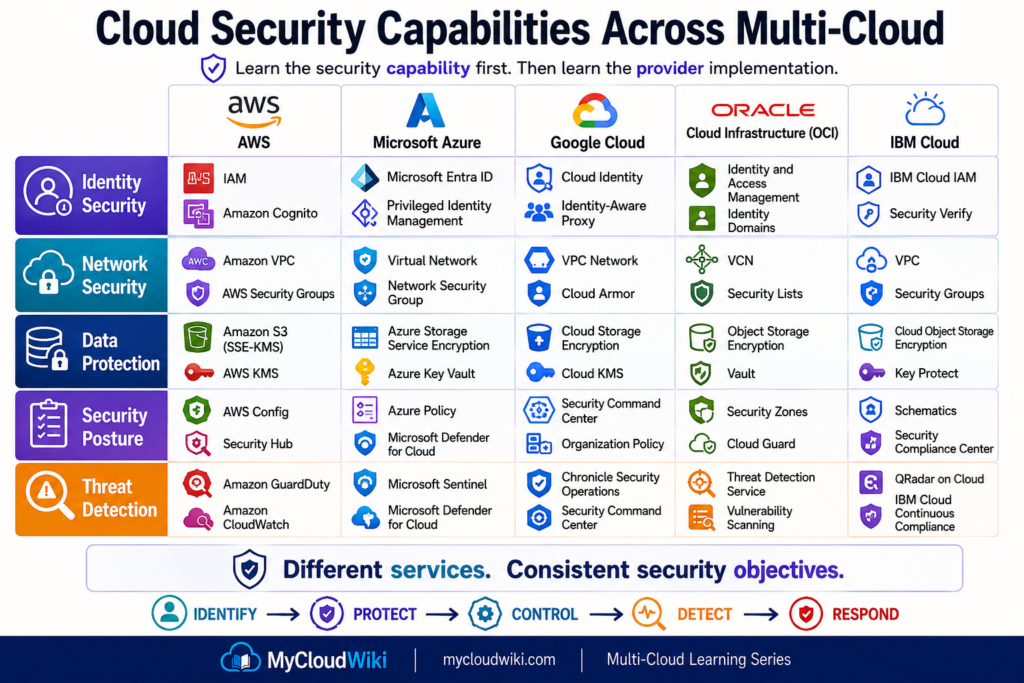
Provider services evolve independently, so exact service capabilities and naming should be validated against current provider documentation before publication.
The important lesson is not memorizing the table.
It is learning to translate a requirement such as:
“We need encryption-key management.”
into:
“What key-management capability does this provider offer, and how should it fit our enterprise security model?”
That is the same capability-first thinking introduced in Cloud Building Blocks.
Consistency Does Not Mean Identical Configuration
Multi-cloud security introduces an important architecture distinction.
MyRetail may establish a common enterprise principle such as:
Administrative access requires strong authentication and least privilege.
That principle can remain consistent across providers.
But its implementation may differ because each cloud has its own:
- IAM model.
- Policy language.
- Security services.
- Resource hierarchy.
- Logging model.
- Native controls.
The objective should therefore be:
Common Security Principles
↓
Common Governance Expectations
↓
Provider-Appropriate Implementation
Not:
Force every cloud to look identical
This prevents the multi-cloud architecture from falling into a lowest-common-denominator design.
Central Governance + Cloud-Native Controls
There is another useful distinction.
Enterprise security teams often want centralized visibility and governance.
At the same time, each cloud provides native security capabilities that understand its own resources deeply.
These approaches should not automatically be treated as competitors.
A practical model is:
Enterprise Security Governance
Cloud-Native Security Controls
For example, MyRetail might establish common requirements for:
- Identity protection.
- Encryption.
- Logging.
- Security posture.
- Vulnerability management.
- Incident handling.
Each cloud environment can then implement those requirements using the controls appropriate to that platform.
This principle will become increasingly important as MyRetail moves toward broader Multi-Cloud Architecture.
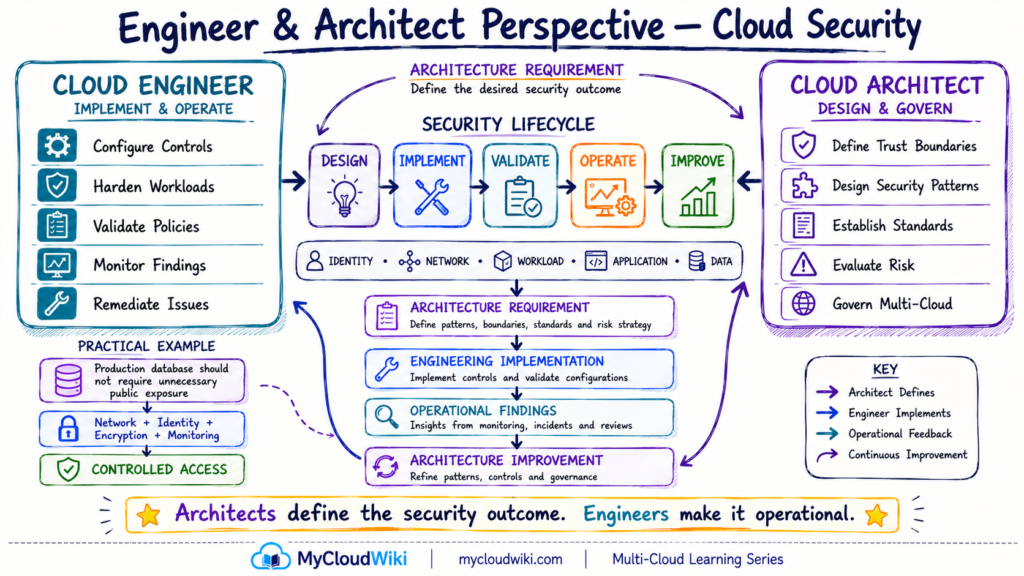
Engineer & Architect Perspective
Cloud engineers and cloud architects work on the same security architecture from different perspectives.
Engineers make security operational. Architects make security intentional and consistent.
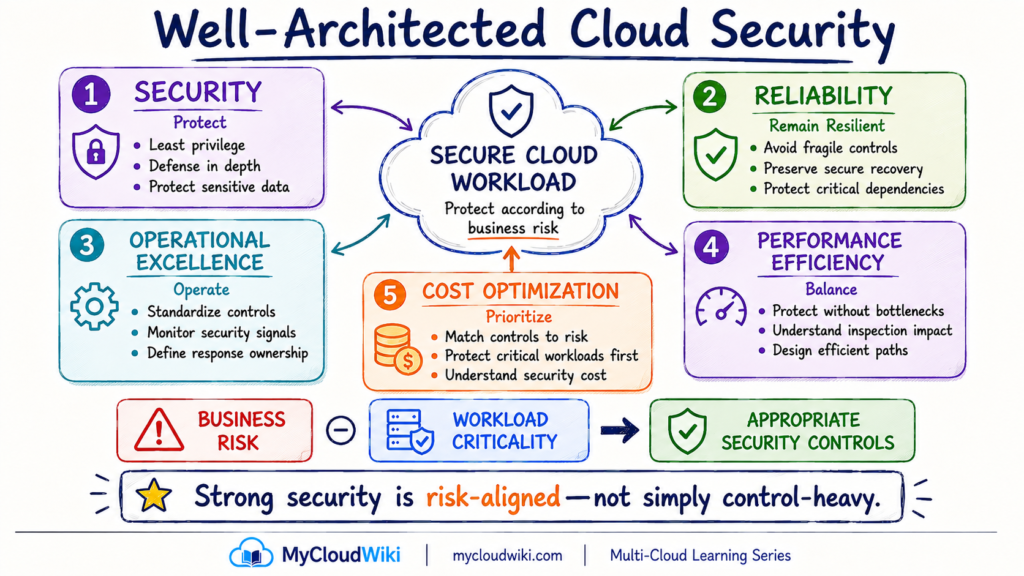
Well-Architected Perspective
Cloud security decisions affect more than protection. They also influence reliability, operations, performance, and cost.
For MyRetail, the goal is not to apply the maximum possible security everywhere. Controls should match the risk, sensitivity, and business importance of the workload.
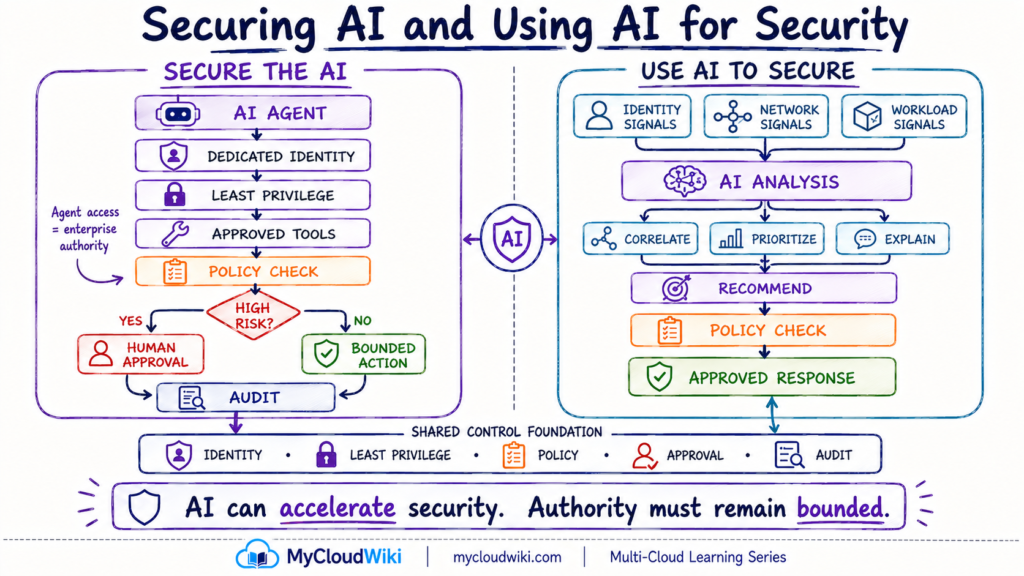
AI & Agentic AI Perspective
AI changes cloud security in two directions.
Enterprises must secure AI systems and agents, while AI can also help security teams analyze signals, investigate problems, prioritize findings, and perform approved actions.
The essential distinction is:
AI capability does not automatically mean AI authority.
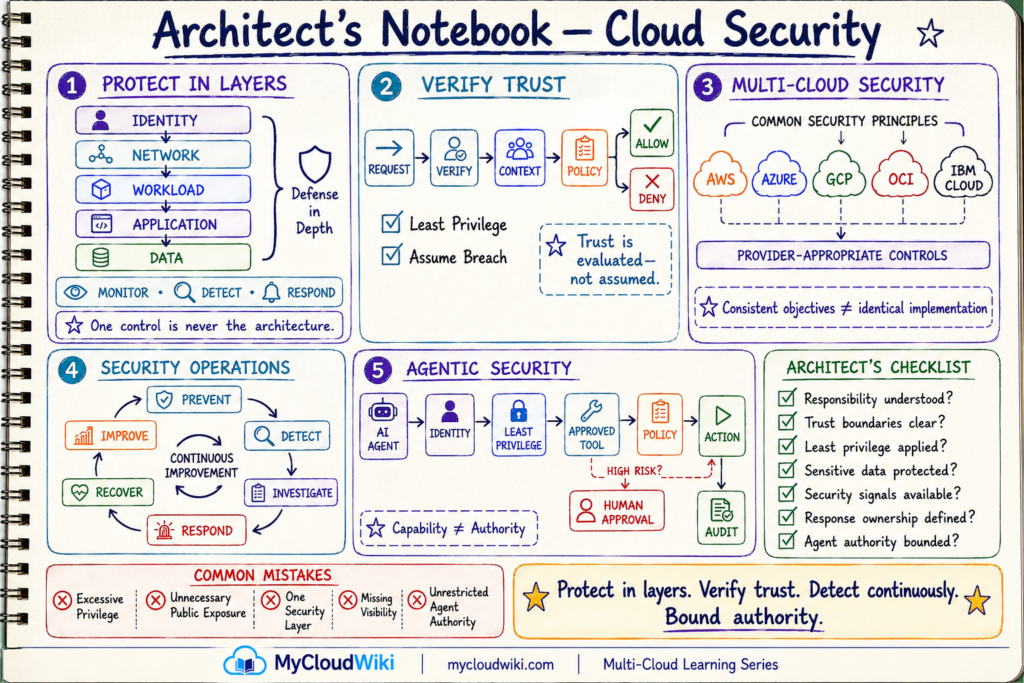
Architect’s Notebook
The final signature view brings the entire lesson together.
Instead of remembering individual security products, architects should retain a small set of reusable principles that can guide decisions across AWS, Microsoft Azure, Google Cloud, Oracle Cloud Infrastructure (OCI), and IBM Cloud.
MyRetail Business Solution & Progress
At the beginning of this lesson, MyRetail had already established resource provisioning, identity, and networking foundations. The missing capability was a consistent way to protect those resources across the architecture.
MyRetail can now apply a layered security model:
Identity → Network → Workload → Application → Data
supported by:
Governance → Detection → Response
This gives MyRetail a security foundation that can evolve as its cloud platform grows.
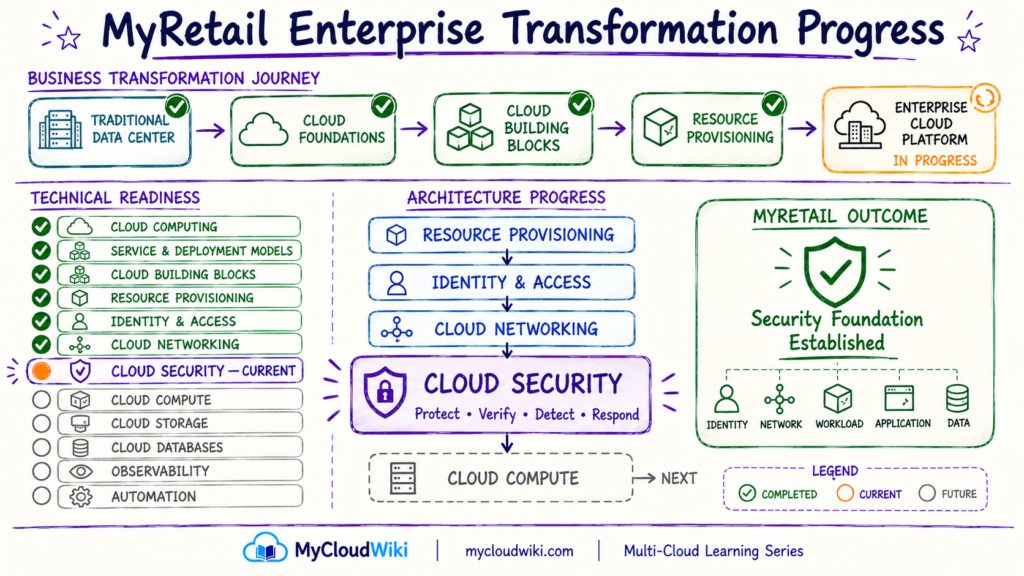
MyRetail is now ready to move from securing the cloud foundation to understanding the resources that actually run business applications.
That brings us to Cloud Compute Across Multi-Cloud.
Knowledge Check
Use these questions to confirm the architecture concepts rather than memorizing provider product names.
Key Takeaways
Cloud security becomes easier to understand when you stop thinking about individual products and instead think about responsibility, layers, trust, visibility, and risk.
- Cloud security is shared. Understand which responsibilities belong to the provider and which remain with the customer.
- Protect in layers. Identity, network, workload, application, and data controls reinforce one another.
- Verify trust. Zero Trust evaluates access rather than assuming trust from network location.
- Protect the complete workload path. Security should extend from the requesting identity through the application to its data.
- Detect continuously. Prevention alone is not enough.
- Keep multi-cloud security capability-first. Common objectives can use different provider-native implementations.
- Treat AI agents as identities with authority. Permissions, tools, policies, approvals, and auditability matter.
- Design according to risk. Strong security is not about deploying the most controls; it is about applying the right controls to the right risks.
Protect in layers. Verify trust. Detect continuously. Bound authority.
Continue Learning
The next step is to understand the cloud resources that actually execute applications and business workloads.

