
Quick Read
- ✔ Cloud storage enables organizations to store, protect, and manage data without maintaining physical storage infrastructure.
- ✔ Every cloud workload depends on storage, whether it is running a virtual machine, hosting a website, processing transactions, or training AI models.
- ✔ The three primary storage types are Object Storage, Block Storage, and File Storage, each designed for different workload requirements.
- ✔ Choosing the appropriate storage service directly affects performance, availability, durability, security, and cost.
- ✔ Although service names differ, the storage concepts are consistent across all Major Cloud Providers.
- ✔ Enterprise architects design storage strategies that balance scalability, governance, compliance, resilience, and operational efficiency.
- ✔ Modern engineering teams increasingly use Agentic AI to optimize storage operations, analyze usage patterns, recommend lifecycle policies, and automate routine management tasks.
Cloud Storage as a Foundational Cloud Building Block
In the previous lesson, you learned how cloud security protects identities, applications, networks, and cloud resources.
Also Read: Cloud Security across Multi-Cloud environments
However, security alone is not enough.
Every application also needs a reliable place to store operating systems, databases, documents, images, backups, logs, and business data. Without storage, applications cannot retain information or support day-to-day business operations.
This is where cloud storage becomes a foundational building block of cloud computing.
Introduction
Whether you stream a video, upload a photo, save a document, or complete an online transaction, your data is stored somewhere in the cloud.
Cloud storage provides scalable, durable, and highly available services that allow applications to store and retrieve data without organizations managing physical storage infrastructure. Instead of purchasing storage hardware and planning capacity months in advance, engineers can provision storage on demand and scale it as application requirements grow.
As organizations adopt multi-cloud architectures, storage decisions become increasingly important. Architects must consider performance, availability, disaster recovery, governance, compliance, and cost across multiple cloud providers.
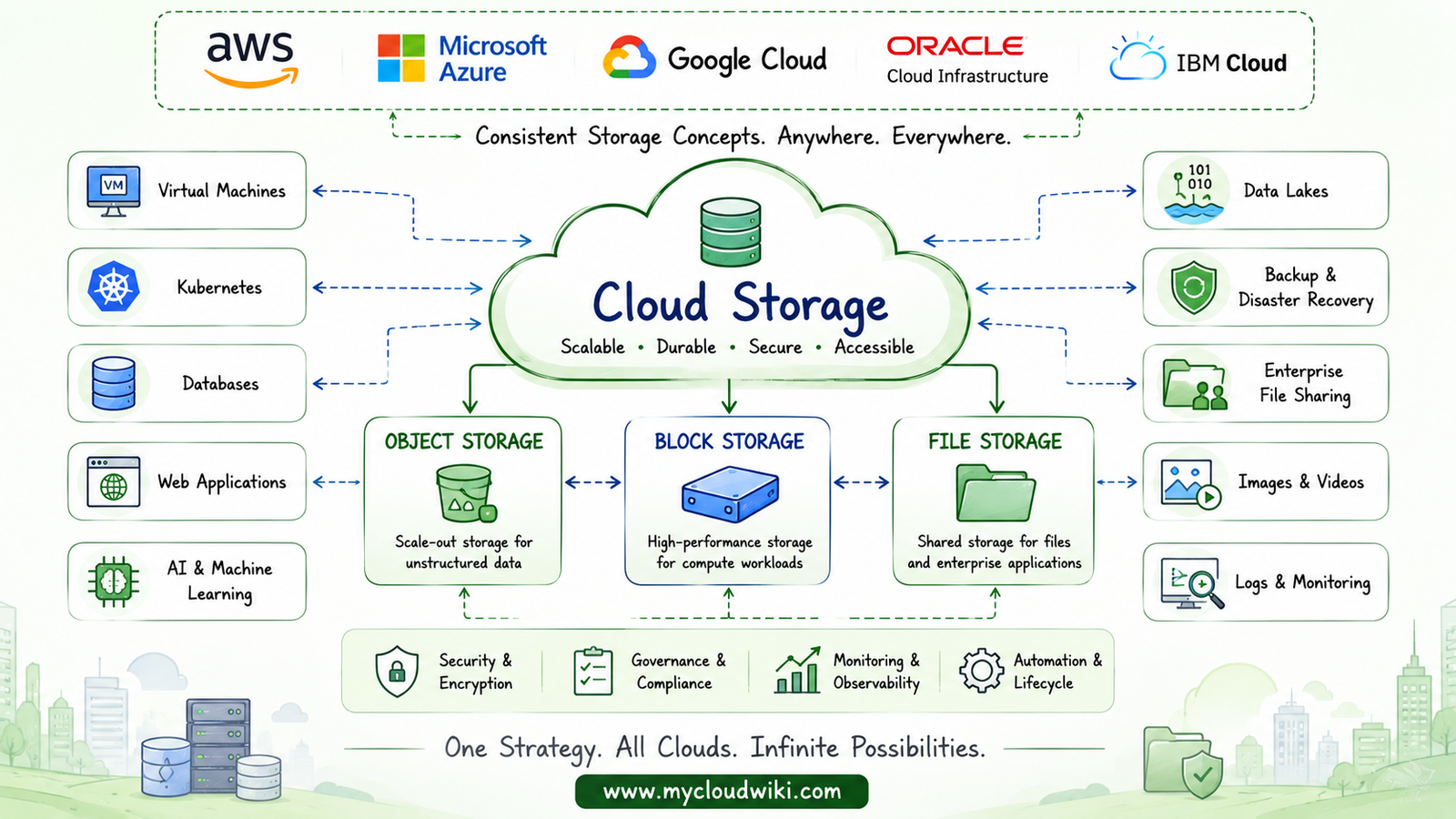
In this lesson, you’ll learn the three primary types of cloud storage, understand when to use each one, compare storage services across the Major Cloud Providers, and build a strong foundation for designing enterprise multi-cloud storage architectures.
Learning Objectives
After completing this lesson, you will be able to:
- Explain the purpose of cloud storage in modern cloud architectures.
- Differentiate between Object Storage, Block Storage, and File Storage.
- Identify common enterprise use cases for each storage type.
- Understand key storage concepts such as durability, availability, and performance.
- Compare storage concepts across the Major Cloud Providers.
- Build a strong foundation for enterprise multi-cloud storage design.
Core Cloud Storage Concepts
What Is Cloud Storage?
Cloud storage is a managed cloud service that enables organizations to store, retrieve, protect, and manage data without owning or maintaining physical storage hardware.
Instead of purchasing storage arrays, installing disks, configuring RAID groups, or planning hardware upgrades, organizations simply provision storage as needed and pay only for the capacity they consume.
Cloud storage services are designed to provide:
- Elastic scalability that grows with business demand.
- High durability to minimize the risk of data loss.
- High availability to keep data accessible.
- Built-in redundancy across storage infrastructure.
- Integrated security through encryption and access controls.
- API-driven management for automation and Infrastructure as Code.
- Global accessibility across regions and availability zones.
These characteristics make cloud storage one of the most heavily used services in every cloud platform.
Before exploring different storage types, it is helpful to understand where storage fits within a typical cloud application architecture.
The following diagram illustrates how cloud storage supports every layer of a modern cloud application.
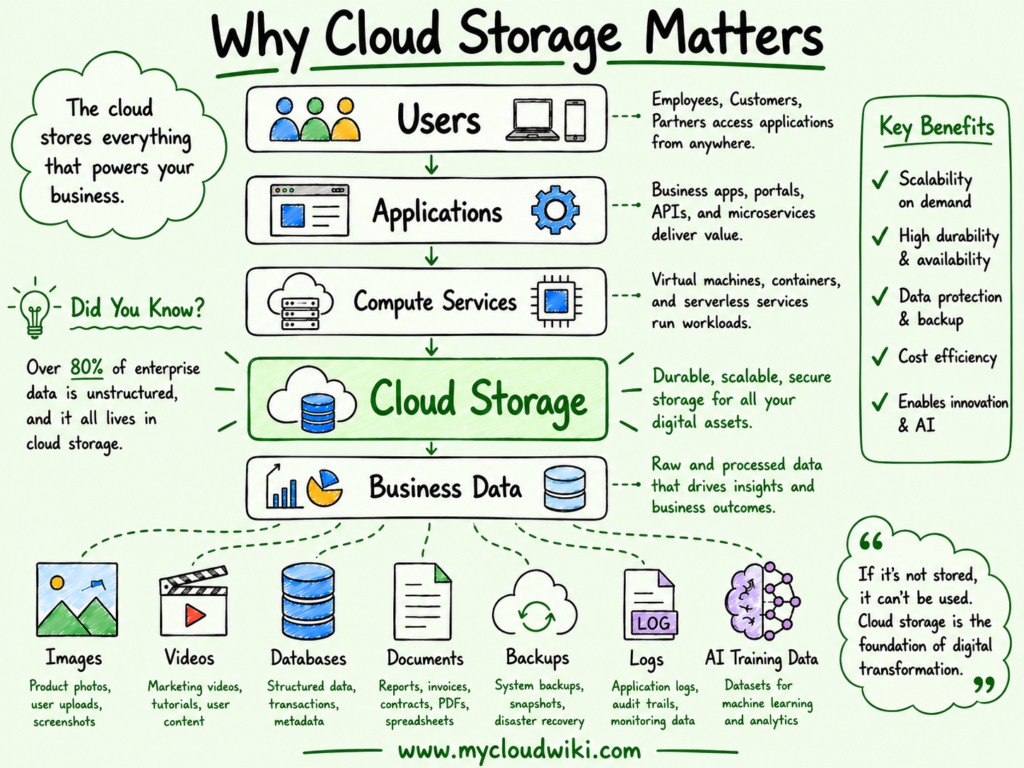
Cloud storage serves as the persistent data layer for virtually every cloud workload, enabling applications to reliably store and retrieve business-critical information.
Why Cloud Storage Is Different
Traditional data centers required organizations to predict future storage requirements, purchase hardware months in advance, and manually expand capacity as business needs increased.
This approach often resulted in either underutilized hardware or insufficient capacity to support business growth.
Cloud computing fundamentally changed this operating model.
Storage is now delivered as an on-demand managed service that can scale within minutes rather than weeks or months.
Instead of maintaining storage hardware, organizations consume storage as a utility while cloud providers manage the underlying infrastructure.
The following comparison highlights the key differences.
Traditional Storage vs Cloud Storage
This shift allows engineering teams to spend less time managing infrastructure and more time delivering business value.
Types of Cloud Storage
Not every workload requires the same storage characteristics.
Some applications need extremely low latency, while others prioritize scalability, durability, or shared access across multiple systems.
To address these different requirements, cloud providers offer three primary storage models:
- Object Storage
- Block Storage
- File Storage
Understanding when to use each storage type is one of the most important skills for both cloud engineers and enterprise architects.
The following diagram introduces the three primary cloud storage models and their most common enterprise use cases.
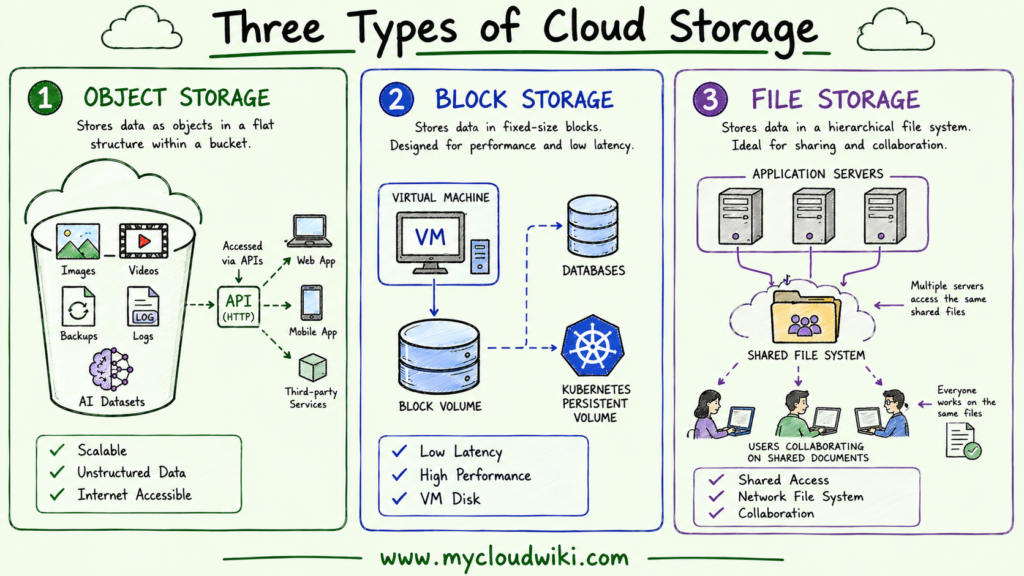
Each storage model is optimized for different workload characteristics, making storage selection an important architectural decision rather than simply a technical preference.
Object Storage
Object storage stores information as individual objects rather than files or disk blocks.
Each object contains:
- The data itself
- Metadata describing the object
- A unique identifier used for retrieval
Unlike traditional file systems, object storage is designed to scale almost without practical limits, making it ideal for storing massive volumes of unstructured data.
Typical enterprise use cases include:
- Images
- Videos
- Website assets
- Application logs
- Data lakes
- Backups
- AI and machine learning datasets
- Static website hosting
Advantages
- Extremely scalable for large data volumes.
- Highly durable through built-in redundancy.
- Cost-effective for long-term storage.
- Accessible through APIs from anywhere with network connectivity.
- Well suited for analytics, AI, and modern cloud-native applications.
Limitations
- Not designed for operating system disks.
- Higher latency than block storage.
Cannot be mounted as a traditional file system by operating systems.
Block Storage
Block storage divides data into fixed-size blocks and presents them to an operating system as a virtual disk.
Unlike object storage, block storage behaves much like a traditional hard drive. Applications can install operating systems, create file systems, and perform low-latency read and write operations.
Because of its performance characteristics, block storage is the preferred choice for workloads that require fast and consistent access to data.
Typical enterprise use cases include:
- Virtual machine operating system disks
- Enterprise databases
- Transactional applications
- Kubernetes Persistent Volumes
- Enterprise ERP systems
Advantages
-
- High performance and low latency
- Excellent for transactional workloads
- Supports operating systems and file systems
- Suitable for enterprise databases
- Predictable performance for business-critical applications
Limitations
- Typically attached to a single compute instance at a time
- Higher cost than object storage
- Less suitable for storing massive amounts of unstructured data
File Storage
File storage organizes information into familiar folders and files that can be shared between multiple users or servers.
Unlike block storage, which is usually attached to a single virtual machine, file storage allows multiple systems to access the same files simultaneously through standard network file protocols.
Many enterprise applications still rely on shared file systems for collaboration, application configuration, and centralized document storage.
Typical enterprise use cases include:
- Shared corporate file systems
- User home directories
- Enterprise content management systems
- Shared development environments
- Media production workflows
Advantages
- Familiar file and folder structure
- Shared access across multiple servers
- Easy integration with existing enterprise applications
- Simplifies collaboration
Limitations
- Less scalable than object storage
- Performance depends on network connectivity
- Not intended for high-performance transactional databases
The following comparison helps you understand when each storage type is the best choice for a particular workload.
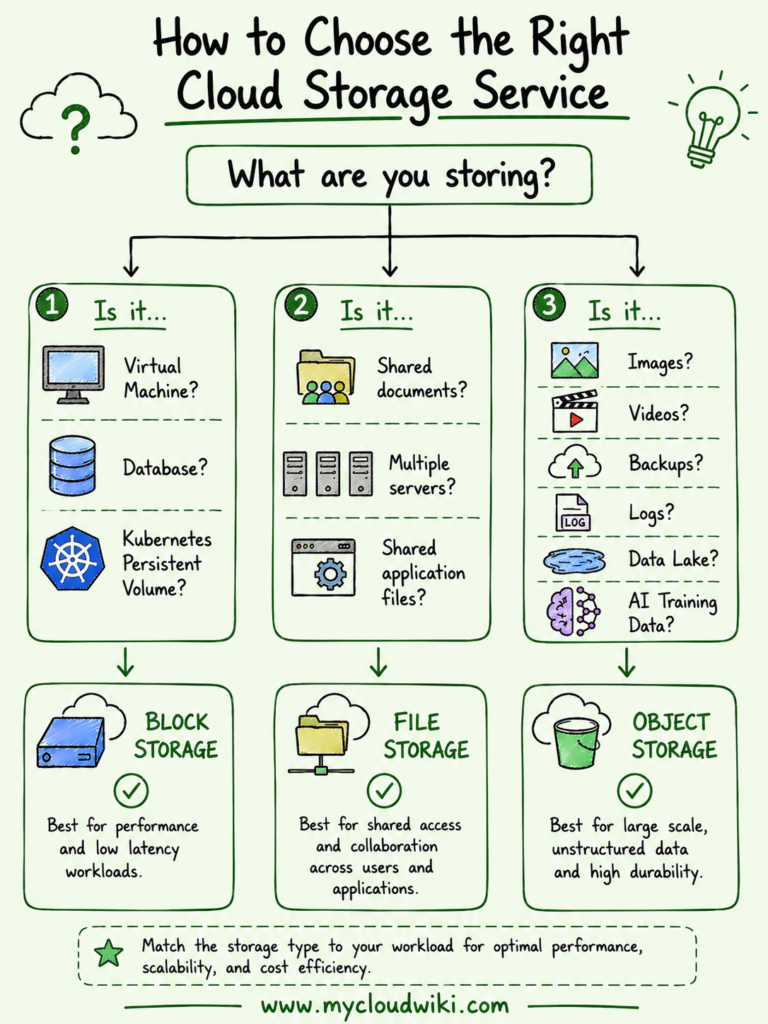
Choosing the appropriate storage service is one of the first architectural decisions made when designing cloud applications. Each storage type is optimized for different workload characteristics, and selecting the wrong option can affect performance, scalability, operational complexity, and cost.
Comparing Object, Block, and File Storage
Although all three storage types persist data, they are designed for different access patterns and business requirements.
Comparison of Cloud Storage Types
Instead of thinking about which storage service is “better,” engineers and architects should determine which storage model best aligns with the workload’s functional and performance requirements.
How Applications Use Different Types of Cloud Storage
Modern cloud applications rarely depend on a single storage service.
Instead, they combine multiple storage technologies, with each one serving a different purpose within the overall architecture.
For example:
- A virtual machine stores its operating system on Block Storage.
- Multiple application servers share configuration files using File Storage.
- Images, videos, logs, backups, and AI training datasets are stored in Object Storage.
This layered approach allows organizations to optimize performance, scalability, availability, and cost simultaneously.
The following architecture demonstrates how a typical enterprise application uses multiple cloud storage services together.
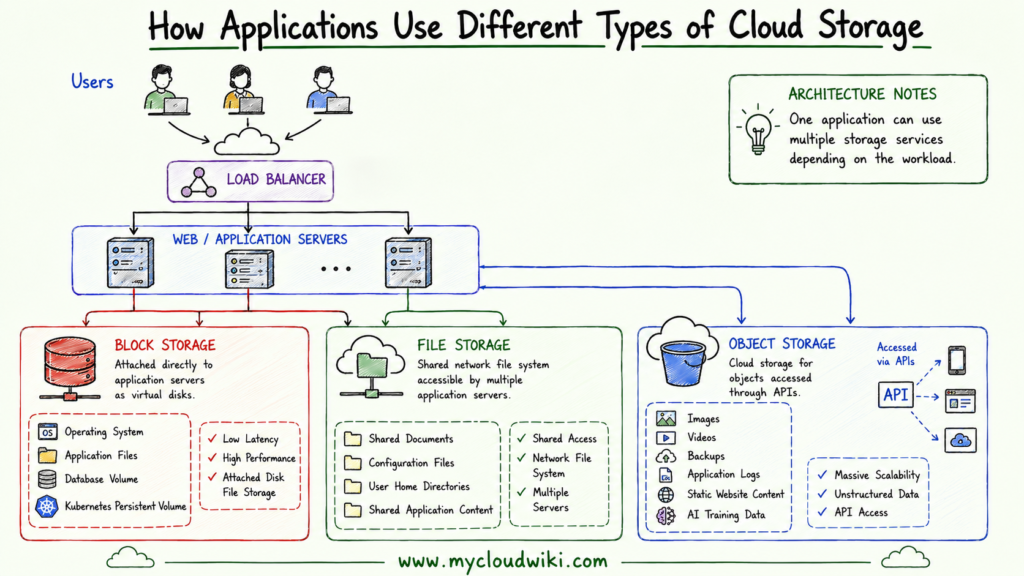
Understanding how storage services work together helps engineers build scalable applications and prepares architects to design enterprise storage platforms.
How to Choose the Right Cloud Storage Service
One of the most common questions asked by new cloud engineers is:
“Which storage service should I choose?”
The answer depends entirely on the workload rather than the cloud provider.
Instead of memorizing individual services, begin by understanding what the application needs to do.
The decision framework below provides a simple approach that works across all Major Cloud Providers.
The following decision framework demonstrates how engineers and architects evaluate workload requirements before selecting the most appropriate cloud storage service.
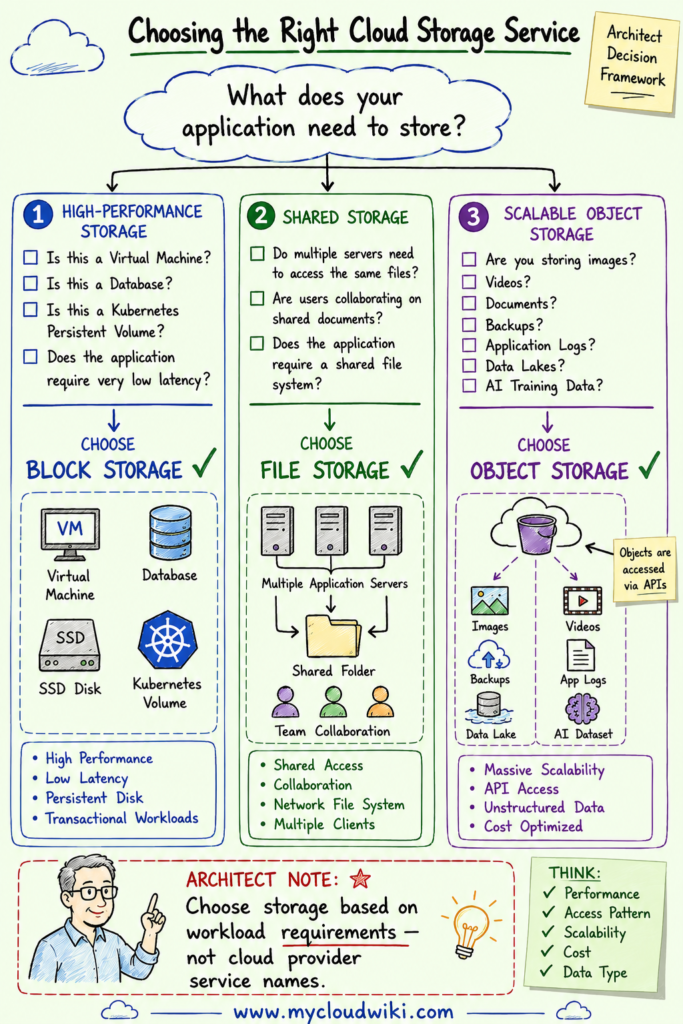
This decision framework helps engineers focus on workload requirements rather than provider-specific service names, making it easier to work across multiple cloud environments.
Storage Classes
Not all data needs the same level of performance or availability throughout its lifecycle.
Frequently accessed production data benefits from high-performance storage, while backups and historical records can be stored on lower-cost archival tiers.
To address these varying requirements, the Major Cloud Providers offer multiple storage classes that balance performance and cost.
Common storage classes include:
- Standard Storage for frequently accessed production workloads.
- Infrequent Access Storage for data that is accessed occasionally.
- Archive Storage for long-term retention and regulatory compliance.
- Intelligent Tiering that automatically moves data between storage classes based on access patterns.
Selecting the appropriate storage class is an important FinOps practice because it reduces storage costs without compromising business requirements.
Storage Performance Concepts
Selecting the correct storage type is only one part of designing an effective storage solution.
Engineers and architects must also understand the performance characteristics that influence how applications behave.
IOPS
Input/Output Operations Per Second (IOPS) measures the number of read and write operations a storage system can perform every second.
Applications such as enterprise databases and online transaction processing systems often require high IOPS to maintain fast response times.
Throughput
Throughput measures the volume of data transferred over a period of time, typically expressed in MB/s or GB/s.
Large file transfers, analytics platforms, and media streaming workloads generally benefit from high throughput.
Latency
Latency measures how quickly a storage service responds to a read or write request.
Lower latency results in faster application response times and is especially important for business-critical and customer-facing applications.
The following illustration explains the three most important storage performance characteristics.
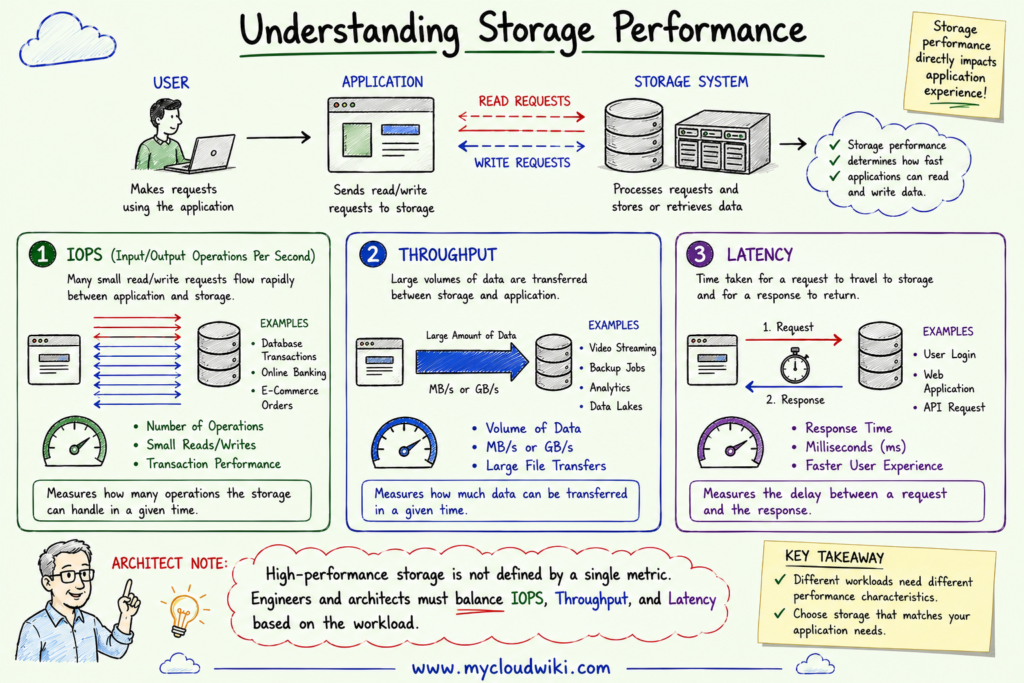
A clear understanding of these performance characteristics enables engineers to choose storage services that meet both application performance requirements and cost objectives.
Durability vs Availability
Durability and availability are closely related but represent different aspects of storage reliability.
- Durability measures the likelihood that stored data remains intact and is not lost over time.
- Availability measures how often that data can be successfully accessed when requested.
For example, a storage service can provide extremely high durability while becoming temporarily unavailable because of planned maintenance or a regional outage.
Understanding the distinction helps architects design resilient storage strategies that combine high durability with appropriate redundancy, backup, replication, and disaster recovery capabilities.
Cloud Storage Across Major Cloud Providers
Although every major cloud provider offers object, block, and file storage services, each uses its own service names and management interfaces. While the names differ, the underlying storage concepts remain remarkably consistent.
As a cloud engineer or architect, it is more important to understand which storage capability is required than to memorize provider-specific service names.
The following comparison shows how the major cloud providers implement the three primary cloud storage models.
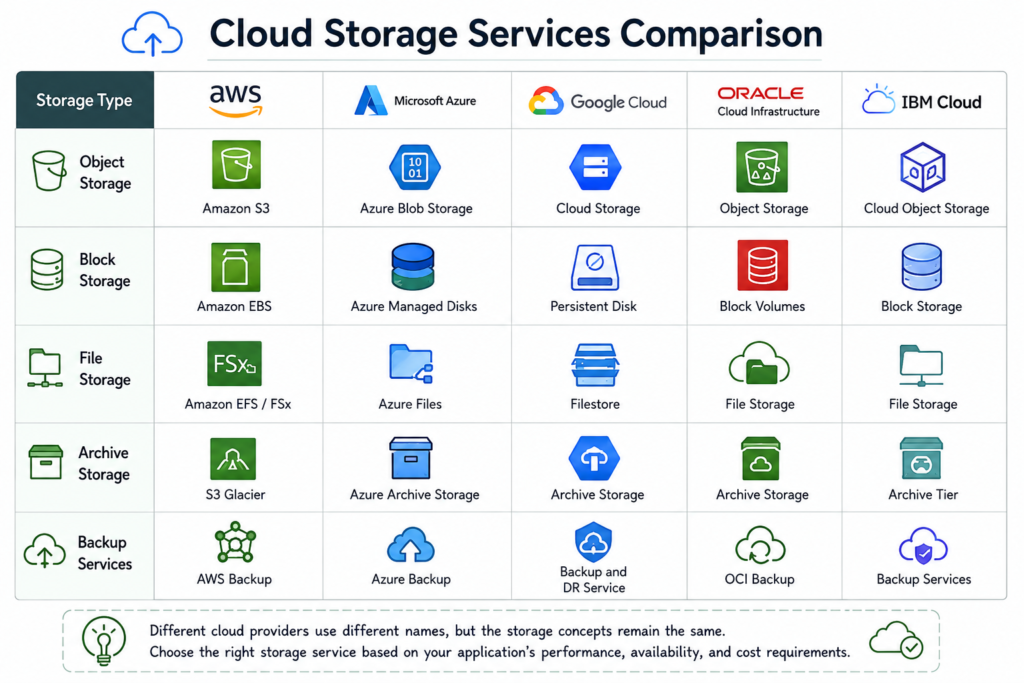
Although the service names vary, engineers and architects make the same architectural decisions across all providers. Understanding these common patterns makes it much easier to work in multi-cloud environments.
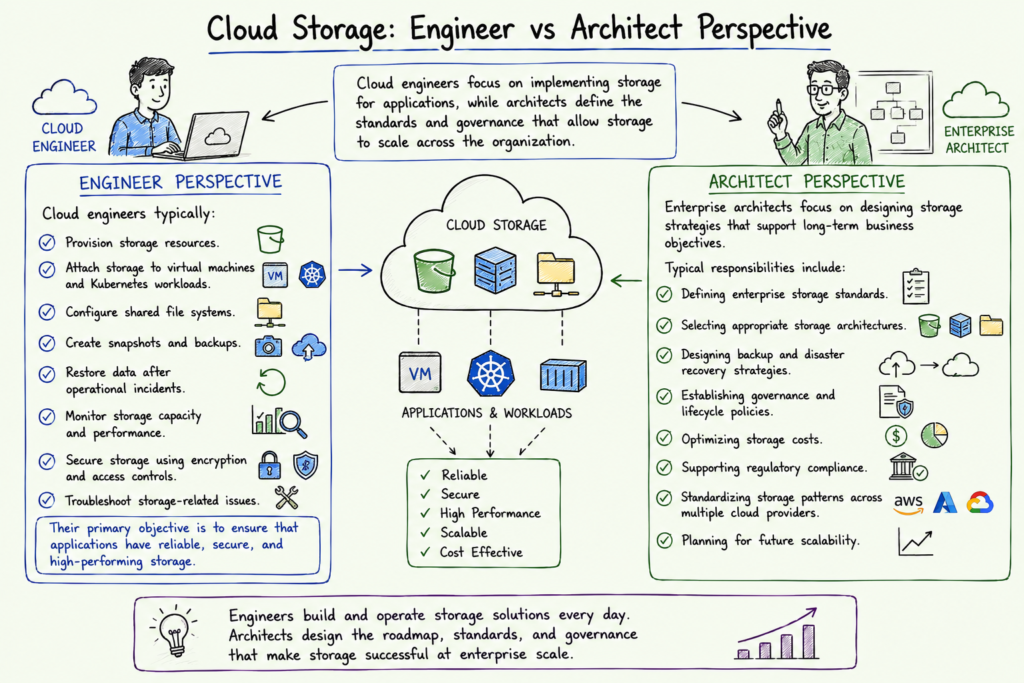
Cloud Storage Through the Engineer and Architect Lens
Storage decisions evolve as engineers move from deploying individual workloads to designing enterprise platforms.
Cloud engineers focus on implementing storage for applications, while architects define the standards and governance that allow storage to scale across the organization.
Engineer Perspective
Cloud engineers typically:
- Provision storage resources.
- Attach storage to virtual machines and Kubernetes workloads.
- Configure shared file systems.
- Create snapshots and backups.
- Restore data after operational incidents.
- Monitor storage capacity and performance.
- Secure storage using encryption and access controls.
- Troubleshoot storage-related issues.
Their primary objective is to ensure that applications have reliable, secure, and high-performing storage.
Architect Perspective
Enterprise architects focus on designing storage strategies that support long-term business objectives.
Typical responsibilities include:
- Defining enterprise storage standards.
- Selecting appropriate storage architectures.
- Designing backup and disaster recovery strategies.
- Establishing governance and lifecycle policies.
- Optimizing storage costs.
- Supporting regulatory compliance.
- Standardizing storage patterns across multiple cloud providers.
- Planning for future scalability.
Architects create the standards that enable engineering teams to deliver consistent and repeatable storage solutions.
Multi-Cloud Reality Check
Moving from a single cloud to a multi-cloud environment introduces new challenges that go beyond simply provisioning additional storage.
Data must remain secure, compliant, highly available, and accessible regardless of where applications are deployed. As data volumes grow, managing storage consistently across multiple cloud providers becomes increasingly complex.
Common Multi-Cloud Storage Challenges
Data Gravity
Large datasets become difficult and expensive to move between cloud providers. As data grows, applications are often deployed closer to the data rather than moving the data itself.
Data Replication
Synchronizing data across multiple cloud providers requires careful planning to balance consistency, latency, and cost.
Data Residency
Organizations must ensure that sensitive data remains in approved geographic regions to satisfy legal and regulatory requirements.
Storage Cost Management
Storage costs include more than capacity. Data transfer, replication, retrieval, backup, and archival all contribute to the overall cost of operating enterprise storage platforms.
Operational Complexity
Different cloud providers offer different management interfaces, monitoring tools, lifecycle policies, and automation capabilities. Without standardized operating practices, administration quickly becomes difficult.
The following diagram highlights the most common challenges organizations encounter when managing storage across multiple cloud providers.
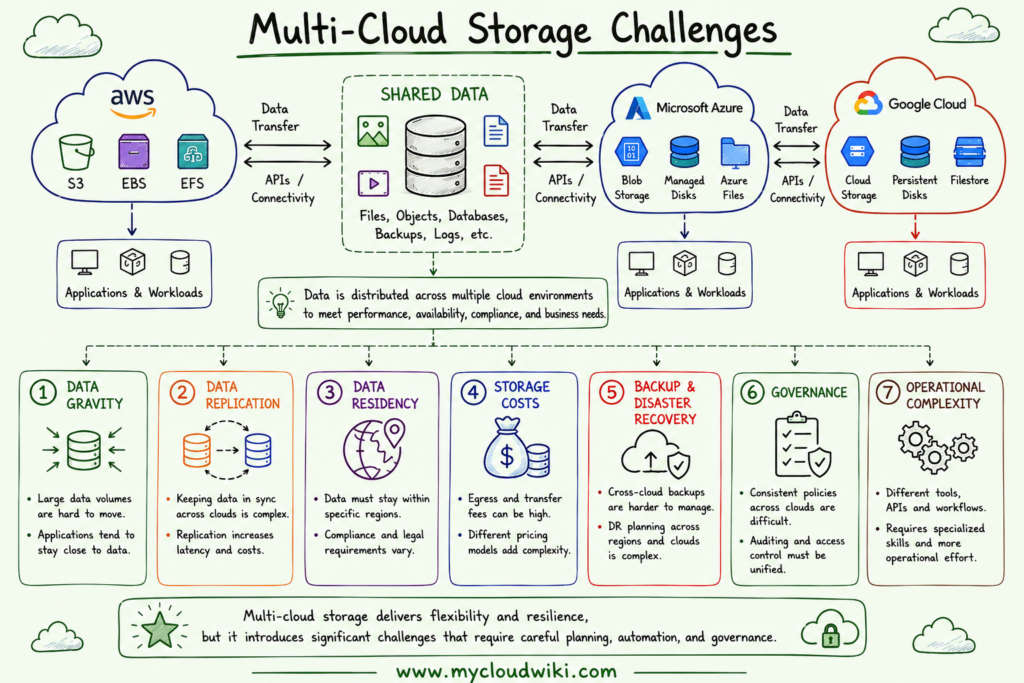
As organizations expand across multiple cloud providers, storage management becomes less about individual storage services and more about designing a consistent operating model that balances performance, resilience, governance, and cost.
Cloud Storage in Multi-Cloud Environments
As organizations adopt multi-cloud strategies, storage evolves from an infrastructure service into a strategic architectural capability.
Applications, databases, analytics platforms, AI services, and backup systems may operate across different cloud providers. Designing storage independently within each cloud often leads to inconsistent governance, operational complexity, and higher costs.
Also Read: Cloud Building Blocks Fundamentals
Instead, organizations should establish common storage principles that remain consistent regardless of the cloud platform.
Architecture Considerations
A well-designed multi-cloud storage architecture should address:
- Data placement based on application requirements.
- High availability and disaster recovery.
- Regional and cross-region replication.
- Network latency between applications and storage.
- Scalability for future business growth.
- Consistent storage patterns across cloud providers.
The objective is to place data where it delivers the best balance of performance, resilience, compliance, and cost.
Governance Considerations
Storage governance ensures that enterprise data remains secure, compliant, and properly managed throughout its lifecycle.
Key governance practices include:
- Data classification.
- Encryption standards.
- Data retention policies.
- Access control and identity integration.
- Regulatory compliance.
- Backup governance.
- Immutable storage for critical business data.
Consistent governance policies reduce operational risk and simplify compliance across multiple cloud providers.
Operational Considerations
Managing storage at enterprise scale requires standardized operational processes.
Typical operational activities include:
- Monitoring storage utilization.
- Capacity planning.
- Performance optimization.
- Backup verification.
- Restore testing.
- Lifecycle management.
- Cost optimization.
- Infrastructure as Code automation.
Operational consistency is often more valuable than provider-specific storage features.
Enterprise Best Practices
Organizations should establish enterprise storage standards that can be applied consistently across all environments.
Recommended practices include:
- Select storage based on workload requirements rather than cloud provider preference.
- Classify data before defining storage policies.
- Encrypt sensitive data at rest and in transit.
- Regularly validate backup and disaster recovery procedures.
- Apply lifecycle policies to optimize storage costs.
- Monitor storage growth and usage trends.
- Standardize storage governance across all cloud providers.
- Design for resilience from the beginning.
The following illustration demonstrates the key architectural principles for building an enterprise multi-cloud storage platform.
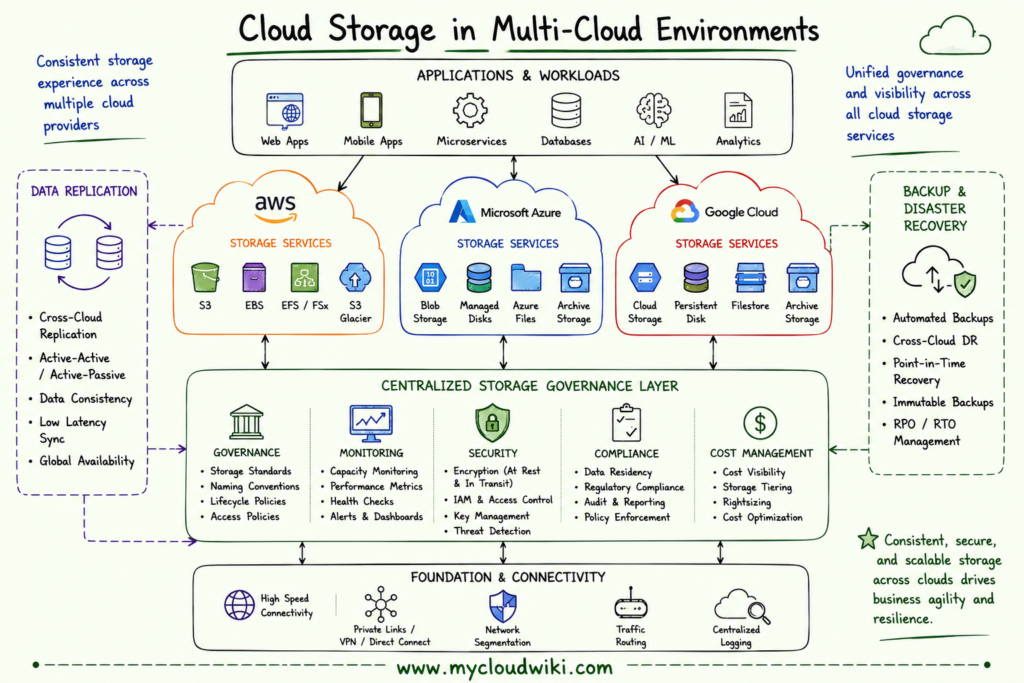
A successful multi-cloud storage strategy is built on standardization rather than provider-specific implementations.
Cloud Storage with Agentic AI
Storage management has traditionally relied on engineers manually monitoring capacity, investigating performance issues, reviewing costs, and managing backup policies.
Agentic AI is changing this operating model by assisting engineers and architects with analysis, recommendations, automation, and decision support while keeping humans responsible for governance and final approval.
How Agentic AI Helps Engineers
Agentic AI can assist engineers by:
- Analyzing storage utilization trends.
- Identifying unused or underutilized storage resources.
- Recommending lifecycle policy improvements.
- Detecting backup failures.
- Explaining storage performance issues.
- Generating Infrastructure as Code templates for storage provisioning.
- Recommending storage cost optimization opportunities.
Rather than replacing engineers, Agentic AI reduces repetitive operational work and accelerates troubleshooting.
How Agentic AI Helps Architects
Agentic AI also supports enterprise architects by providing insights across large cloud environments.
Examples include:
- Reviewing enterprise storage architectures.
- Identifying governance inconsistencies.
- Recommending disaster recovery improvements.
- Analyzing storage costs across cloud providers.
- Validating architecture against enterprise standards.
- Identifying opportunities for storage standardization.
Architects remain responsible for enterprise decisions while using AI to evaluate large volumes of operational and architectural data.
Adapting to New Ways of Working
As Agentic AI becomes part of everyday cloud operations, the responsibilities of engineers and architects continue to evolve.
Engineers spend less time collecting information and more time implementing improvements.
Architects spend less time manually reviewing environments and more time defining governance, validating recommendations, and making strategic technology decisions.
Organizations that combine automation with strong governance can improve operational efficiency while maintaining security and compliance.
Storage Considerations for AI Agents
AI agents should follow the same governance principles applied to human users and automation platforms.
Enterprise best practices include:
- Least-privilege access.
- Secure handling of sensitive data.
- Audit logging for AI activities.
- Human approval for critical storage operations.
- Encryption for AI-accessible data.
- Policy-based governance for autonomous actions.
Treating AI agents as managed identities helps organizations safely integrate AI into enterprise storage operations.
The following illustration shows how engineers, architects, and AI agents collaborate to manage enterprise cloud storage.
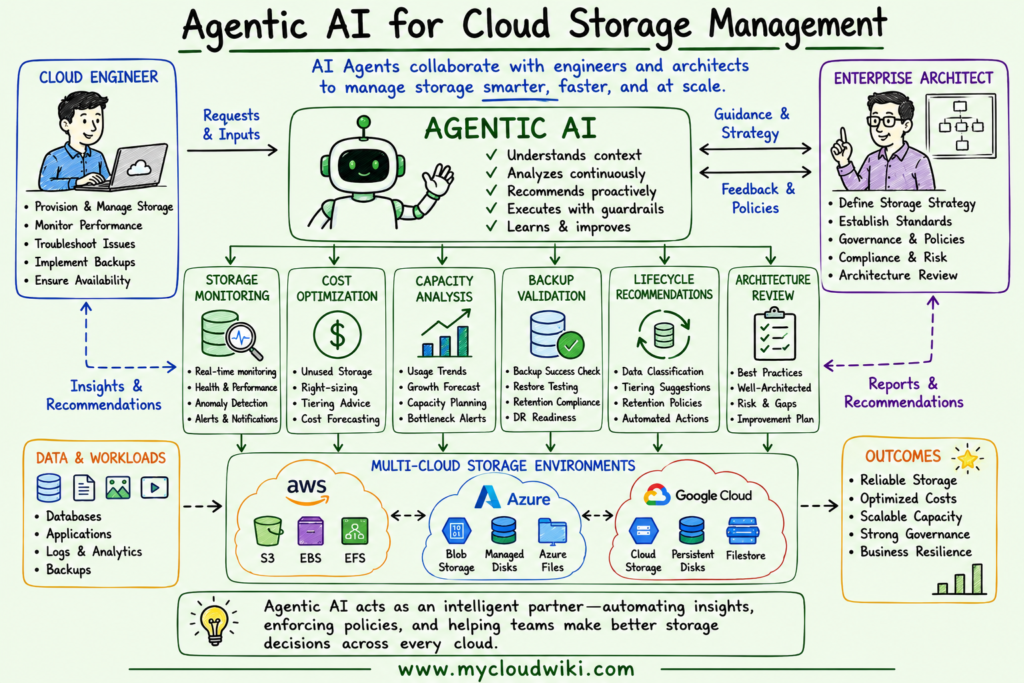
Agentic AI enhances storage operations by improving visibility and accelerating decision-making while leaving governance and accountability with engineering and architecture teams.
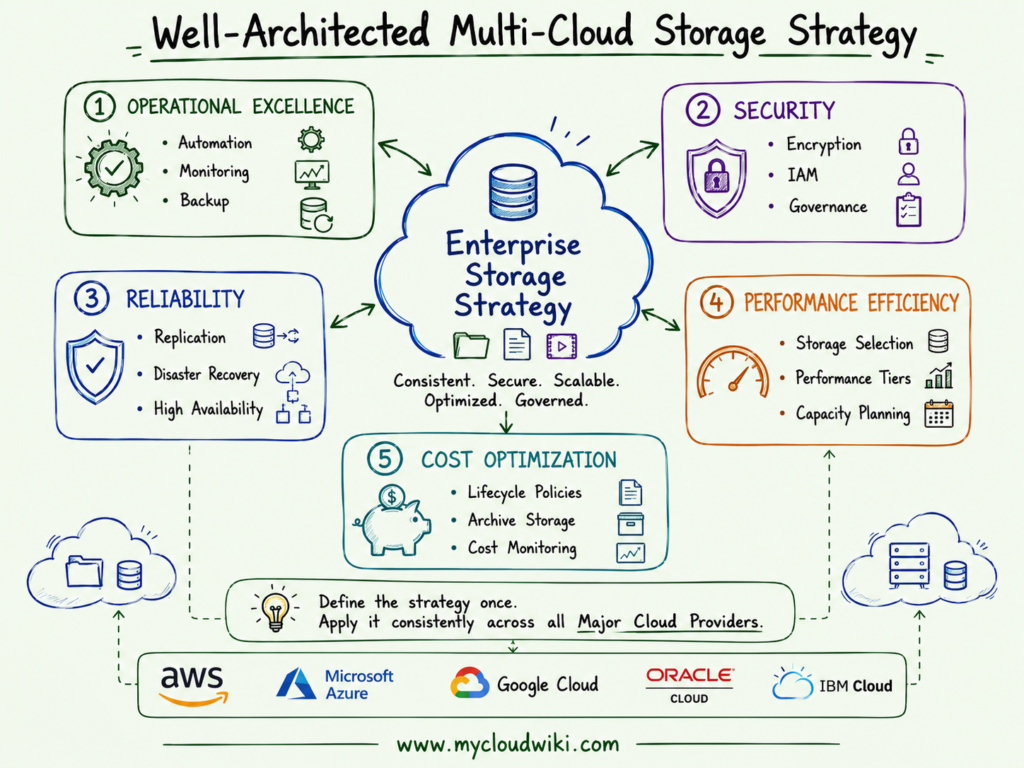
Well-Architected Multi-Cloud Storage Strategy
A well-architected storage strategy establishes common standards that every engineering team should follow when designing storage solutions across the Major Cloud Providers.
The goal is to ensure storage remains secure, reliable, scalable, operationally efficient, and cost-effective throughout its lifecycle.
Well-Architected Storage Strategy
The Well-Architected Framework helps organizations define consistent storage standards that can be applied across all cloud environments rather than making different decisions for every project.
Common Mistakes and Misconceptions
Cloud storage services are easy to provision, but poor storage decisions can affect application performance, resilience, security, and cost. Understanding these common mistakes helps engineers and architects build more reliable storage platforms.
Common Storage Mistakes and Their Risks
Avoiding these mistakes helps organizations build storage platforms that remain secure, resilient, and operationally efficient as they scale.
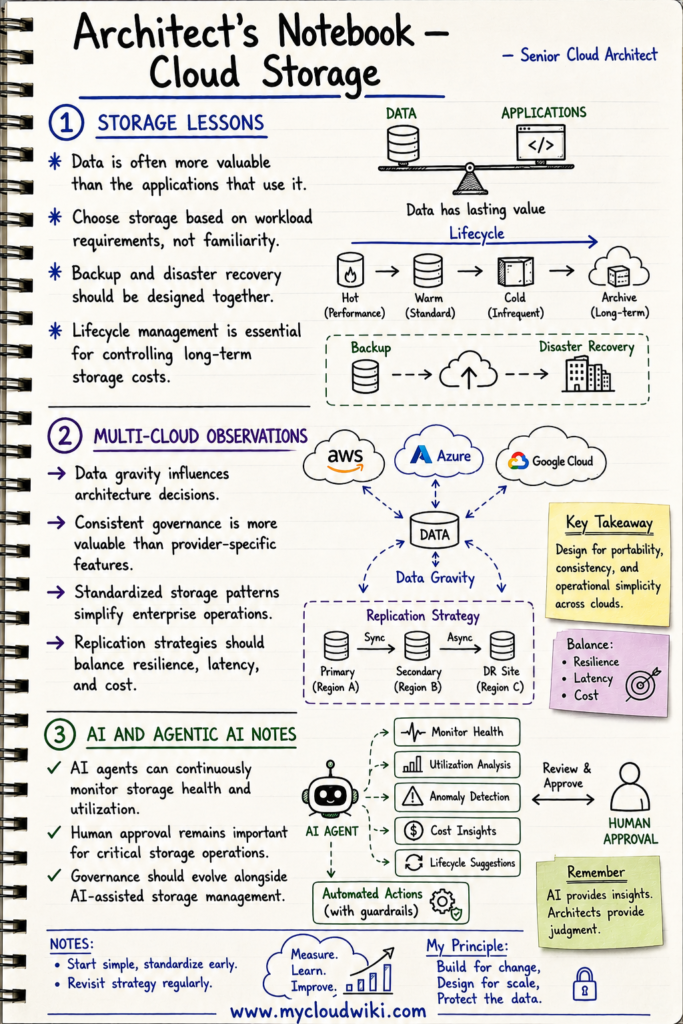
Architect’s Notebook
The following notes summarize practical lessons that experienced cloud architects consistently apply when designing enterprise storage platforms.
Key Takeaways
- Cloud storage provides the persistent foundation for modern cloud applications.
- Object Storage, Block Storage, and File Storage are designed for different workload requirements and should be selected based on application needs.
- Understanding storage performance, durability, and availability helps engineers build reliable and efficient cloud solutions.
- Multi-cloud environments require consistent governance, replication strategies, and lifecycle management to reduce operational complexity.
- Enterprise architects should define standardized storage strategies that align with the Well-Architected Framework across all cloud providers.
- Agentic AI is transforming storage operations by improving monitoring, optimization, governance, and decision support while keeping humans responsible for oversight.
What’s Next
Cloud storage provides the persistent foundation for enterprise workloads, but applications also need compute resources to process data and deliver business functionality.
In the next lesson, you’ll learn how cloud providers deliver virtual machines, containers, Kubernetes, serverless computing, and other compute services that power modern cloud applications.

